24-Port 10/100Mbps Layer 2 Switch w/ 4 Gigabit Ports and 2 Shared Mini-GBIC Slots
6-13
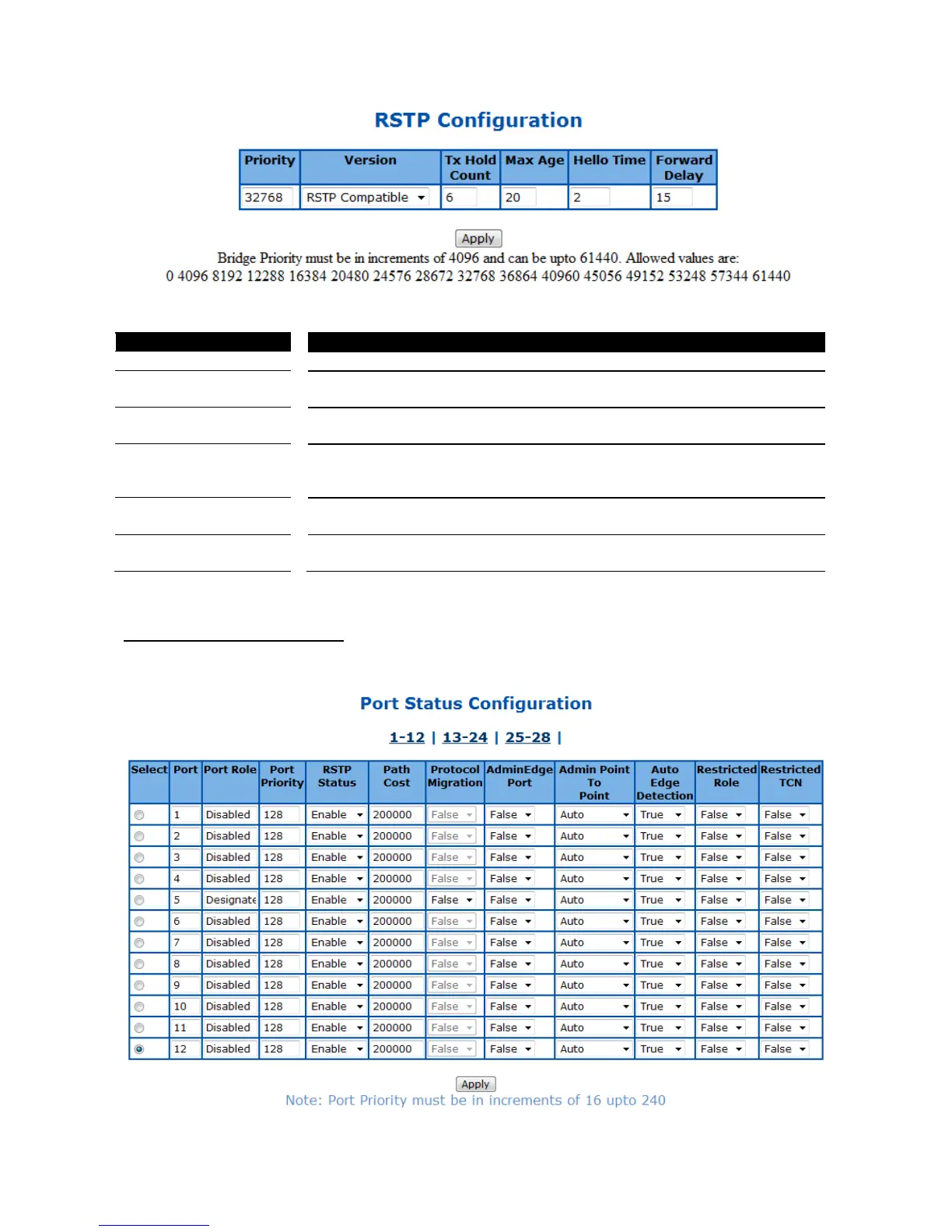
Figure 45 – Layer2 Management > RSTP > Basic Settings
Specify the bridge priority of spanning tree. Default is 32768.
Select the spanning tree compatibility version. The possible options are STP
Compatible or RSTP Compatible. Default is RSTP Compatible.
Specify the hold counter to limit maximum transmission rate of the Switch.
Default is 6.
Specify the maximum age in second for STP information learned from the
network on any port before it is discarded. The possible value is 6-40. Default
is 20.
Specify the time interval in second for a root bridge broadcasts the hello
packets to other switches. Possible value is 1-2. Default is 2.
Specify the time period in second that a port changes the STP state from
blocking to forwarding. The possible value is 4-30. Default is 15.
Click Apply to submit the changes.
RSTP Port Status Configuration
This page is to configure the port related RSTP settings
Figure 46 – Layer2 Management > RSTP > Port Settings



 To Next Page