24-Port 10/100Mbps Layer 2 Switch w/ 4 Gigabit Ports and 2 Shared Mini-GBIC Slots
6-6
Specifies the switch port which is to be configured.
To set the port VLAN ID of the port, all ingress untagged or priority tagged
packet from this port will be assign to this VLAN. The range is from 1 to 4094.
To configure the acceptable frame type of a port.
All: Accepts all kinds of frames.
Tagged: Accepts only tagged frames
UnTagged and Priority Tagged: Accepts only untagged frames and frames
with priority tag.
Default is All.
To enable/disable the filter of ingress packets not with the same VLAN tag as
the VLAN membership of the port. Default is Enabled.
In the left-hand Select column, check all of the ports modified and click Apply to submit the changes.
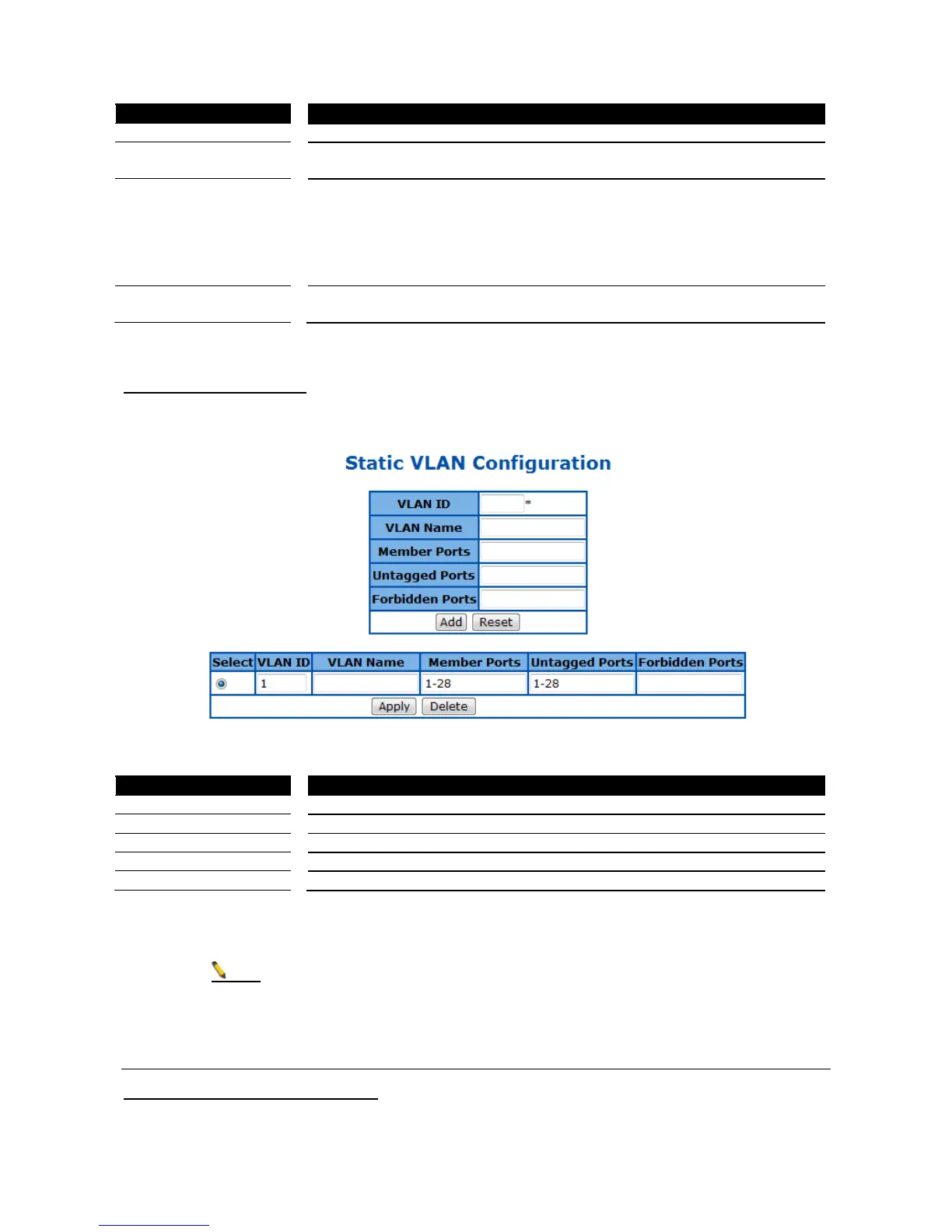
Static VLAN Configuration
This page is to set up the static VLAN configuration.
Figure 34 – Layer2 Management > VLAN > Static VLANs
Specify the VLAN ID to be created.
Specify the name of VLAN.
Specify the ports to apply the VLAN membership.
Specify the ports to be untagged interfaces.
Specify the ports to be forbidden interfaces.
Click Apply to submit the changes and the Reset button will clear the information. Click Delete will remove an
existed VLAN.
There has to be at least one VLAN in the system.
Dynamic VLAN
Dynamic VLAN Global Configuration
This page is to set the global dynamic VLAN configuration.



 To Next Page