EasyManua.ls Logo

TRENDnet TL2-E284 - Port Control

TRENDnet TL2-E284
293 pages
Print Icon
To Next Page IconTo Next Page
To Previous Page IconTo Previous Page
Loading...
24-Port 10/100Mbps Layer 2 Switch w/ 4 Gigabit Ports and 2 Shared Mini-GBIC Slots
6-3
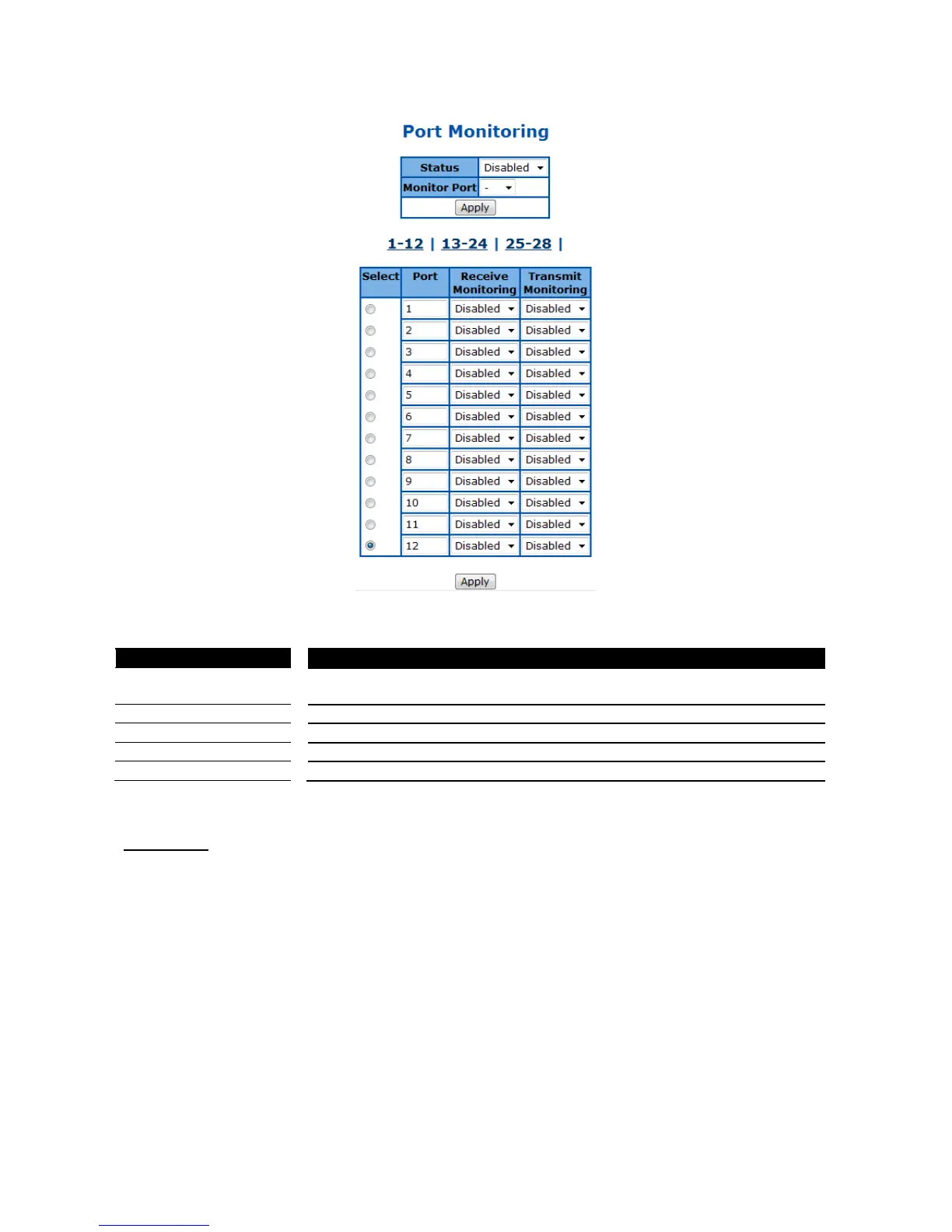
Figure 30 Layer2 Management > Port Manager > Port Monitoring
Parameter
Description
Status
To enable/disable the port monitoring session on the device. Default is
disabled.
Monitoring Port
Specify the source port of the mirror session.
Port
Specify the destination port of the mirror session.
Receive Monitoring
Monitoring the traffic received from the source port.
Transmit Monitoring
Monitoring the traffic transmitted from the source port.
Click Apply to submit the changes.
Port Control
This page is to configure the control parameters of interface.

Table of Contents

Other manuals for TRENDnet TL2-E284

Related product manuals