EasyManua.ls Logo

TRENDnet TL2-E284 - Vlan; VLAN Basic Information; VLAN Port Settings

TRENDnet TL2-E284
293 pages
Print Icon
To Next Page IconTo Next Page
To Previous Page IconTo Previous Page
Loading...
24-Port 10/100Mbps Layer 2 Switch w/ 4 Gigabit Ports and 2 Shared Mini-GBIC Slots
6-5
VLAN
VLAN Basic Information
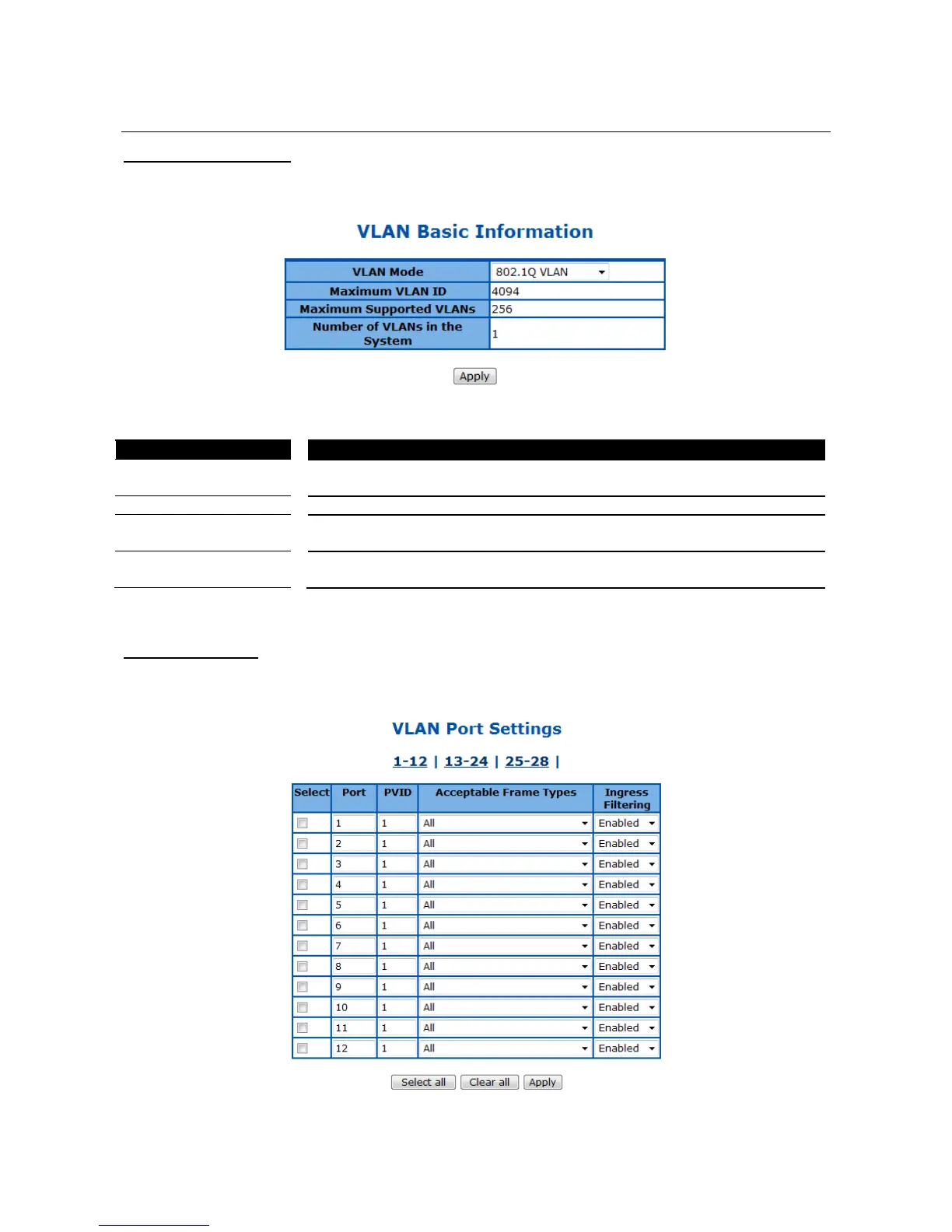
This page is to configure the basic settings of virtual local area network (VLAN) on the device.
Figure 32 Layer2 Management > VLAN > Basic Information
Parameter
Description
VLAN Mode
Choose from 802.1Q VLAN or Asymmetric VLAN modes. Default is 802.1Q
VLAN.
Maximum VLAN ID
Display the maximum VLAN ID can be configured. Default is 4094.
Maximum Supported
VLANs
Display the maximum VLANs can be supported. Default is 256.
Number of VLANs in
the System
Display the current VLAN number in the system. Default is 1.
Click Apply to submit the changes.
VLAN Port Settings
This page is to configure VLAN setting on physical port interfaces.
Figure 33 Layer2 Management > VLAN > Port Settings

Table of Contents

Other manuals for TRENDnet TL2-E284

Related product manuals