24-Port 10/100Mbps Layer 2 Switch w/ 4 Gigabit Ports and 2 Shared Mini-GBIC Slots
6-22
IGMP Snooping
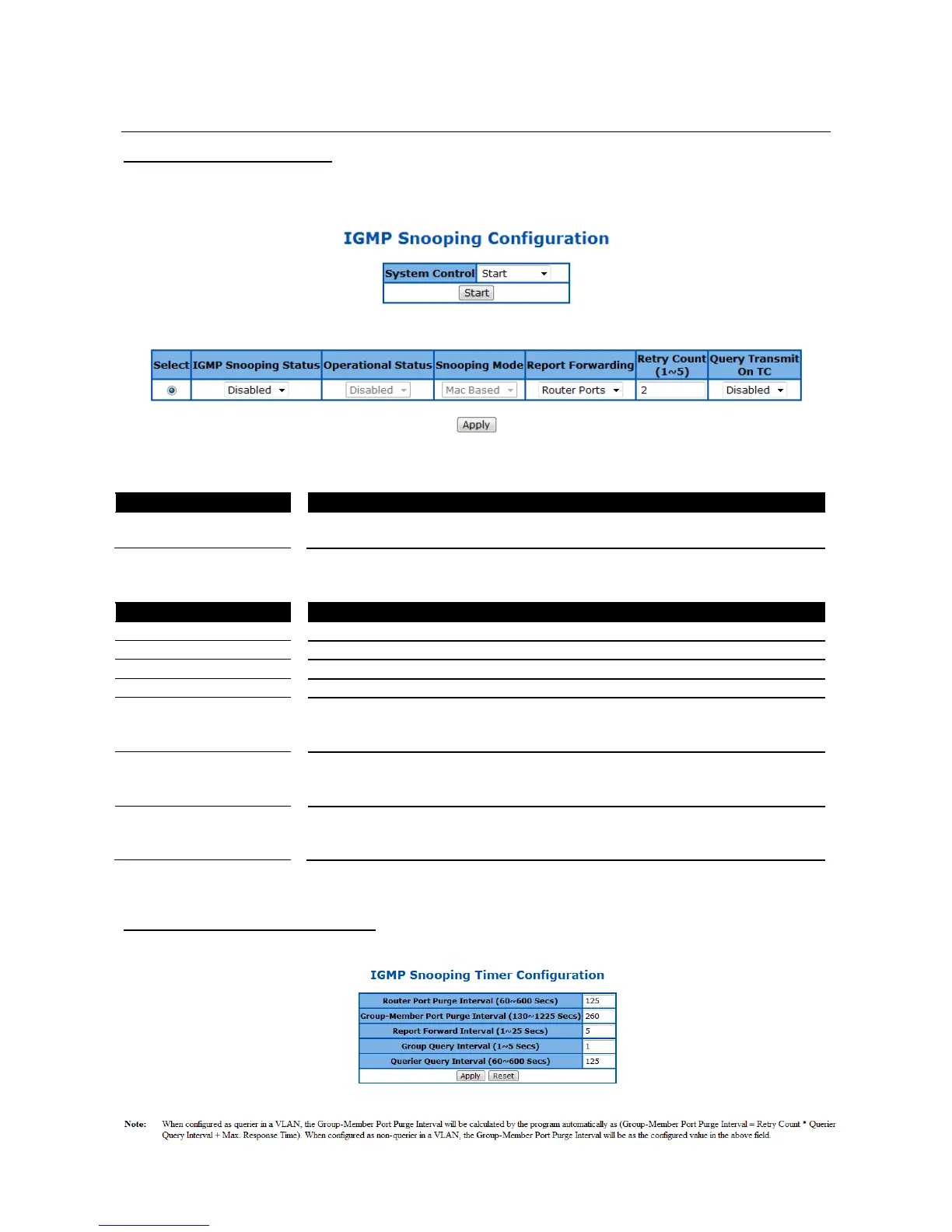
IGMP Snooping Configuration
This page is to configure the IGMP Snooping global settings.
Figure 59 – Layer2 Management > IGMP Snooping > Basic Settings
To activate or shutdown IGMP snooping of the Switch. Select Start to activate
the function, Shutdown to shutdown it. Default is Start.
Click Start to start or shutdown the IGMP Snooping globally.
Select a line to change the configuration.
To enable or disable IGMP Snooping globally. Default is enabled.
Specify the operational status of IGMP snooping function.
Specify the Snooping mode of IGMP snooping function.
Specify which port to forward the IGMP report. Select All Ports to forward the
report to all ports, Router Ports to forward the reports to IGMP router ports
only. Default is Router Ports.
To set the maximum retries for group specific queries which sent to a port
received an IGMPv2 leave message. The possible number is 1-5 times.
Default is 2.
Specify if the IGMP queries will still be sent when STP topology change
happens. Select Enable to transmit the queries, Disabled not to transmit.
Default is Disabled.
Click Apply to submit the changes.
IGMP Snooping Timer Configuration
This page is to configure the IGMP Snooping timers.



 To Next Page