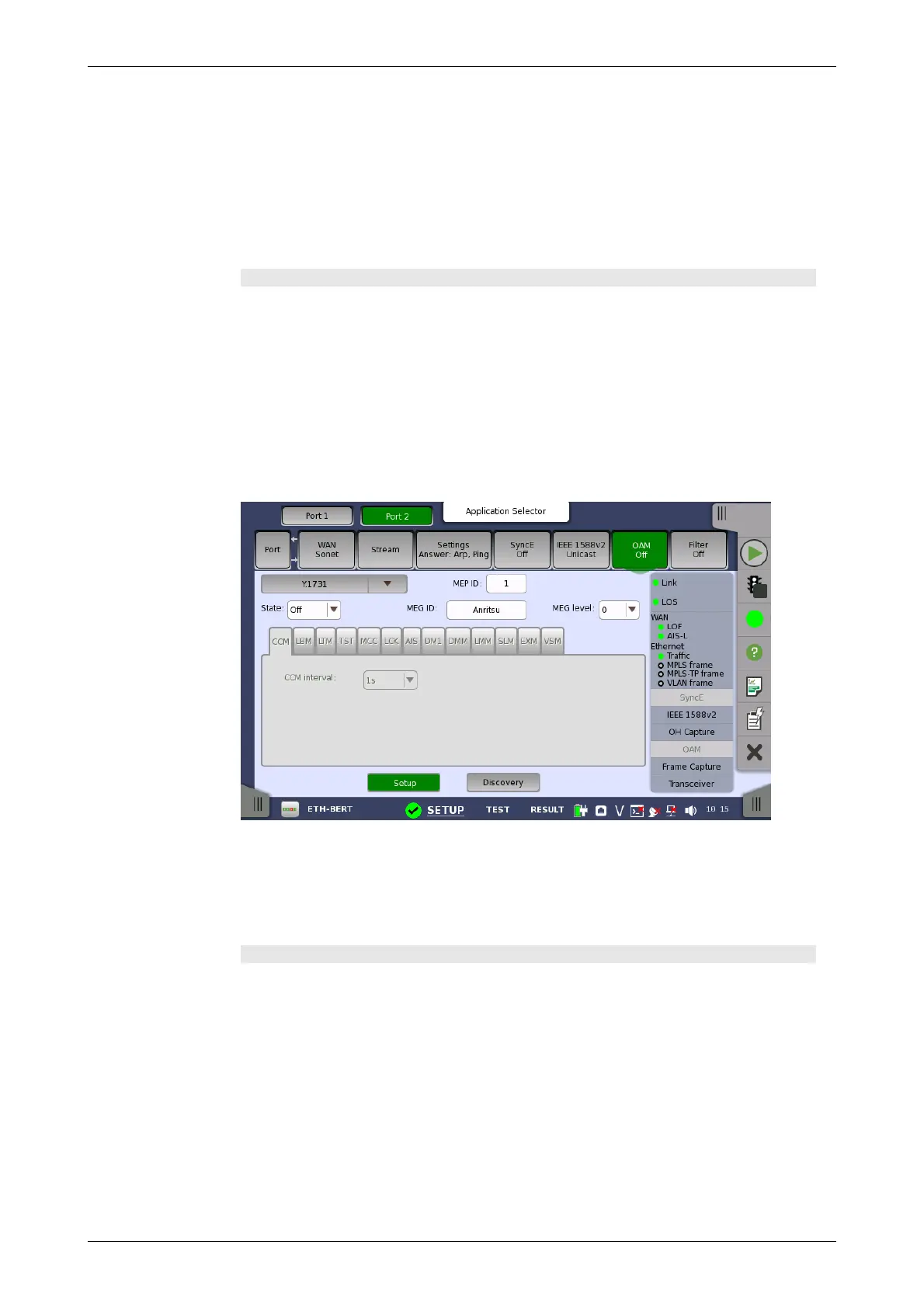
Y.1731 protocol
setup
Only available if a Data or Test TLV type has been selected. Allows you to
specify the length of the TLV.
Value
Only available if a Data or Test TLV type has been selected. Allows you to
specify the value of the TLV. Note that for the Data TLV type, this field is an
entry field where you open an editor and type the value; for the Test TLV
type, it is a drop-down menu.
LTM tab page
The LTM tab page contains the following parameters:
TTL
Allows you to specify a TTL value. Used to indicate whether or not an LTM
should be terminated by the receiver.
Trans ID
Allows you to specify the transaction number for the LTM.
Selecting the Y.1731 protocol will display the screen shown below.
The screen contains two views: the default Setup view and the Discovery
view. Use the Setup and Discovery buttons at the bottom of the screen to
switch between the two views.
The Setup view is described below. The Discovery view is described in a
separate section.
General parameters
State
Allows you to set the state of the protocol to either On or Off. Note that when
State is set to On, the other general parameters are disabled, but the tab
pages and their contents are enabled.
MEP ID
Allows you to specify the Local Maintenance Point ID, which will identify the
unit in the MEG.
MEG ID
Allows you to identify the MEG to which the MEP belongs.
MEG level














 To Next Page