AP Servo Installation, Configuration, and Calibration
10-12 SkyView System Installation Guide - Revision AA
powered on in routine operation. When the servos are receiving power but the autopilot is not
engaged, the servos draw negligible power.
SkyView Network Connection
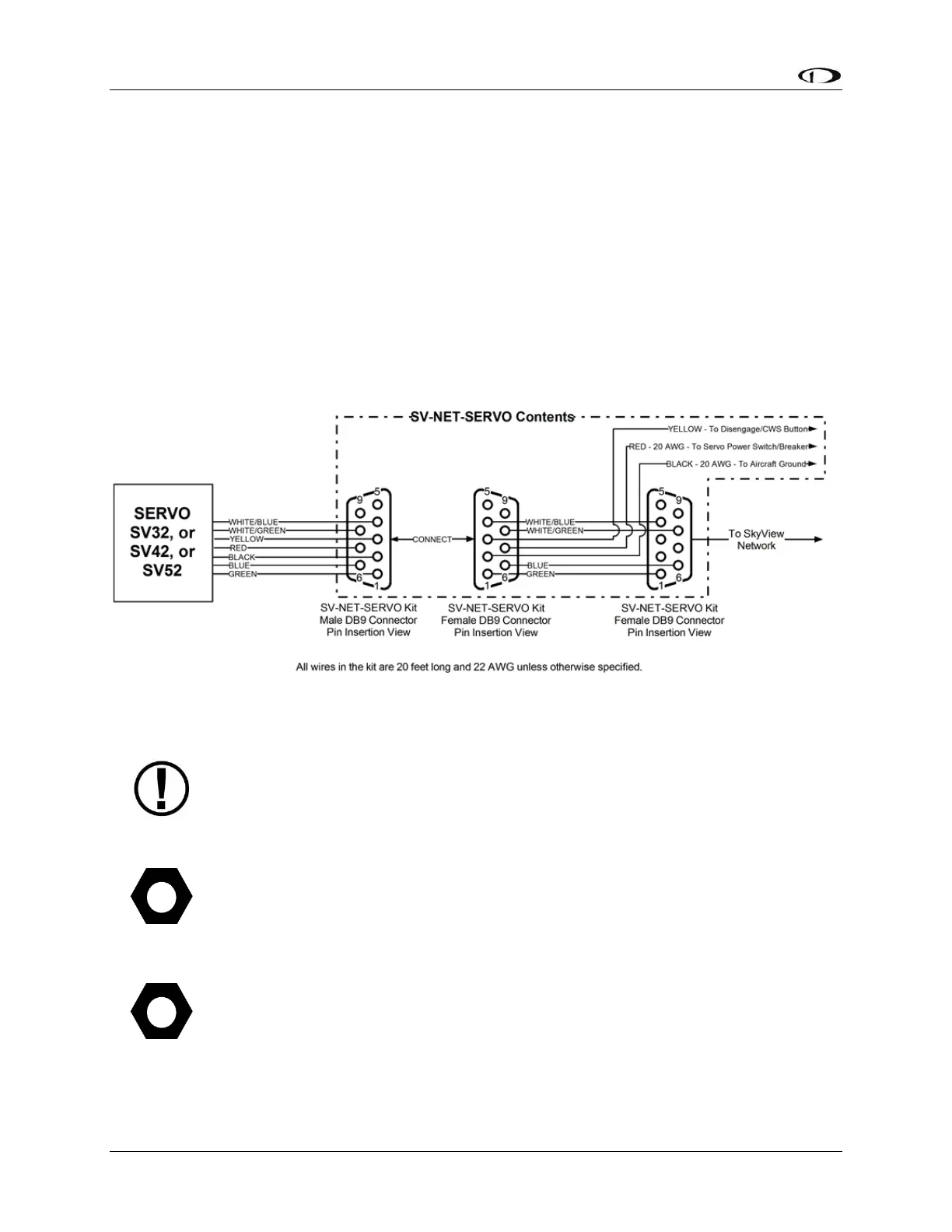
Connect the servos to the SkyView network according to Figure 114 and Table 74. Dynon
Avionics offers the SV-NET-SERVO cabling kit (each kit provides wire and connections for one
servo). The kit contains connectors, pins, and 20 feet of wire of each color, which should be
sufficient for most servo installations. Also note that the white/blue, white/green and blue,
green wire combinations come pre-twisted per recommendation for the data communications
pairs for SkyView Network.
Figure 115 is the recommended pin insertion scheme for the three D9 connectors included in
the SV-NET-SERVO Kit.
Figure 115 – SV-NET-SERVO Recommended Pin Insertion (All Connectors Rear View)
Extreme care should be observed that D9M connector for the servo CAN ONLY BE
CONNECTED TO THE MATING D9F CONNECTOR FOR THE SERVO. If either of these
servo DB9 connectors is connected directly to a SkyView Network connection, the
SkyView displays (which supply power to the SkyView Network) and other SkyView
Network components can be damaged and require non-warranty repair.
A few SkyView pilots have reported that after installing Dynon Avionics servos,
noise is heard in the intercom system whenever the servos operate. Such noise
can be eliminated by connecting an electrolytic capacitor between the Red wire (+
terminal of the capacitor) and Black wire (- terminal of the capacitor) at the servo.
Dynon Avionics does not supply this component. Capacitor specifications:
Type: Electrolytic










 To Next Page