Matrix ETERNITY NE System Manual 1067
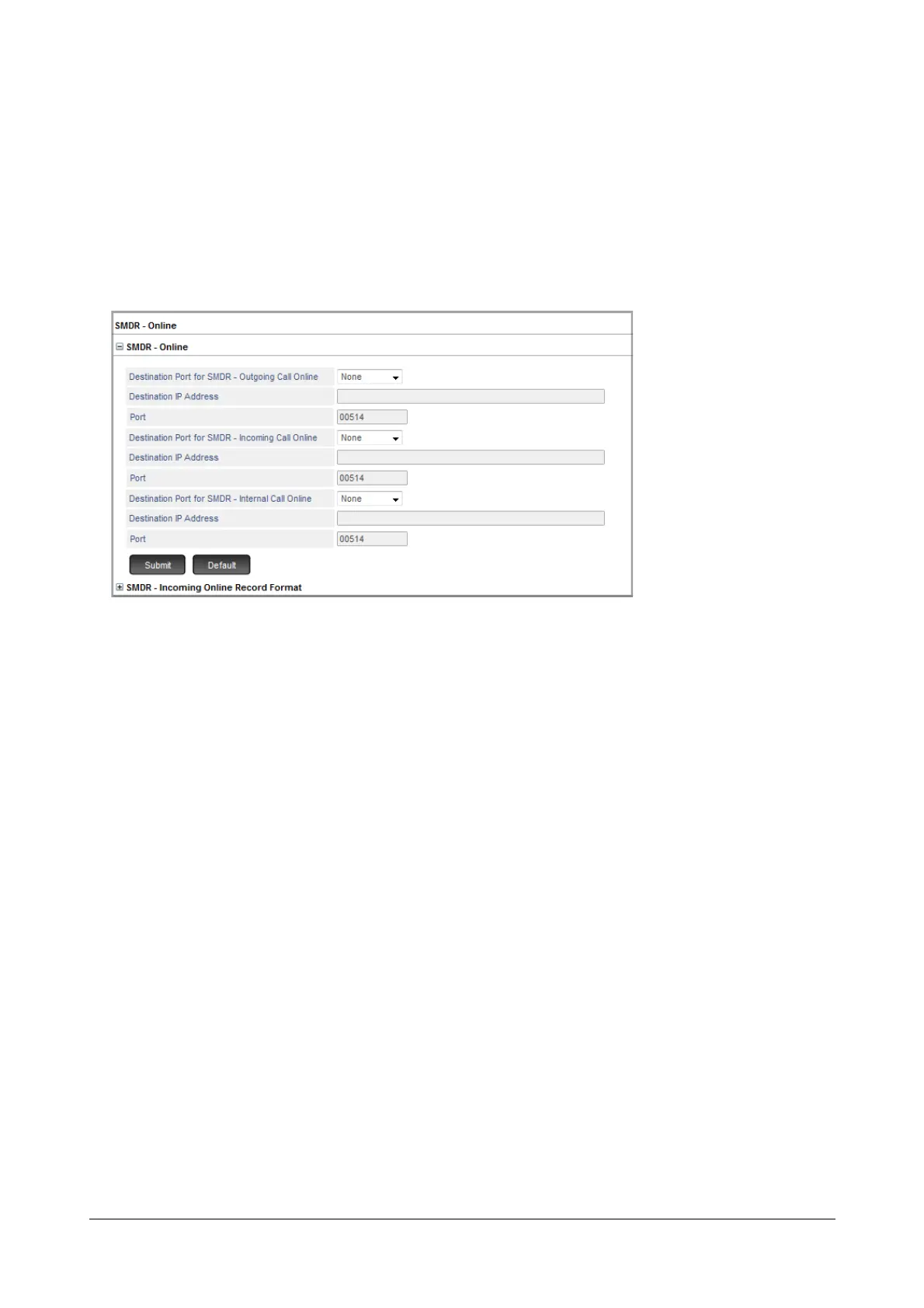
To configure SMDR- Online,
• Login as System Engineer.
• Under Advanced Settings, click SMDR.
• Click SMDR - Online.
• To configure SMDR- online parameters, click SMDR Online to expand.
•For SMDR - Outgoing Call Online,
• Select the Destination Port.
•In Destination IP Address, enter the IP Address of the remote Syslog Server. Both IPv4 and IPv6
addresses are supported.
•In Port, enter the port of the remote Syslog Server. Valid port range: 514, 1025 to 65535.
•For SMDR - Incoming Call Online,
• Select the Destination Port.
•In Destination IP Address, enter the IP Address of the remote Syslog Server. Both IPv4 and IPv6
addresses are supported.
•In Port, enter the port of the remote Syslog Server. Valid port range: 514, 1025 to 65535.
•For SMDR - Internal Call Online,
• Select the Destination Port.
•In Destination IP Address, enter the IP Address of the remote Syslog Server. Both IPv4 and IPv6
addresses are supported.
•In Port, enter the port of the remote Syslog Server. Valid port range: 514, 1025 to 65535.
You can also configure Call Record Format for Incoming Calls as per your requirement.


 To Next Page