Matrix ETERNITY NE System Manual 115
SLT Extensions
ETERNITY NENXIP50
20
supports 2 Single Line Telephone (SLT) extension ports, depending on the configuration
you are using.
The number of SLT extensions available to you for configuration depends on the number of SLT ports supported by
your configuration of ETERNITY NENX and the number of SLT ports you have specified on the “Pre-requisites”
page.
To configure,
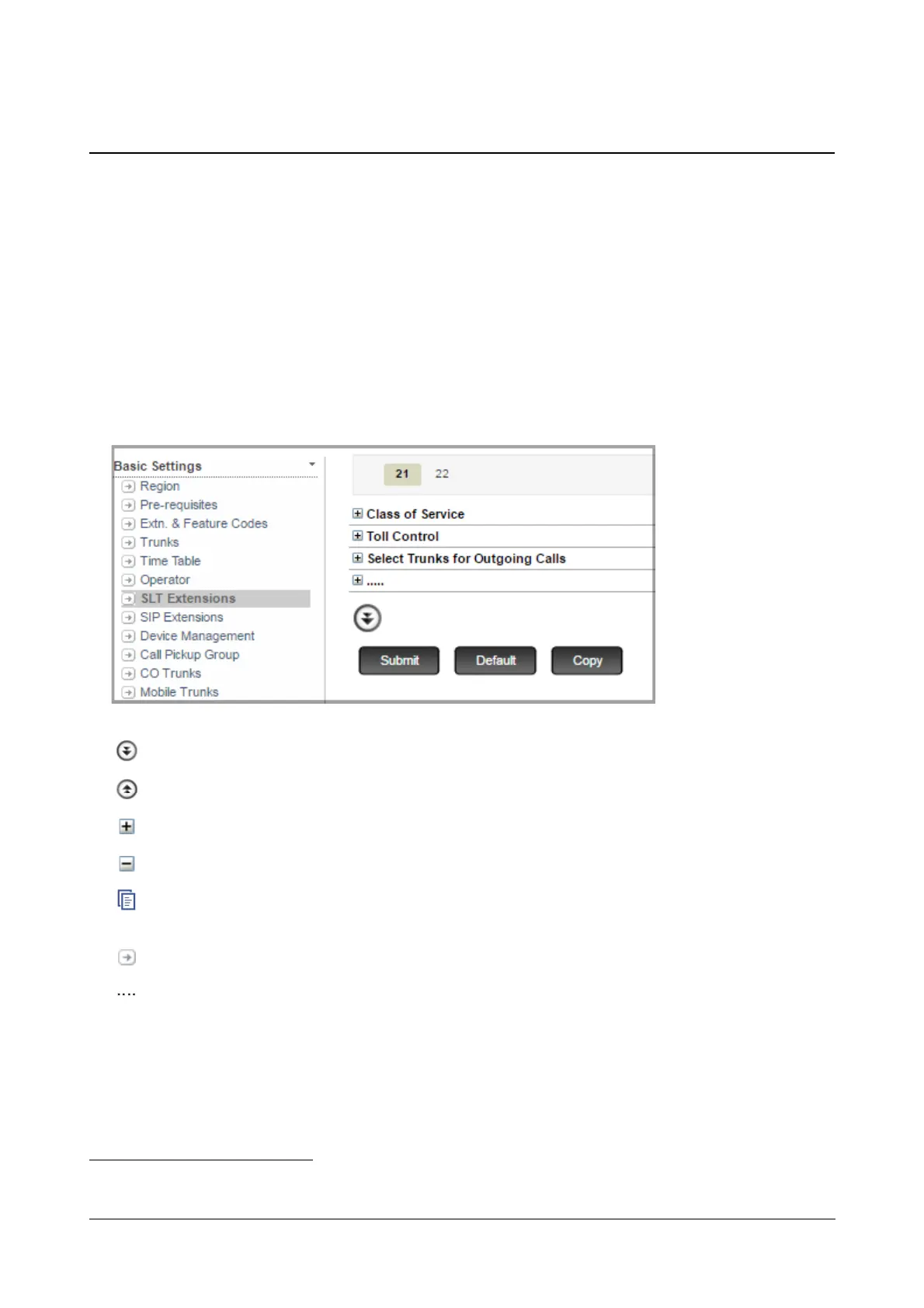
• Click SLT Extensions.
On this page,
More: Click this button to view all parameter links on the page.
Less: Click this button to view only the essential parameter links on the page.
Expand: Click to expand a link to display all parameters under the link.
Collapse: Click to collapse a link. Hides all parameters under the link.
Copy: Click to copy the parameters under a specific link of a page to the same link under any other extension
page.
Settings: Click to configure the settings of a parameter further.
More link: Click to view all additional parameters on the page.
To configure another SLT extension, click the SLT Extension name (number) tab.
To save the settings, click Submit.
To assign default values to all the parameters of the SLT extension, click Default.
20. ETERNITY NENX312 and ETERNITY NENX416 supports 12 and 16 SLT Ports respectively.


 To Next Page