1042 Matrix ETERNITY NE System Manual
Shared Call Appearance
Shared Call Appearance (SCA) allows SIP Phones that are registered with SARVAM UCS at different locations with
the same address/number, to get notification on call states of the call appearance(s) shared by them.
Whenever a call is made or received from a shared call appearance, SARVAM UCS sends each SIP Phone sharing
the call appearance(s), a notification on the state of the call appearance. Through these notifications, each user
sharing the same address/number can know the current state of the call appearance and act accordingly.
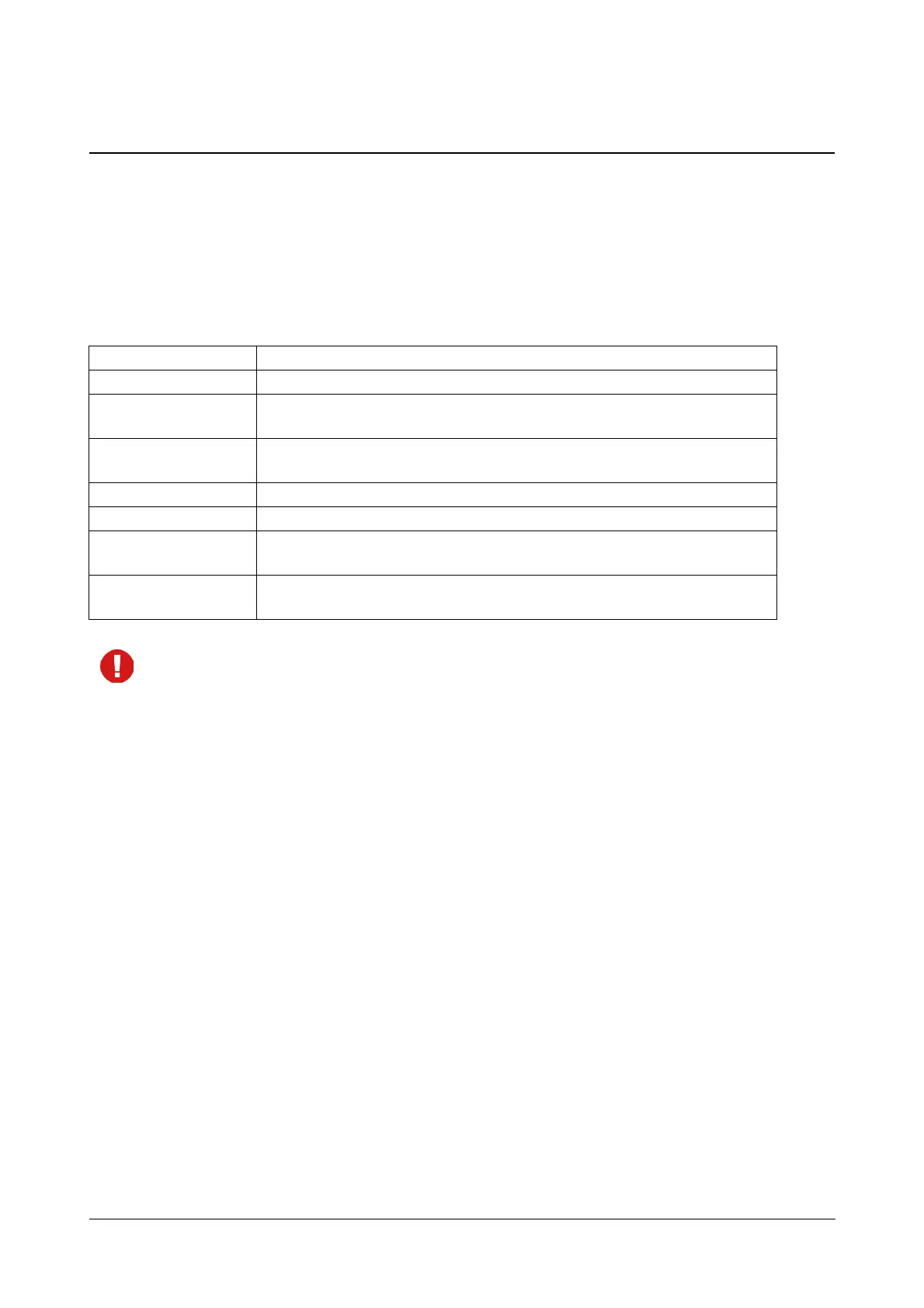
SARVAM UCS supports and displays the following call states for a shared call appearance on the SIP phones:
• SARVAM UCS supports SCA as per the Broadsoft SCA feature Specifications.
• SARVAM UCS supports this feature only on Standard IP Phones.
• Open Standard IP Phones may differ in the type of indication (LED color and cadence, text message
display) they provide for the Call States. Refer to the manufacturer’s documentation for SCA indication
supported on the phones.
• If a call is put on 'Consultation Hold' from Location -1 of SIP Extension (binding -1), then the SIP
Extension registered at Location-2/3 (another binding) cannot retrieve that call.
How it works
SARVAM UCS supports up to 10 call appearances on SIP extensions. The number of call appearances that will be
shared by the SIP Phones will depend on the number of call appearances you have configured for the SIP
extension.
To provide SCA to the Open Standard IP Phones registered with the same ID, the Shared Call Appearance check
box must be enabled in the SIP Extension Settings of SARVAM UCS.
On the Open Standard IP Phones, make sure you have configured as many call appearances as allowed on the
SIP extension by SARVAM UCS and configure the corresponding number of CA keys.
Here is an example of how Shared Call Appearance works:
• A, B and C are Open Standard SIP phones registered with SARVAM UCS at three different locations with
the same SIP ID, 602.
State Meaning
Idle When the call appearance is free.
Seized
When the call appearance is been seized from any User binding using the line-
seize subscription.
Progressing
When the User has generated a call using the call appearance and the called
destination is ringing.
Ringing When the call is received on the User at the call appearance.
Active When the call of the User at the call appearance is in matured state.
Held
When the call at the call appearance of the User has been put on public hold
from the User binding.
Held-private
When the call at the call appearance of the User has been put on private hold
from the User binding.



 To Next Page