Matrix ETERNITY NE System Manual 105
Pre-requisites
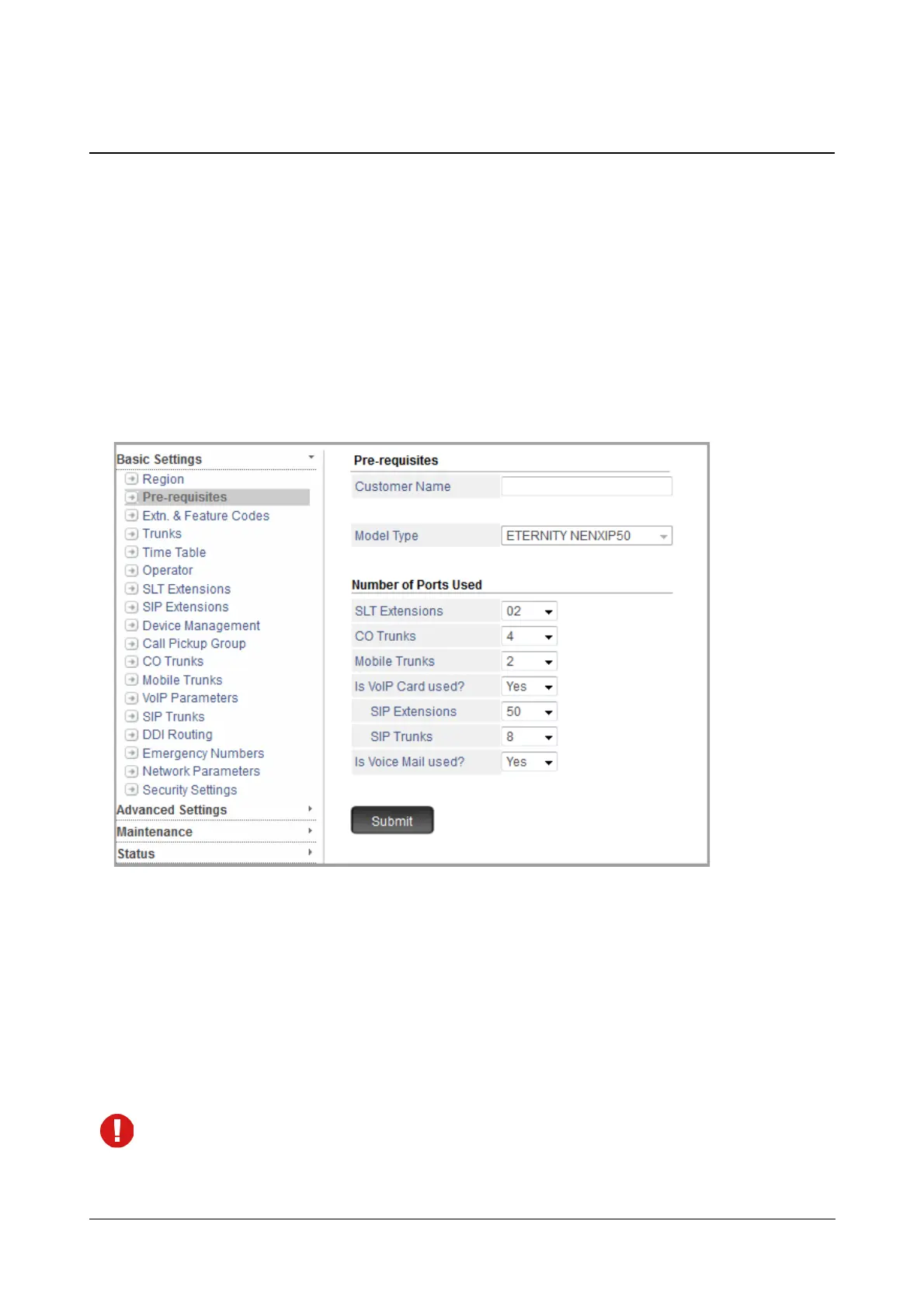
This page displays the system resources (number of trunk and extension ports supported) supported by SARVAM
UCS. It is quite common for users to utilize the system resources below its capacity, especially when they begin
using a new system.
To make the task of configuring easier and more focused, SARVAM UCS allows you to define System Pre-
requisites: the system configuration you are using (ETERNITY NENXIP50, ETERNITY NENX312, ETERNITY
NENX416) the number of trunk and the number of extension ports you want to configure. Accordingly, Jeeves will
show only as many trunk and extension ports that you have specified.
To configure,
• Click Pre-requisites.
• Enter Customer Name. Default: Blank.
Customer Name is the name of the organization/enterprise using SARVAM UCS.
The Customer Name you enter in this field will appear as header on the various System Reports generated
and printed by the SARVAM UCS like SMDR Incoming, Outgoing and Internal Call Reports, Alarm Status
Reports, etc.
The Customer Name may consist of a maximum of 80 characters, including punctuation marks. So, you
can also enter the organization's address along with the Customer Name.
You can assign Customer Name also on the “System Parameters” page. If you have entered the Customer
Name on this page, the same Name will appear on the System Parameters page.



 To Next Page