Matrix ETERNITY NE System Manual 111
To configure,
• Click Time Table.
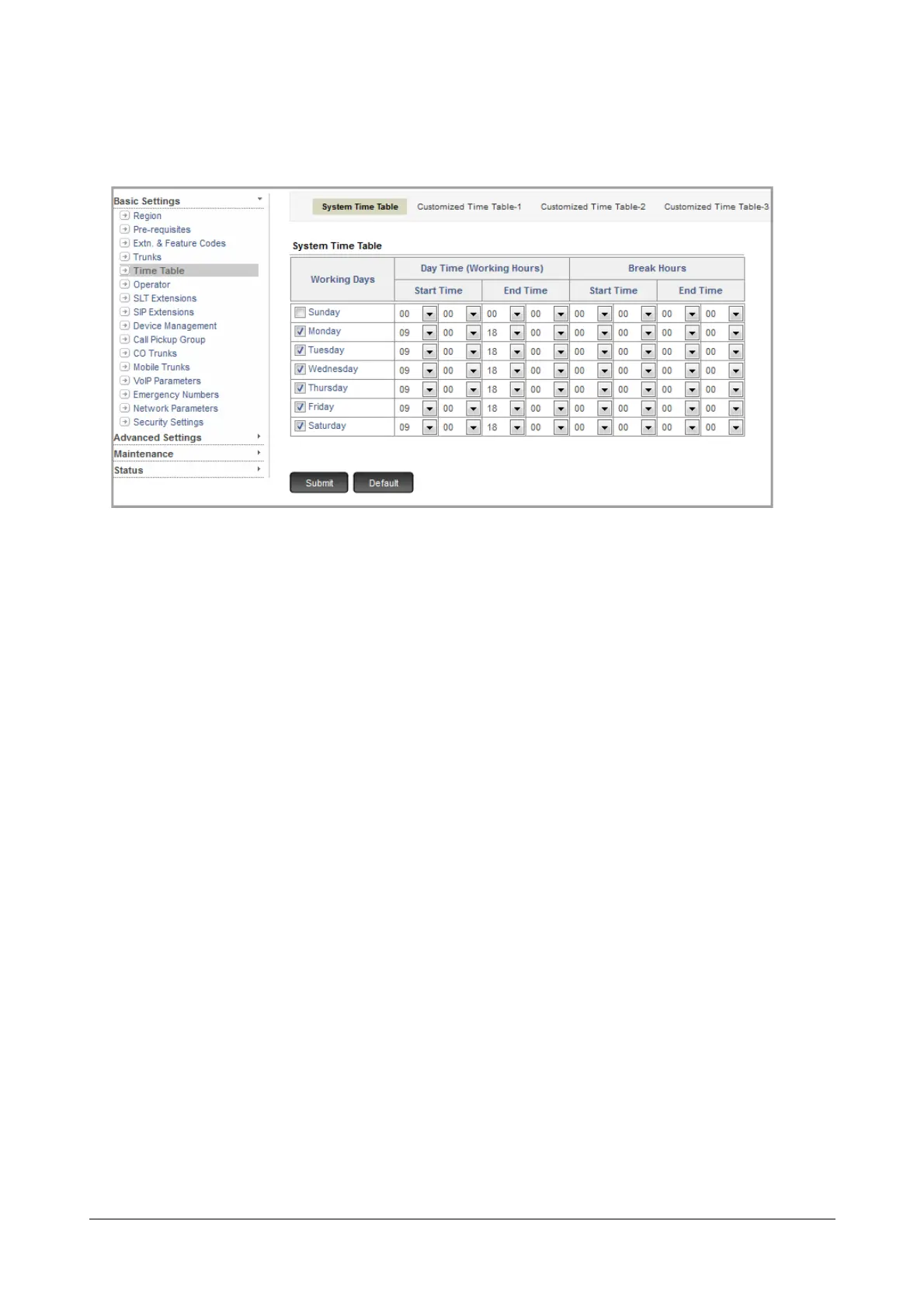
• Decide your Working days, Working hours and Break hours (24 hours format).
By default, System Time Table has Monday to Saturday as Working days, Working hours are defined as:
09:00 to 18:00 for all Working days and Break hours are defined as: 00:00 for all Working days. Sunday is
a Non-working day, with Working hours and Break hours set to 00:00.
The system considers the time period other than the Day time (Working hours) and Break hours as Night
time (Non-working hours).
If the System Time Table suits you, retain it. You may redefine the Working days and Working hours. You
can also define different Working hours for each day of the week.
• To define the Working Day, select the related check box.
• To define the Day Time (Working Hours), select the Start Time and the End Time from the combo
boxes.
• To define the Break Hours, select the Start Time and the End Time from the combo boxes.
• Click Submit.
• If you want to use a Customized Time Table, click the tab Customized Time Table-1.
• Define the Working days and the Day Time and Break Hours - start time and end time - for each Working
day.
• Click Submit.
If you want to use the other customized time table, click their tabs and follow the same instructions as
above.



 To Next Page