Matrix ETERNITY NE System Manual 209
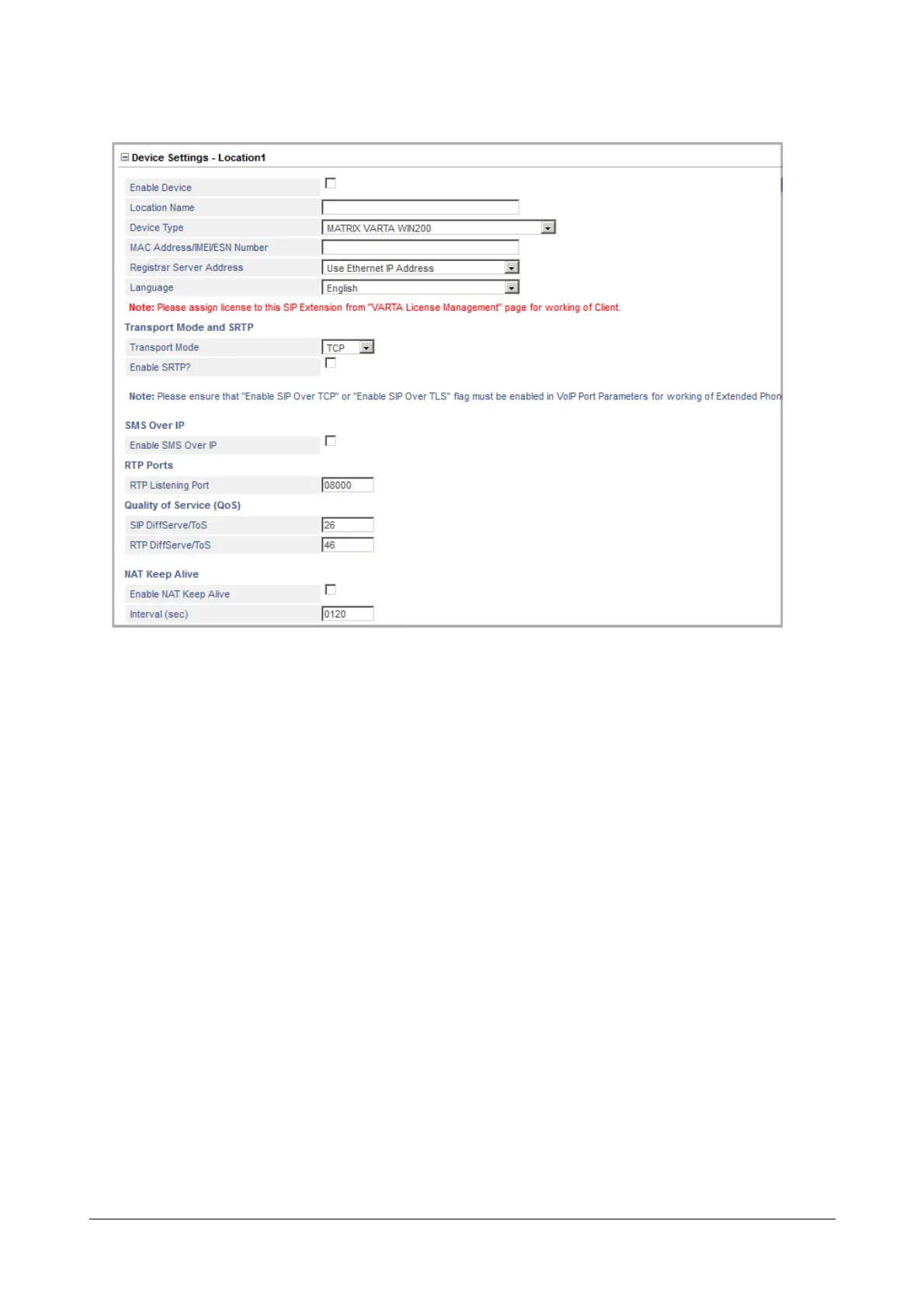
• Click Device Settings - Location 1 to expand.
• Select the Enable Device check box. Default: Disabled.
• Enter the Location Name of your choice. The Location Name may consist of 18 characters (maximum).
Default: Blank.
• Select MATRIX VARTA WIN200 as the Device Type at this location. Make sure you assign the desired
license to this SIP extension. For details, see “VARTA License Management”.
•In MAC Address/IMEI/ESN Number, enter the Device ID. Default: blank.
SARVAM UCS validates the desktop/PC on which you have installed the UC Client on the basis of the
Device ID, and provides configuration on validation.
As SARVAM UCS allows registration of the SIP Extension from three different locations, it identifies the
SIP Extension in each location by the programmed Device ID.
• Select the appropriate Registrar Server Address to register the UC Client with the SIP Registrar of
SARVAM UCS, according to your installation scenario:
• If you want the UC Client to register using the WAN network, select Use Ethernet IP Address as
Registrar Server Address.
• If the UC Client is in the Global Network and SARVAM UCS is connected to Internet over Mobile WAN,
select Use Mobile Port IP Address as Registrar Server Address.


 To Next Page