Matrix ETERNITY NE System Manual 673
• Login as System Engineer.
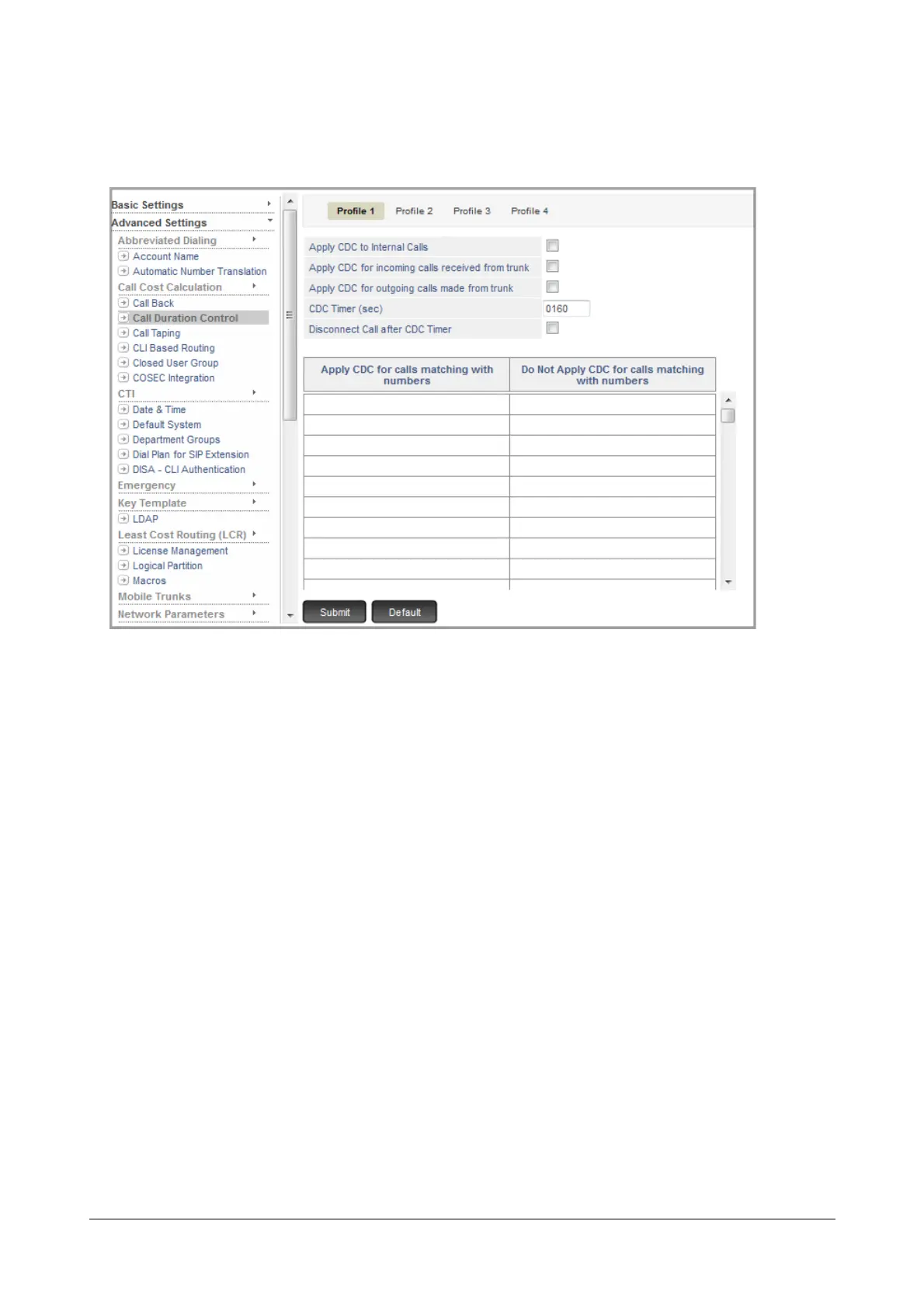
• Under Advanced Settings, click Call Duration Control.
• The CDC Profile 1 opens on this page.
• Enable Apply CDC to Internal Calls, if CDC is to be applied on internal calls. Default: Disabled.
• Enable Apply CDC for Incoming Calls received from trunk, if CDC is to be applied on incoming external
calls. Default: Disabled.
• Enable Apply CDC for Outgoing Calls made from trunk, if CDC is to be applied to outgoing external
calls. Default: Disabled.
• If required, change the CDC Timer to the desired duration. The range of the timer is 0001 to 9999
seconds. Default: 160 seconds.
• To have calls disconnected on the expiry of the CDC Timer, enable Disconnect Call after CDC Timer
check box. Default: Disabled.
• In the Apply CDC for calls matching with numbers column, enter the numbers on which CDC should be
applied. You may refer to the list you prepared.
• In the Do Not Apply CDC for calls matching with numbers column, enter the numbers on which CDC
should not be applied. You must configure this list with numbers which you want to be exempt from CDC.
• Click Submit at the bottom of the page to save changes.
• To configure another CDC Profile, click the Profile number tab and follow the same steps described above.



 To Next Page