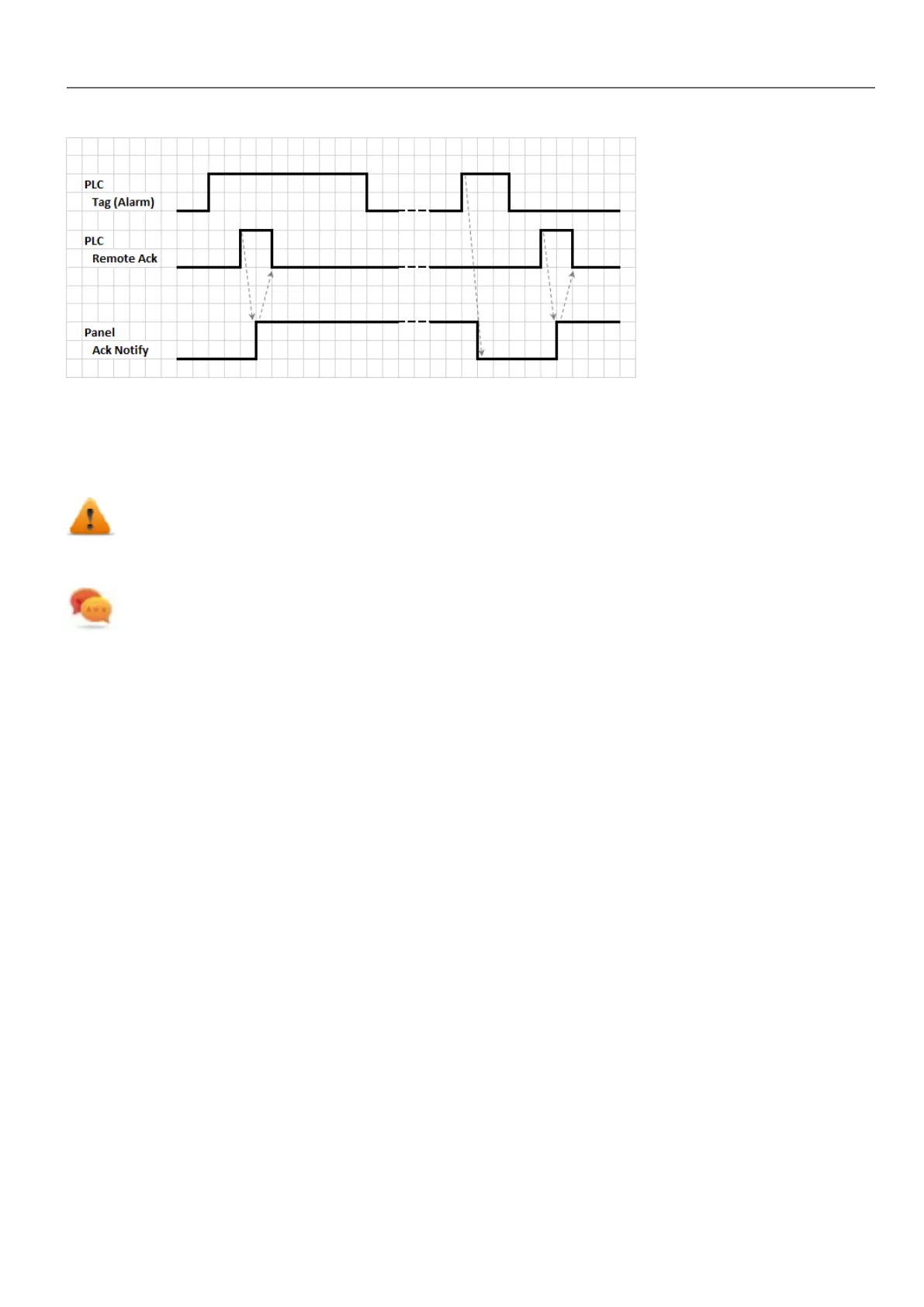
1. When an alarm condition is detected the HMI device set Ack Notify to 0 and all related actions are executed.
2. When the alarm is acknowledged (by HMI device or remotely), Ack Notify is set to 1
3. It's up to the controllerto set Remote Ack to 1 to acknowledge the alarm or reset it to 0 when the HMIdevice send a
notification that the alarm has been acknowledged (Ack Notify =1)
WARNING: When an alarm is triggered, some signals need to be update/communicated through the
connected devices. We assume the Acknowledge to be a signal pushed from an operator and not
released automatically from a controller device. This allows for time required to communicated the
original signals.
Tip: Using the same tag both for Remote Ack and Ack Notify can connect more devices to the same controller
and acknowledge the alarms from any HMIdevice.
Alarm state machine
The runtime implements the alarm state machine described in this diagram.
States and transitions between states are described according to the selected options and desired behavior.
HMWIN Studio |User Manual| v206 (2017-06-30) | EN| © 2014-2017 Panasonic Electric Works Europe AG
169
15 Alarms



 To Next Page