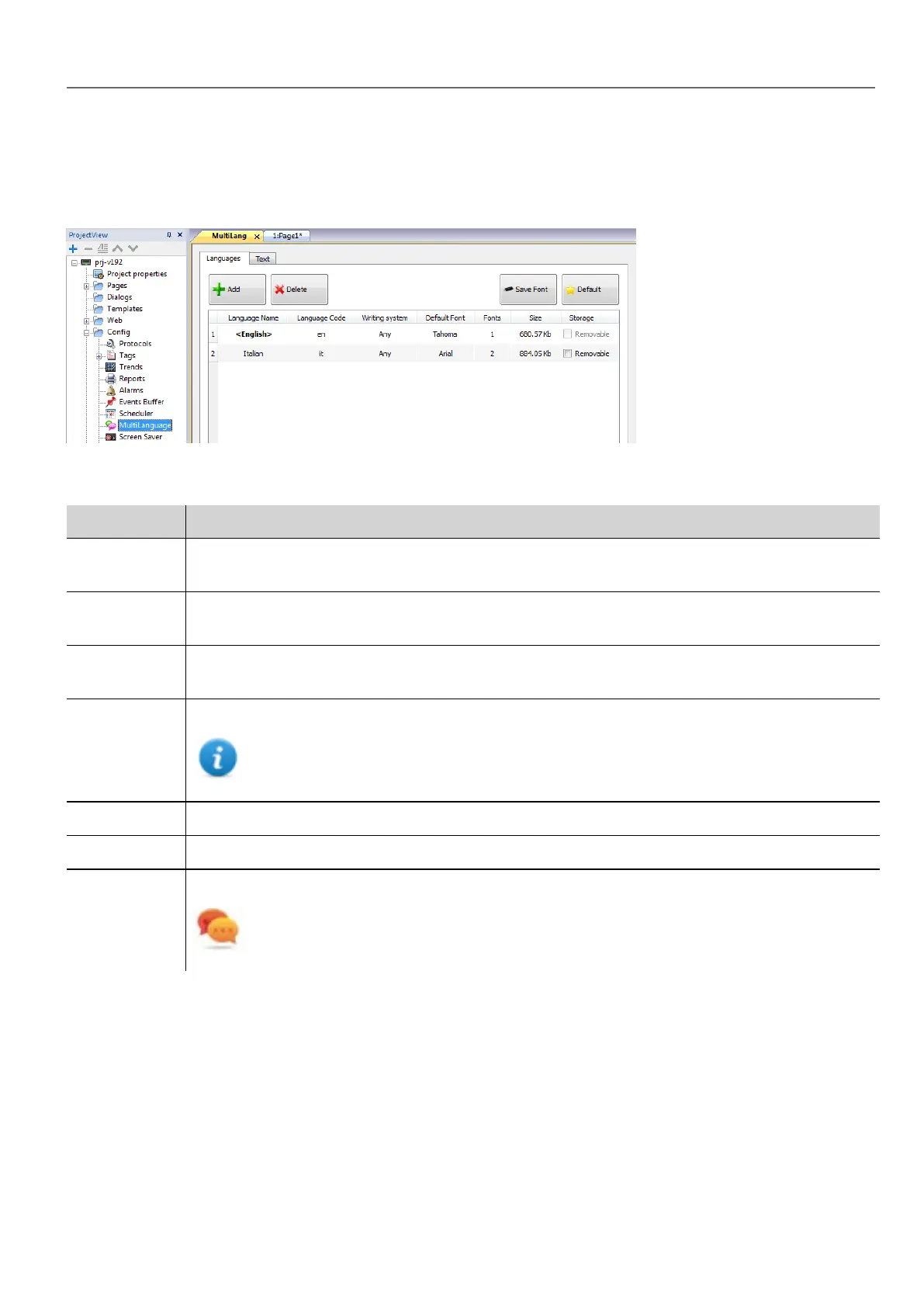
The Multi-language editor
Path: ProjectView> Config > double-click MultiLanguage
Language settings
Parameter Description
Language
Name
Name identifying the language in the project.
Language
Code
ISO 639 language code identifier, used to match language items when importing resources from
external xml files.
Writing
system
Select the set of fonts to be used with the language
Default Font Default font for project's widgets.
Note: When you choose a new font you are prompted to replace the font used in the widgets
you already created.
Fonts Number of fonts associated with the selected language.
Size Memory used to store font files.
Storage Location of file fonts is a removable external memory.
Tip: Store large font files on removable memory to free memory requirements in the HMI
device.
Adding a language
1. In the Languages tab, click +: a line is added to the table.
2. Enter all language settings.
3. Click Default to set the selected language as the default language when the Runtime starts.
4. Click Save Font to copy the fonts you marked as Removable on an external memory.
HMWIN Studio |User Manual| v206 (2017-06-30) | EN| © 2014-2017 Panasonic Electric Works Europe AG
213
20 Multi-language



 To Next Page