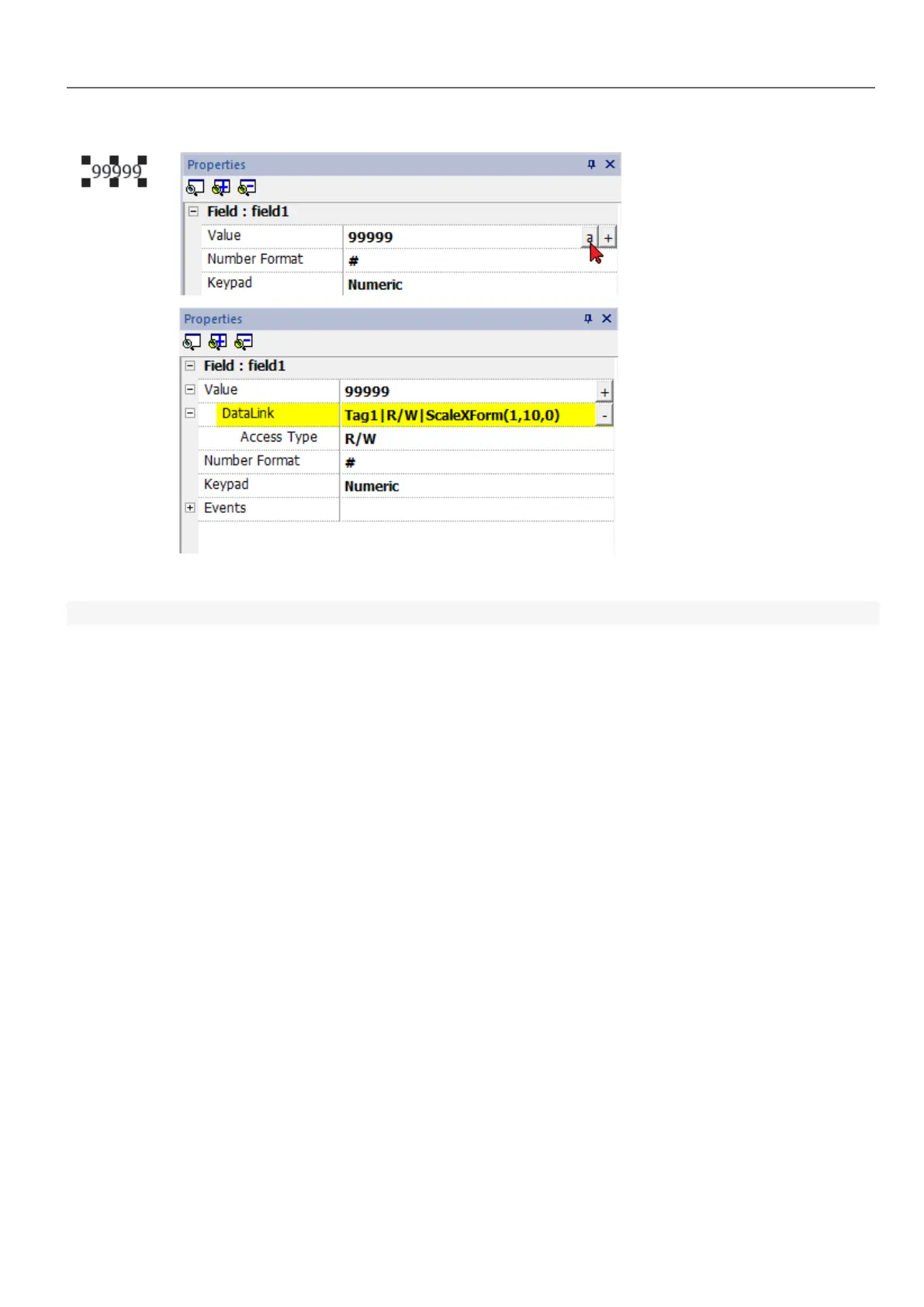
The data link format is:
Tagname [index] | [Atribute] | [XForm] | [XForm] | ...
Example:
l arrayTag[2]
l Tag[0|index]
l Alarm triggered:_SysPropMgr
l Tag|R/W|ScaleXForm(1,10,0)
l Tag|R/W|ScaleXForm(1,10,0)|ByteIndexXForm(1)|ColorPaletteCustomXForm(0#00aa7f,1#ff0000)
Events
Events are used to trigger actions at project level and can be associated to:
l buttons / touch (click, press, release)
l external input devices like keyboards and mouse (click, press, hold, release, wheel)
l data changes (OnDataUpdate)
l switch of pages (OnActivate, OnDeactivate)
l alarms
l scheduler
You can attach one or more actions to an event, so that they will be executed whenever the event occurs.
This example shows a JavaScript action activated by pressing a button.
HMWIN Studio |User Manual| v206 (2017-06-30) | EN| © 2014-2017 Panasonic Electric Works Europe AG
35
4 Programming concepts



 To Next Page