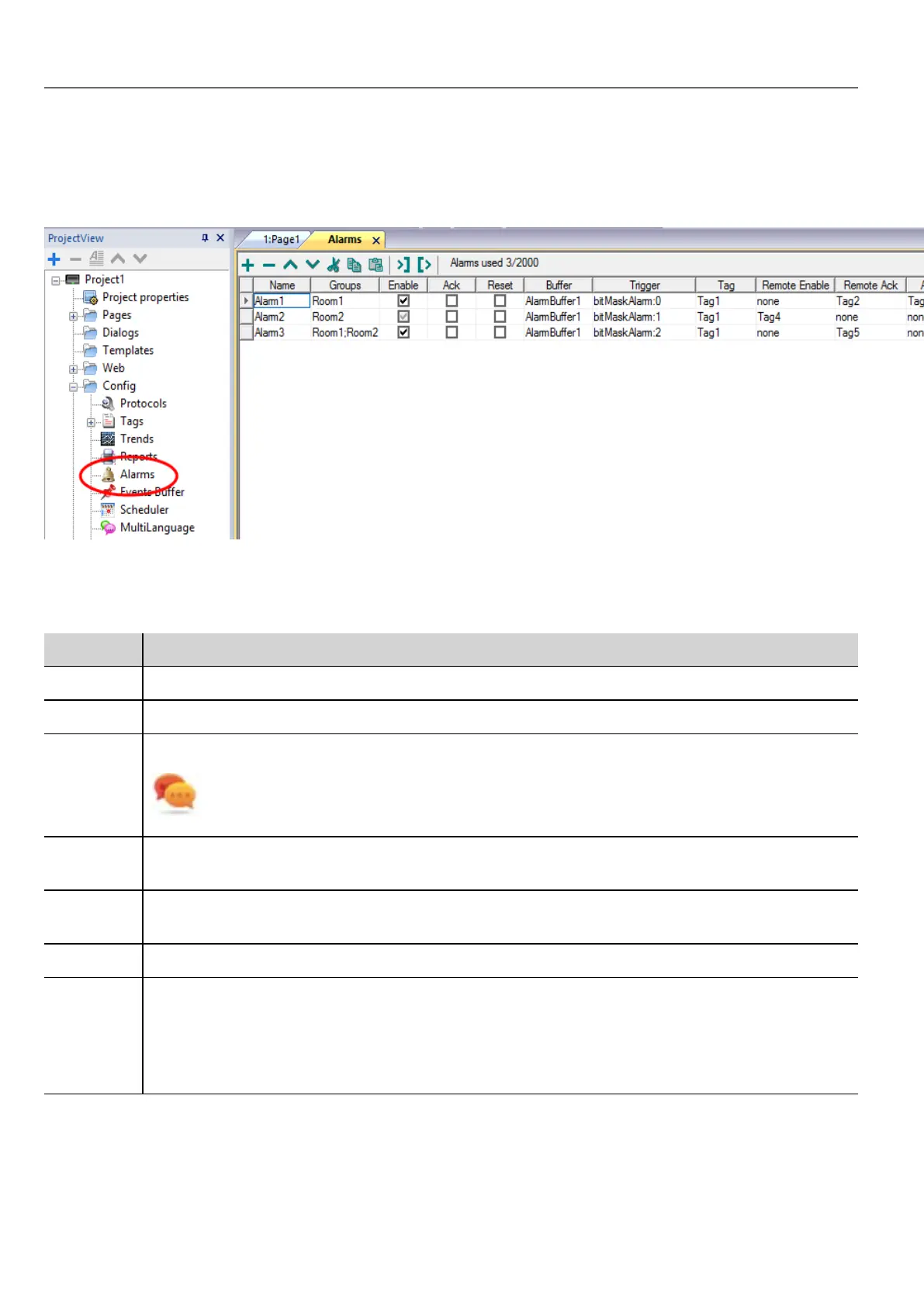
Alarms Editor
Path: ProjectView> Config > double-click Alarms
Adding an alarm
Click + to add an alarm.
Parameter Description
Name Name of alarm
Groups Groups associated with the alarm. They can be used in widgets display filters.
Enable Enable/disable triggering of alarm.
Alarms can be enabled or disabled at run time as well (see "Enable/disable alarms at run time"
on page177 for details).
Ack Enable/disable acknowledgment of alarm, if selected the operator must acknowledge the alarm once
triggered to remove it from the Active Alarm widget.
Reset Used with the Ack option, if selected, acknowledged alarms stay in the alarm list, labeled as Not
Triggered Acked, until the operator presses the Reset button in the alarm widget.
Buffer Buffer file where the alarm history will be saved.
Trigger Triggering condition depending on alarm type:
l limitAlarm: alarm triggered when tag value exceeds its limits. The alarm is not triggered if the
value reaches the limits.
l valueAlarm alarm is triggered when tag value is equal to the configured value
166
HMWIN Studio |User Manual|v206 (2017-06-30) |EN|© 2014-2017 Panasonic Electric Works Europe AG
Alarms Editor



 To Next Page