Creating an indexed addressing set
Scenario
In this scenario, environment data is collected from with four rooms, each equipped with temperature, pressure, and
humidity sensors. Data is available as follows:
Room Number Temperature Pressure Humidity
1 Room1-Temperature Room1-Pressure Room1-Humidity
2 Room2-Temperature Room2-Pressure Room2-Humidity
3 Room3-Temperature Room3-Pressure Room3-Humidity
4 Room4-Temperature Room4-Pressure Room4-Humidity
Using the indexed addressing feature, you can use a single table format to arrange all data in the HMI device.
Data from the three different sensors can be displayed in a single page where the room number is used as a selector
(combo box) to pick the correct set of tags.
How to create an indexed tag set
Path: ProjectView> Tags
To do this you need to create an indexed tag set.
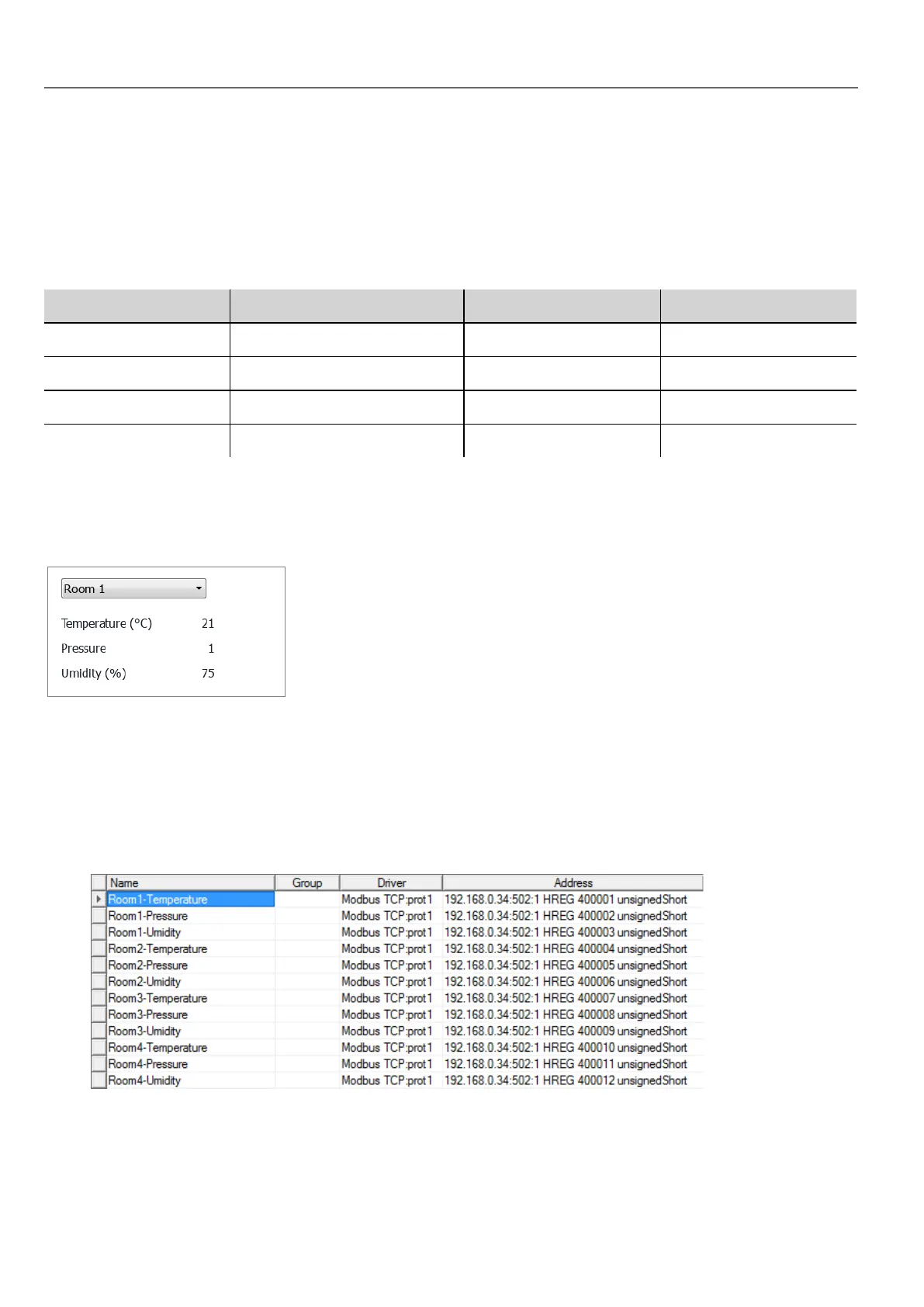
1. In the Tag Editor, define protocols and tag. Define a tag for each data to be indexed, in this example you must create
a tag for each sensor in each room.
274
HMWIN Studio |User Manual|v206 (2017-06-30) |EN|© 2014-2017 Panasonic Electric Works Europe AG
Creating an indexed addressing set



 To Next Page