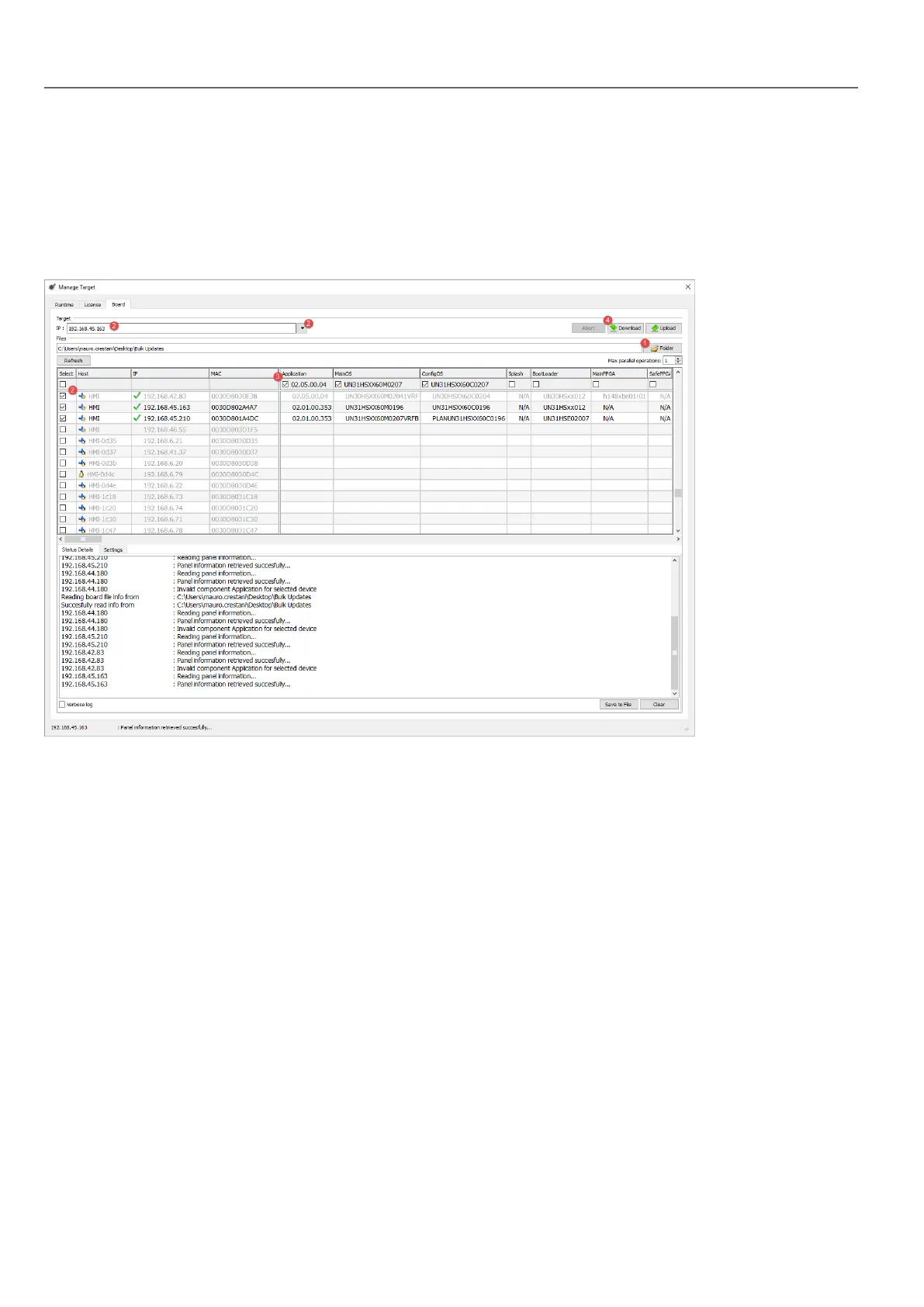
Update of system components from the application
You can download system components to a single HMI device or to a bulk of HMI devices of the same type using the
Ethernet communication interface.
Path: Run> Manage Target> Board
1. Select the folder that contains the files to download to the HMI device or where to upload files from the HMI device
2. Select one or more HMI device.
3. Select the components that you will download (or upload) to/from the devices
4. Start the Download to HMI or the Upload from the HMI operation
Note:
l The tool is designed to update multiple HMI devices of the same type. Please avoid putting files for different device
type into the same folder
l If the desired target IPis not listed, type it directly into the box. The discovery service is a broadcast service. When
a remote connection is done via VPN or from external networks, it will not work and you will have to enter the
address manually.
l Download of the selected components will be performed only to the compatible devices
l Based on your network and hardware capabilities you can increase the number of devices to update in parallel
l You need to restart the HMIdevice to finalize the update.
418
HMWIN Studio |User Manual|v206 (2017-06-30) |EN|© 2014-2017 Panasonic Electric Works Europe AG
Update of system components from the application



 To Next Page