Routing Optical Cables Through the FMT/1HU
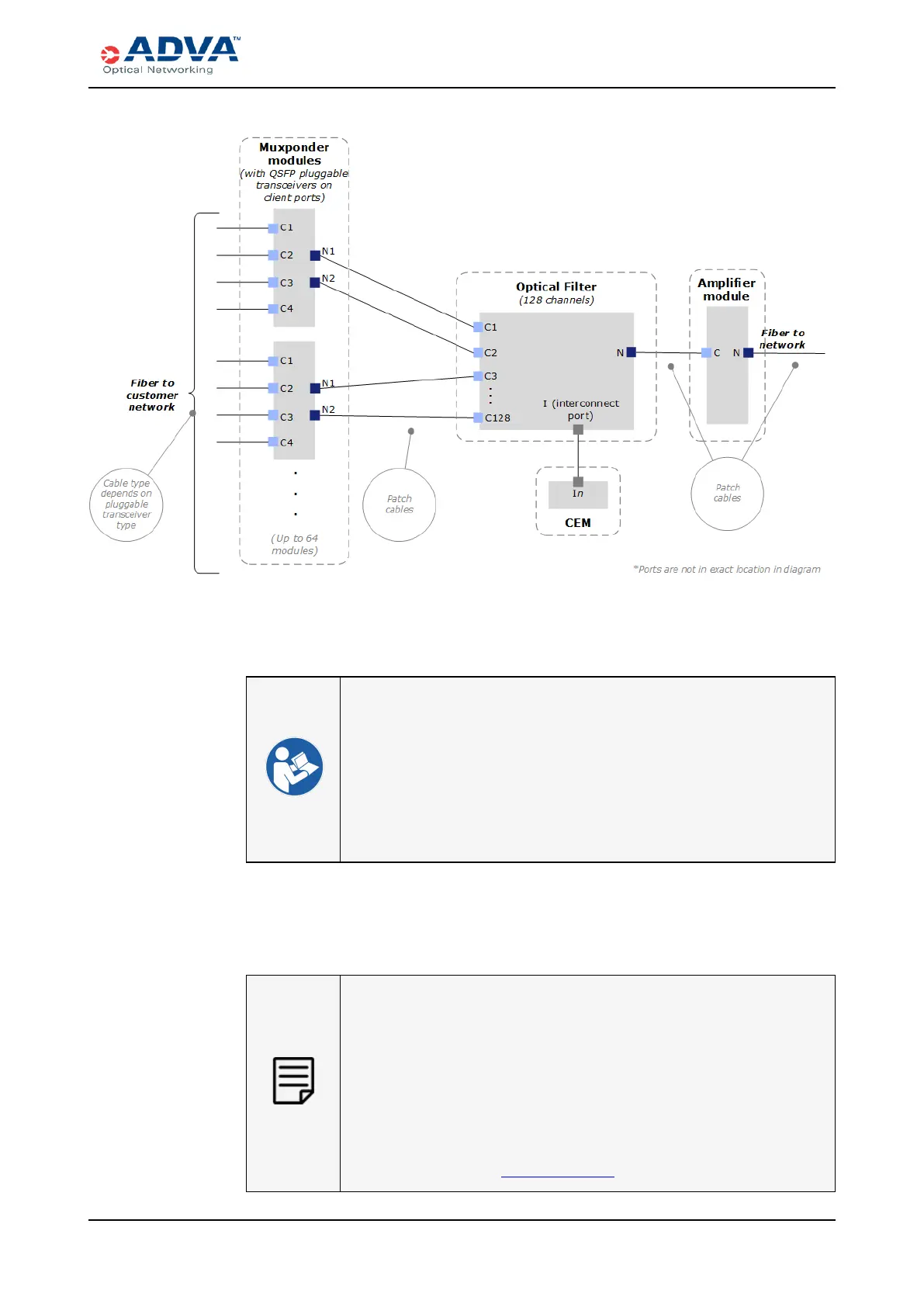
Figure 72: Cabling Diagram with 128Optical Filter Channels
7. Route cables through the appropriate fiber management guides and into the
appropriate fiber management tray (FMT/1HU) for your shelf.
l Cable Management Best Practices
l Routing Optical Cables Through the FMT/1HU
l Electrostatic Discharge Damage Prevention and Warning
l Cables
l Inspecting and Cleaning Fiber-optic Connectors and Receptacles
l Laser and LED Safety Guidelines and Warnings
l FSP 3000 C Troubleshooting Guide
Routing Optical Cables Through the FMT/1HU
If you are using breakout cables, the breakout point must be outside the
shelf(such as in the FMT/1HU).
This procedure assumes that:
l The traffic modules and pluggable transceivers have been installed
correctly;
l The FMT/1HU has been installed; and
l You have reviewed Laser and LED Safety Guidelines and Warnings,
as well as all of the safety guidelines.
FSP3000 C Hardware Guide - R1.1 - Issue:A (12/09/2016) 247



 To Next Page