1‑10
Chapter 1 Troubleshooting
Version 1 2006.11.21
2.2 Menus to be configured at installation
When you forgot the Admin password, you can initialize the password by powering
on the printer while pressing the Menu key. Since the initialization also resets all
other settings, remember to write down the settings before performing this
procedure.
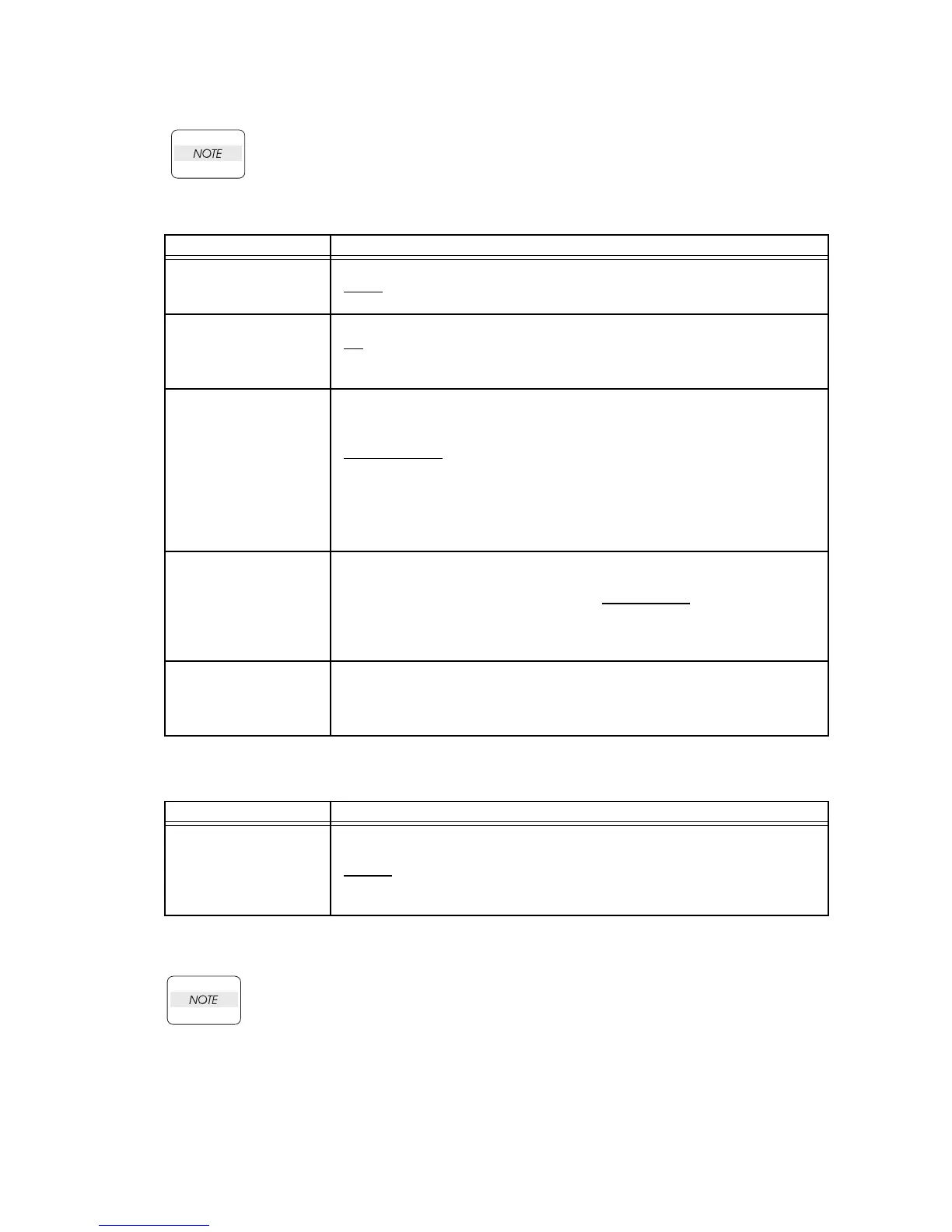
Required Setting Items
Environment-specific setting
The settings described above are the minimum required settings for connecting a fax machine to the
telephone line. Refer to the User's Guide for further settings.
Using [Speed Dial] under [Phone Book] may cause communication errors. Avoid
this option as much as possible.
When dialing with a prefix, a pause should be inserted between the prefix and the
phone number.
Printer Menu Menu Content (Default item is underlined)
Line Type
Line type setting
* PSTN
: Public Switched Telephone Network
* PBX: Private Branch Exchange
Dialing Type
Dialing type setting
* PB
: Pushbutton (touch tone) dialing
* DP(10PPS): Pulse dialing at 10PPS
* DP(20PPS): Pulse dialing at 20PPS
Ans Select
Answering mode selection
* TEL Mode: You must receive a fax manually
* FAX Mode: The multifunction printer receives a fax automatically
* TEL/FAX Mode
: The multifunction printer automatically switches between
an external telephone and the fax reception mode.
* Ans/FAX Mode: The multifunction printer automatically switches between
an external answering machine and the fax reception mode.
* DRPD Mode: Available when DRPD service is provided with your tele-
phone line.
Country
Selection of the country where the multifunction printer is used. (Selectable
from 29 countries including the United States)
Canada, Colombia, Mexico, Puerto Rico, United States
, Algeria, Austria,
Belgium, Denmark, France, Germany, Ireland, Italy, Liechtenstein, Luxem-
bourg, Netherlands EU, Norway, South Africa, Spain, Sweden, Switzerland,
United Kingdom, Egypt, Jordan, Russia, Saudi Arabia, Tunisia, Turkey, UAE
G3ID
Contains your telephone number, which is printed at the top of each page
sent from your multifunction printer. This feature is available when you set
Send Header to on, and must be set to on when you set DM Prevention to
on.
Printer Menu Menu Content (Default item is underlined)
DRPD Pattern
DRPD settings for fax detection to be configured when the Ans Select menu
is set to DRPD (Distinctive Ring Pattern Detection).
* Disable: Disable DRPD
* Pattern 1 to 5: Register one of the DRPD patterns provided by your tele-
phone company.















 To Next Page