3 - 211
Chapter 3 Removal and Replacement Procedures (RRPs)
Version 2 2007.03.20
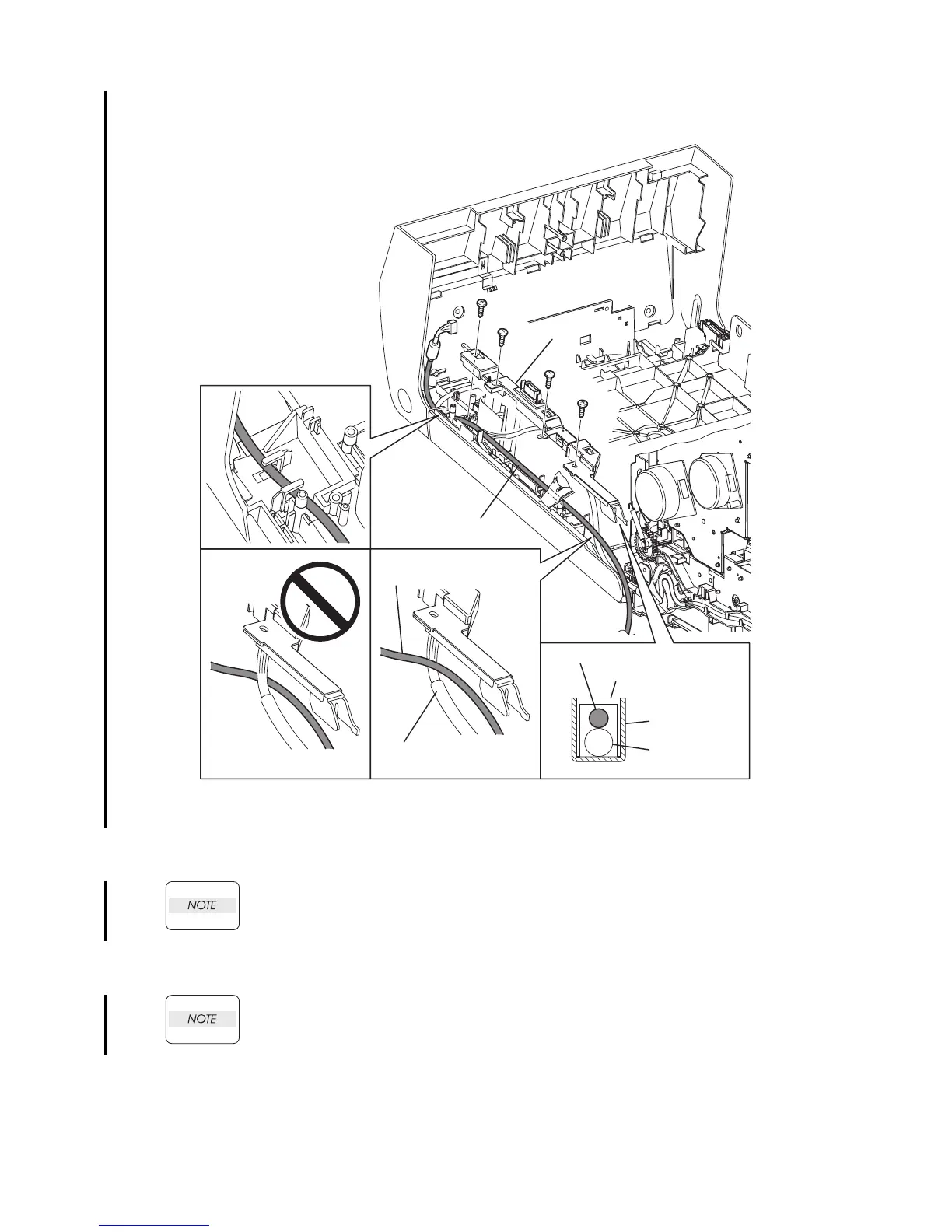
Replacement 66 OPERATOR PANEL (PL13.2.97)
1) Route the HARNESS ASSY A-OP-OPP through the notch on the lib of the FRONT COVER
and the hook.
When performing the step bellow, route the HARNESS ASSY A-OP-OPP so that it
crosses the HARNESS ASSY FRONT COVER.
2) Replace the COVER HARNESS by mating the hole of the COVER HARNESS with the boss on
the FRONT COVER.
When performing the step below, check that the HARNESS ASSY A-OP-OPP is routed
over.
3) Secure the COVER HARNESS to the FRONT COVER using the four screws (silver, tap,
8mm).
Continues to the next page.
Gnb03212KB
3)
3)
3)
2)
1)
3)
HARNESS ASSY A-OP-OPP
NOTE
HARNESS ASSY
FRONT COVER
HARNESS ASSY A-OP-OPP
COVER HARNESS
BRACKET PIVOT
HARNESS ASSY
FRONT COVER















 To Next Page