3 - 174
Chapter 3 Removal and Replacement Procedures (RRPs)
Version 1 2006.11.28
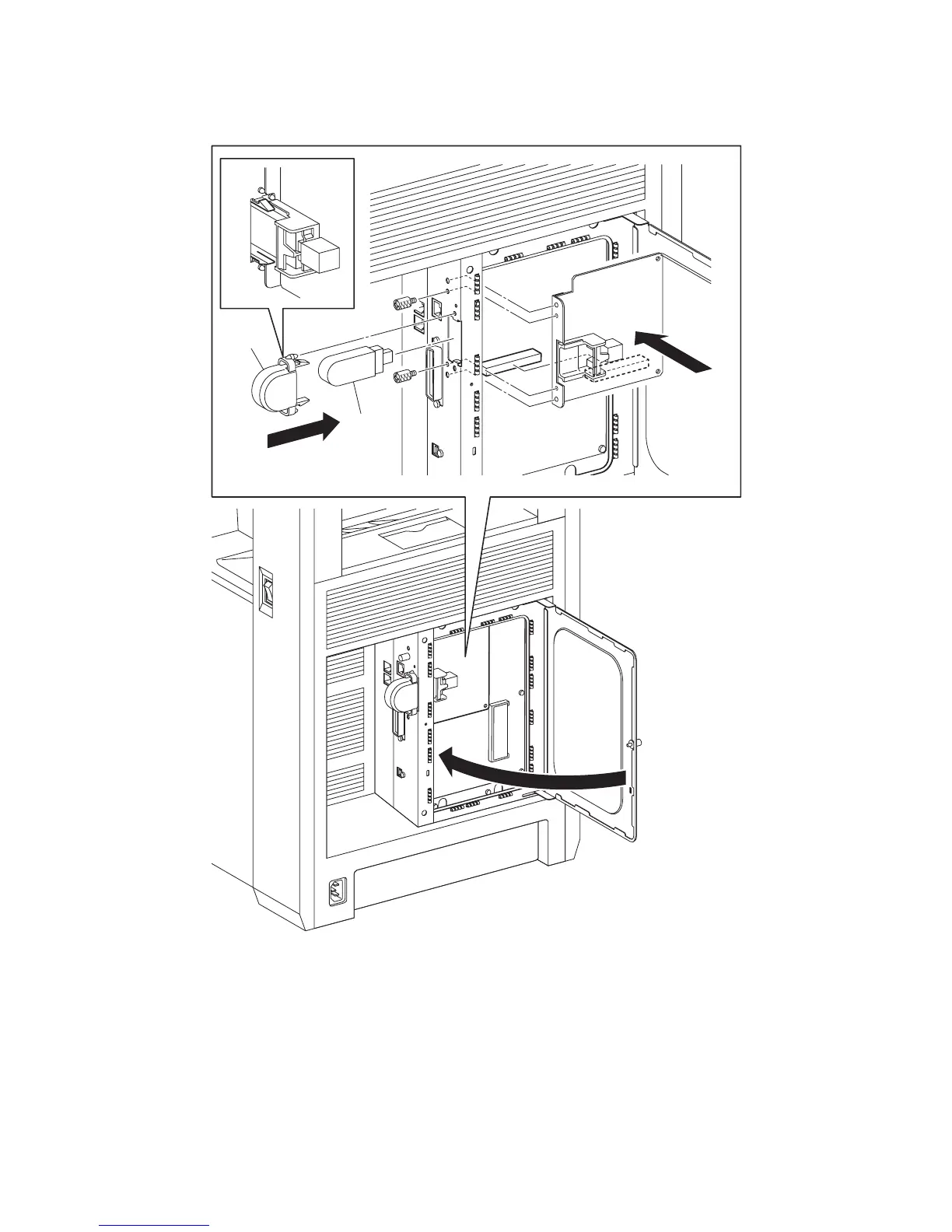
Replacement 46 MULTI PROTOCOL CARD (PL13.4.23)
1) Mate the two bosses on the MULTI PROTOCOL CARD with the holes on the printer, and then
replace the MULTI PROTOCOL CARD to the ELECTRONIC SUB-SYSTEM CONTROL
BOARD.
2) Secure the MULTI PROTOCOL CARD to the printer using the two SCREW KNURLINGs
(PL13.4.12).
3) Replace the WIRELESS PRINTER ADAPTER to the MULTI PROTOCOL CARD.
4) Replace the COVER USB to the printer and secure with the hook.
5) Close the PLATE WINDOW ESS and secure the SCREW KNURLING.
Gnb03129KA
4)
3)
2)
1)
2)
5)















 To Next Page