3 - 217
Chapter 3 Removal and Replacement Procedures (RRPs)
Version 2 2007.03.20
Replacement 67 FRONT COVER (PL13.2.98)
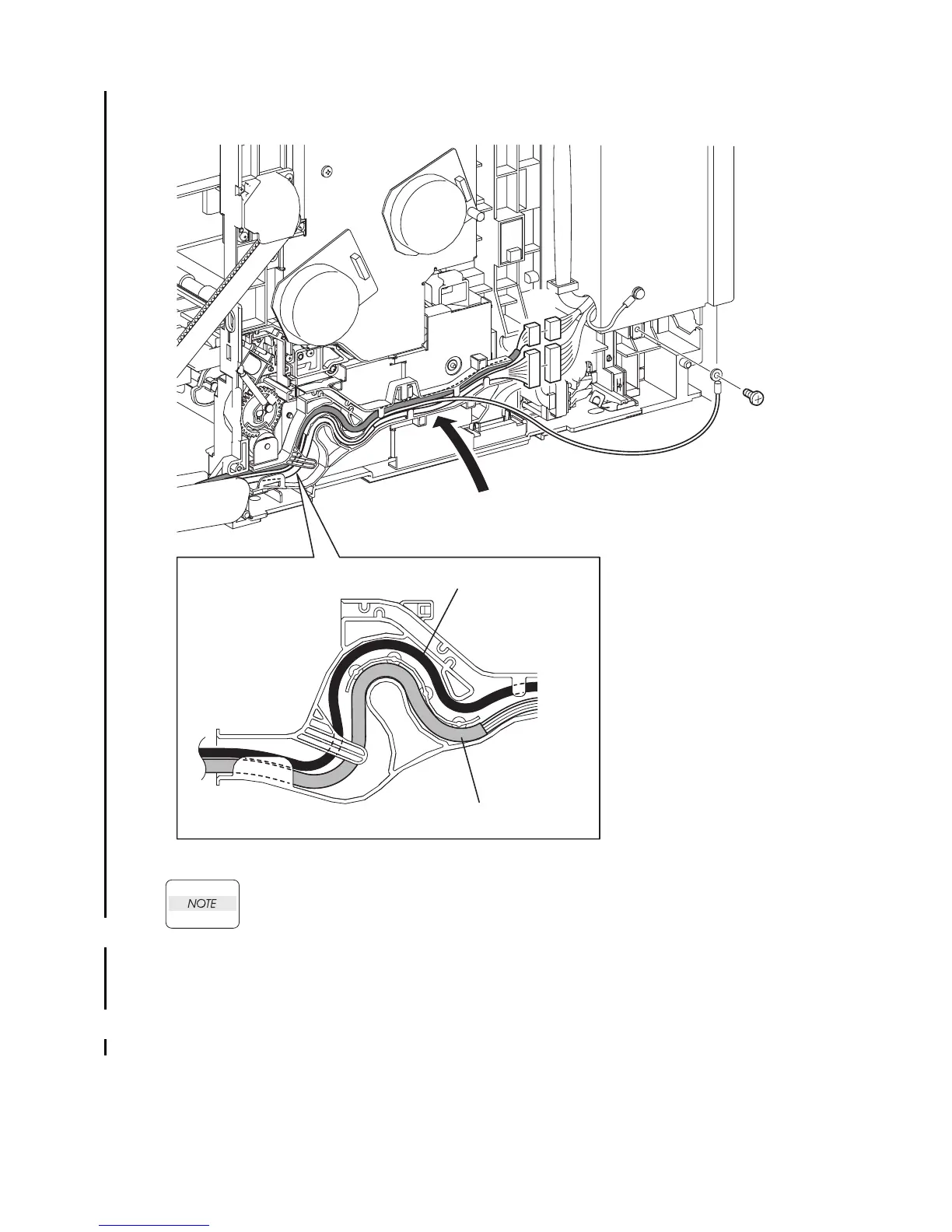
When performing the step below, route the HARNESS ASSY A-OP-OPP over the HAR-
NESS ASSY FRONT COVER.
5) Route the HARNESS ASSY A-OP-OPP and the HARNESS ASSY FRONT COVER along the
DUCT DRV PH.
6) Engage the connector (P/J272) of the HARNESS ASSY FRONT COVER and the connector (P/
J5301) of the HARNESS ASSY A-OP-OPP.
7) Secure the grounding wire of the HARNESS ASSY FRONT COVER to the printer using the
one screw (silver, 6mm).
Go to the next replacement step:
Replacement 68 RIGHT COVER (PL13.1.9)
5)
Gnb03086KB
7)
6)
HARNESS ASSY A-OP-OPP
NOTE
HARNESS ASSY FRONT COVER















 To Next Page