3 - 190
Chapter 3 Removal and Replacement Procedures (RRPs)
Version 1 2006.11.28
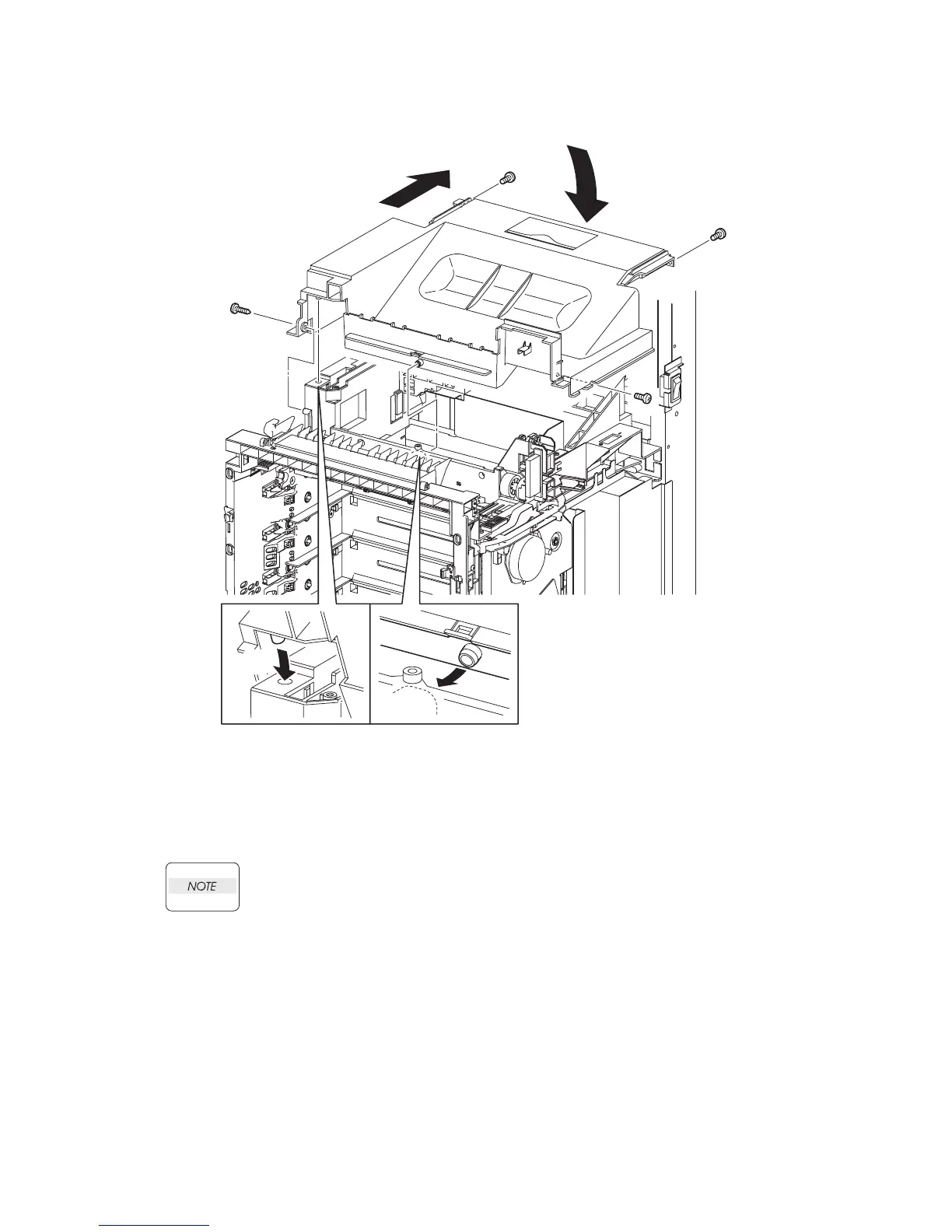
Replacement 54 TOP COVER (PL13.1.1)
1) Set the rear part of the TOP COVER to the printer by inserting it between the left side of the
POLE and right side of the POLE.
2) Mate the two bosses on the center front and the left front on the TOP COVER with the hook
and hole on the printer by tilting the TOP COVER forward.
3) Replace the TOP COVER to the printer by swinging the rear end of the TOP COVER down.
When performing the step described below, take care to check the screw type. The one
screw (silver, tap, 8mm) is used to secure the left side of the TOP COVER.
4) Secure the TOP COVER to the printer using the three screws (silver, 6mm) and the one screw
(silver, tap, 8mm).
Go to the next replacement step:
Replacement 63 LEFT COVER (PL13.1.10)
Gnb03198KA
4)
4)
3)
2)
2)
4)
1)
4)















 To Next Page