3 - 9
Chapter 3 Removal and Replacement Procedures (RRPs)
Version 2 2007.03.20
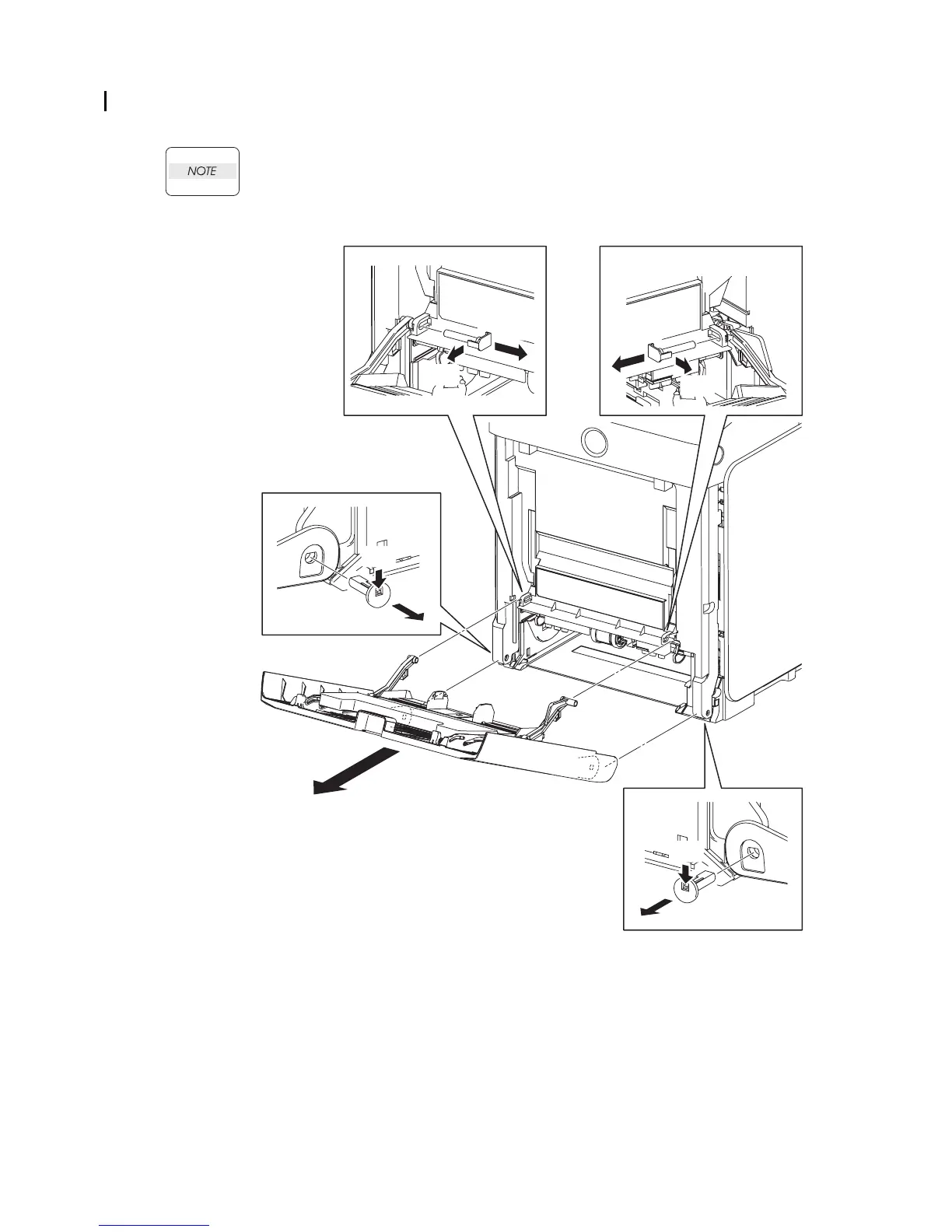
Removal 2 MPF COVER (PL13.2.99)
1) Open the MPF COVER (PL13.2.26).
When performing the step described below, take care not to drop or damage the MPF
COVER.
2) Release the hooks on the PIN PIVOT MSIs (PL13.2.17) that pivot the LINK ASSY MSIs (piv-
oted to the TRAY ASSI MSI BASE at the other end) to the FRONT COVER (PL.1.2.1) at the
two locations on the left and right, and then pull out the PIN PIVOT MSIs to the inside.
3) Release the hooks on the SHAFT PIVOT MSIs (PL13.2.33) that pivot the MPF COVER to the
printer at the two locations on the left and right, and then pull out the SHAFT PIVOT MSIs to
the inside.
4) Remove the MPF COVER from the printer.
Kmy03004KA
2)-1
3)-1
3)-1
3)-2
3)-2
4)
2)-1
2)-2
2)-2















 To Next Page