3 - 207
Chapter 3 Removal and Replacement Procedures (RRPs)
Version 2 2007.03.20
Replacement 62 BOX ASSY PRT AIO (PL13.4.13)
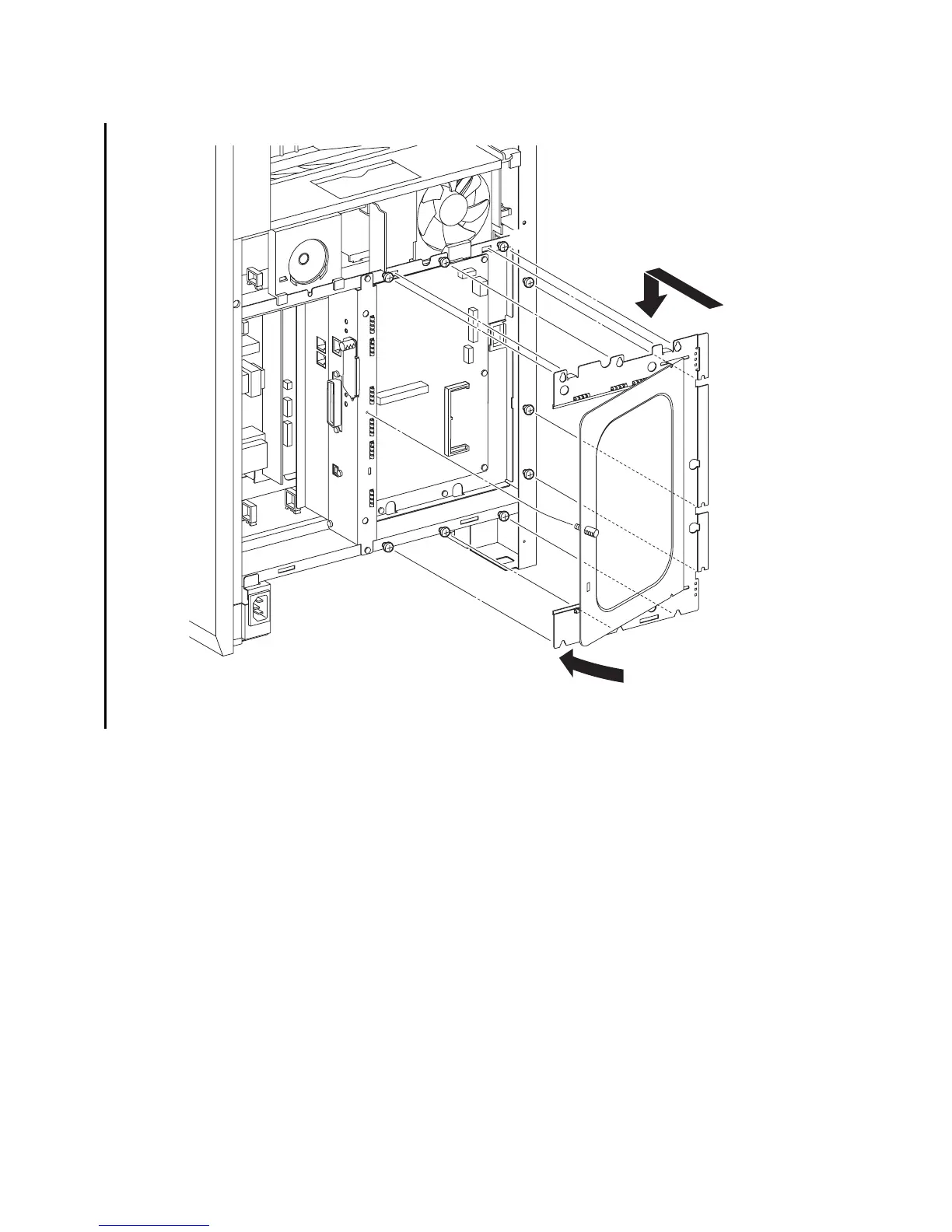
6) Replace the SHIELD ASSY ESS WINDOW to the printer by mating the two hooks of the
SHIELD ASSY ESS WINDOW to the holes of the printer. Mate the six U-shaped notches of
the SHIELD ASSY ESS WINDOW with the six screws on the printer.
7) Secure the SHIELD ASSY ESS WINDOW to the printer using the nine screws (silver, 6mm).
8) Close the SHIELD WINDOW and secure the SCREW KNURLING.
Go to the next replacement step:
Replacement 64 COVER POLE L (PL13.1.11)
Gnb03208KB
8)-1
8)-2
7)
7)
7)
7)
6)
7)
7)
7)
7)
7)















 To Next Page