3 - 54
Chapter 3 Removal and Replacement Procedures (RRPs)
Version 2 2007.03.20
Removal 34 PRINT HEAD (PL13.3.99)
Steps 1 through 13 are for reference. Before removing this component, check that Steps 1 through 13
have been performed.
1) Open FRONT COVER (PL13.2.1).
2) Remove the FUSER.(Removal 8)
3) Remove the REAR COVER. (Removal 49)
4) Remove the COVER BOTTOM. (Removal 50)
5) Remove the COVER POLE IN R.(Removal 51)
6) Remove the COVER POLE R.(Removal 52)
7) Remove the RIGHT COVER. (Removal 54)
8) Remove the COVER POLE IN L. (Removal 57)
9) Remove the COVER POLE L. (Removal 58)
10) Remove the LEFT COVER. (Removal 59)
11) Remove the TOP COVER. (Removal 68)
12) Remove the BOX ASSY PRT AIO. (Removal 60)
13) Remove the BOX ASSY FAX AIO. (Removal 62)
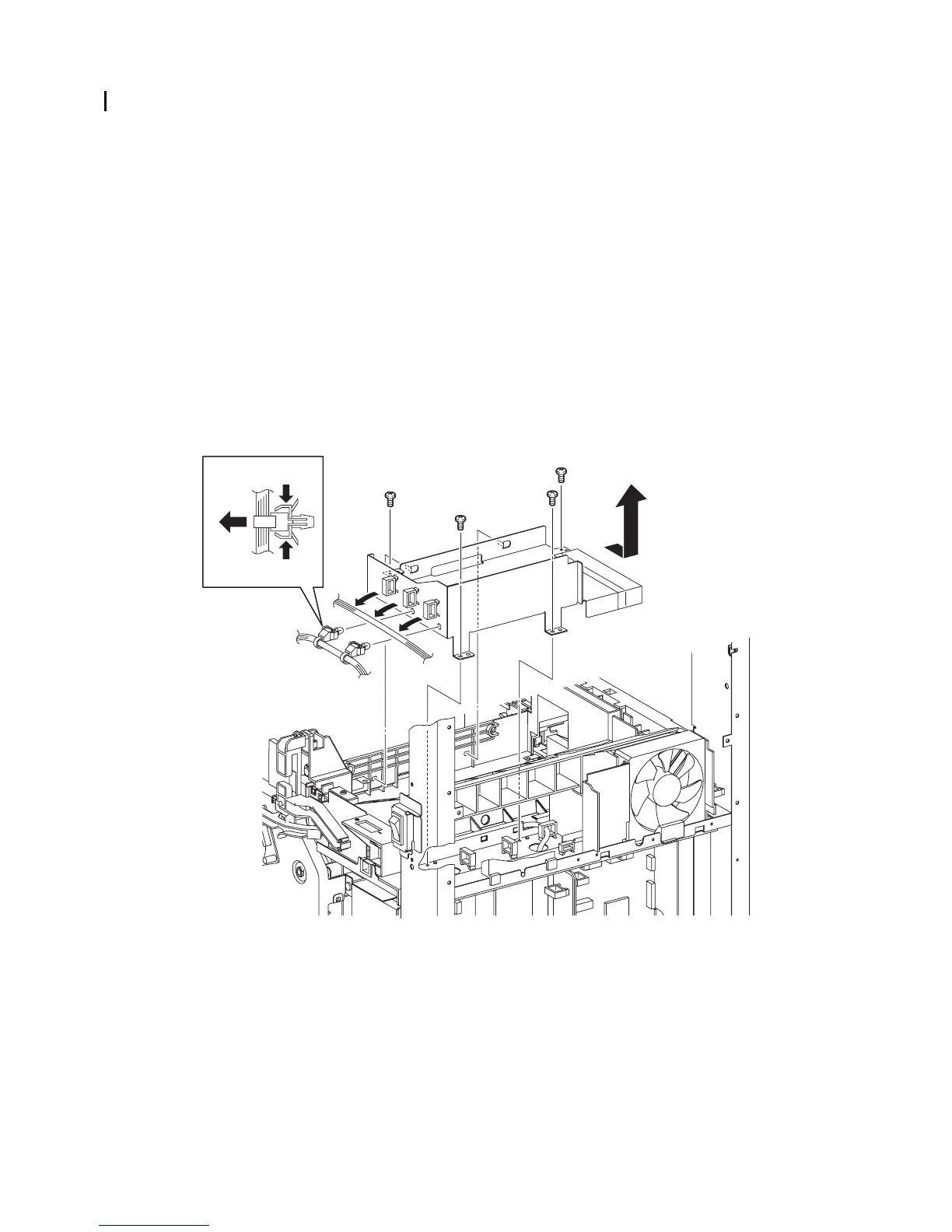
14) Release the harness of the HARN ASSY FUSER AIO (PL13.6.5) from the three clamps on the
FRAME ASSY EARTH (PL13.3.2).
15) Remove the four screws (silver, 6mm) that fix the FRAME ASSY EARTH to the printer.
16) Pull up the two hooks on the front side of the FRAME ASSY EARTH from the holes of the
printer by sliding the FRAME ASSY EARTH backward, and then remove the FRAME ASSY
EARTH.
17) Remove the two clamps on the harness of the HARN ASSY FUSER AIO from the FRAME
ASSY EARTH.
Continues to the next page.
Gnb03151KA
17)-1
14)
15)
15)
15)
16)
15)
17)-1
17)-2















 To Next Page