3 - 129
Chapter 3 Removal and Replacement Procedures (RRPs)
Version 1 2006.11.28
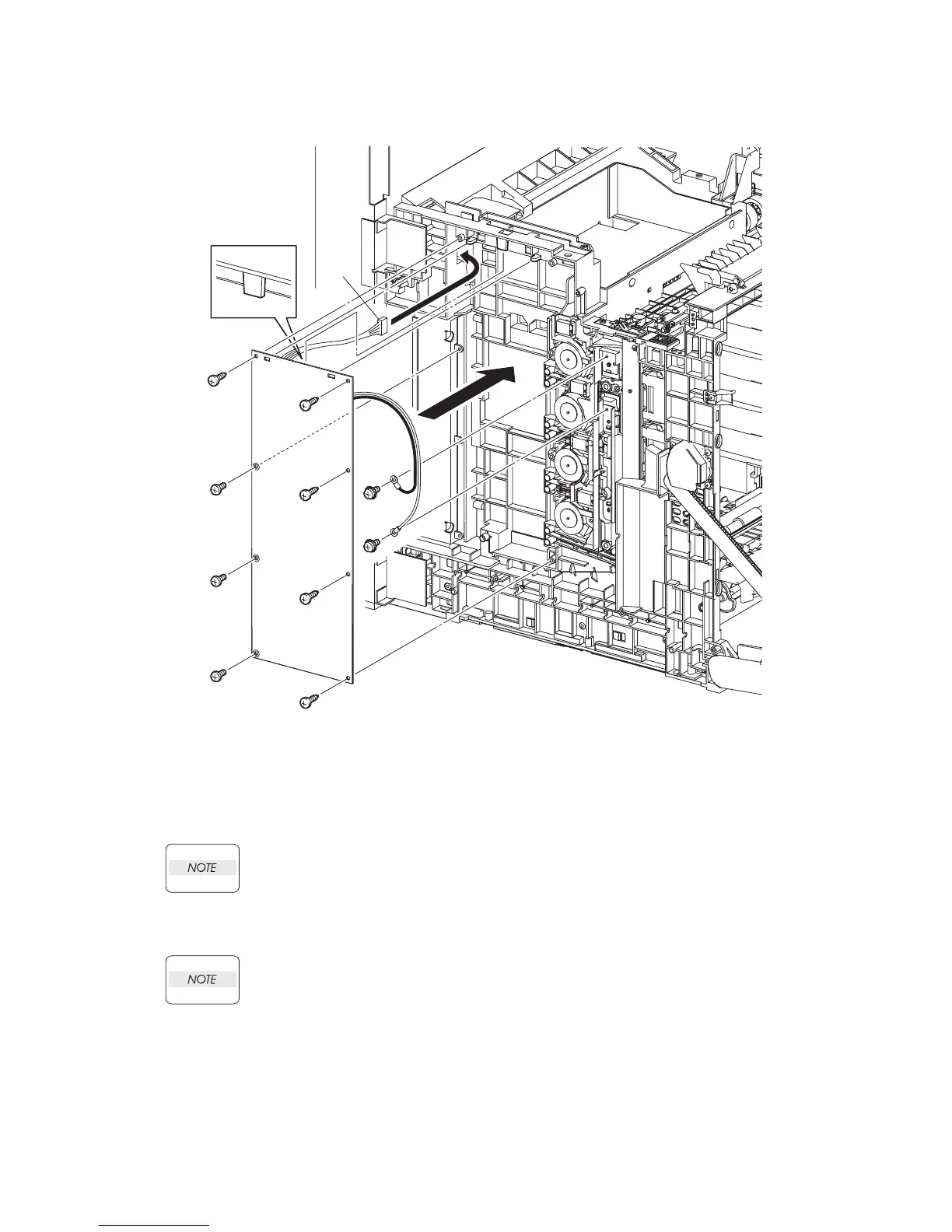
Replacement 14 HIGH VOLTAGE POWER SUPPLY (PL5.1.17)
1) Pass the connector of the HIGH VOLTAGE POWER SUPPLY through the hole on the printer.
2) Replace the HIGH VOLTAGE POWER SUPPLY by mating the two holes on the upper part of
the HIGH VOLTAGE POWER SUPPLY with the bosses on the printer and inserting the
upper part of the HIGH VOLTAGE POWER SUPPLY into the backside tab on the printer.
In the step described below, out of the screw fixing positions of the HIGH VOLTAGE
POWER SUPPLY, the three screw fixing positions with white bearing surfaces must be
fixed with the 6mm silver screws.
3) Secure the HIGH VOLTAGE POWER SUPPLY with the five screws (silver, tap, 10mm) and
the three screws (silver, 6mm).
When performing the step described below, secure the red harness on the upper side and
secure the white harness on the lower side.
4) Secure the two harnesses of the HIGH VOLTAGE POWER SUPPLY using the two screws (sil-
ver, with washer, 6mm).
Continues to the next page.
Gnb03105KA
4)
4)
3)
3)
3)
3)
3)
3)
3)
3)
1)
2)















 To Next Page