3 - 118
Chapter 3 Removal and Replacement Procedures (RRPs)
Version 1 2006.11.28
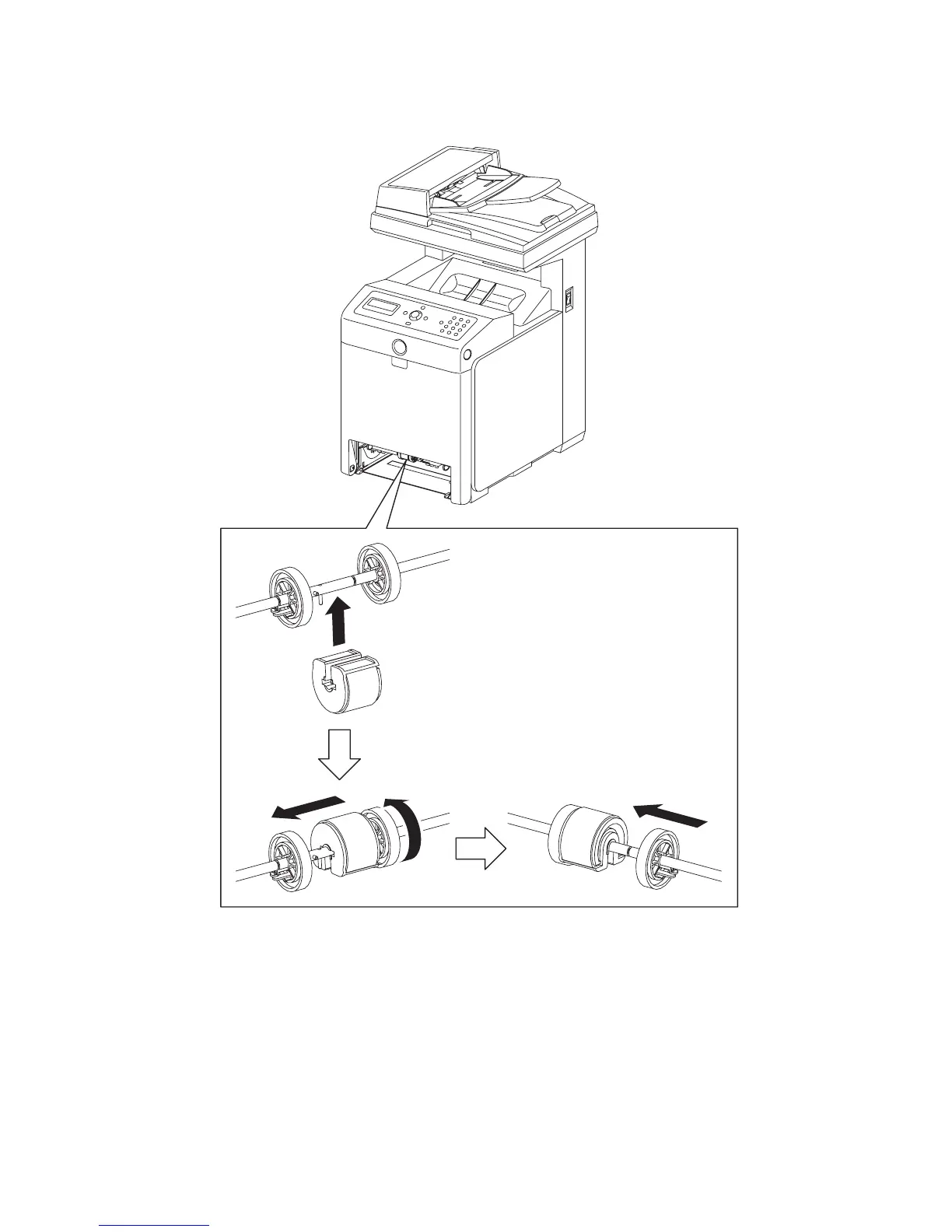
Replacement 6 MPF ROLLER (PL3.1.10)
1) Fit the MPF ROLLER to the SHAFT MSI with the groove of the MPF ROLLER facing
upward.
2) Rotate the MPF ROLLER 180 degrees so that the pin on the SHAFT MSI is aligned with the
groove on the MPF ROLLER.
3) Slide the MPF ROLLER to the right so that the MPF ROLLER covers the pin on the SHAFT
MSI.
4) Slide the right ROLL CORE MSI to the left. Secure the hook on the ROLL CORE MSI into the
groove on the SHAFT MSI.
5) Replace the 250 SHEET PAPER TRAY to the printer.
Gnb03116KA
1)
2)
3)
4)















 To Next Page