3 - 191
Chapter 3 Removal and Replacement Procedures (RRPs)
Version 1 2006.11.28
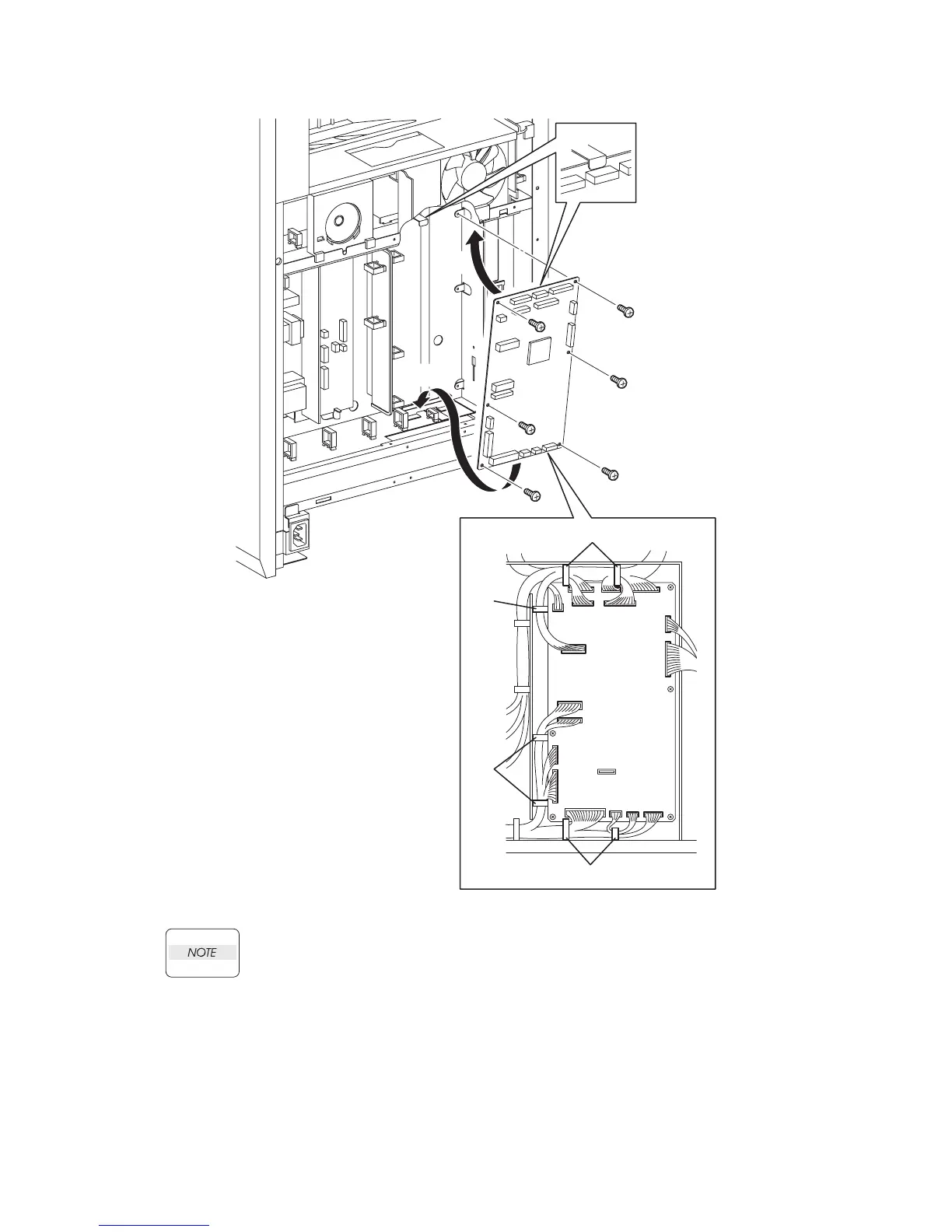
Replacement 55 MACHINE CONTROL UNIT (PL13.5.13)
When performing the step described below, insert the upper part of the MACHINE
CONTROL UNIT into the backside tab on the printer.
1) Replace the MACHINE CONTROL UNIT to the printer by shifting it upward after attaching
the under part of the MACHINE CONTROL UNIT to the printer.
2) Secure the MACHINE CONTROL UNIT using the six screws (silver, 6mm).
3) Engage all the connectors of the MACHINE CONTROL UNIT.
4) Secure all the harness with the clamps.
Continues to the next page.
Gnb03199KA
NOTE
2)
2)
2)
1)-1
1)-2
2)
2)
2)
3)
4)
4)
4)
4)















 To Next Page