3 - 194
Chapter 3 Removal and Replacement Procedures (RRPs)
Version 1 2006.11.28
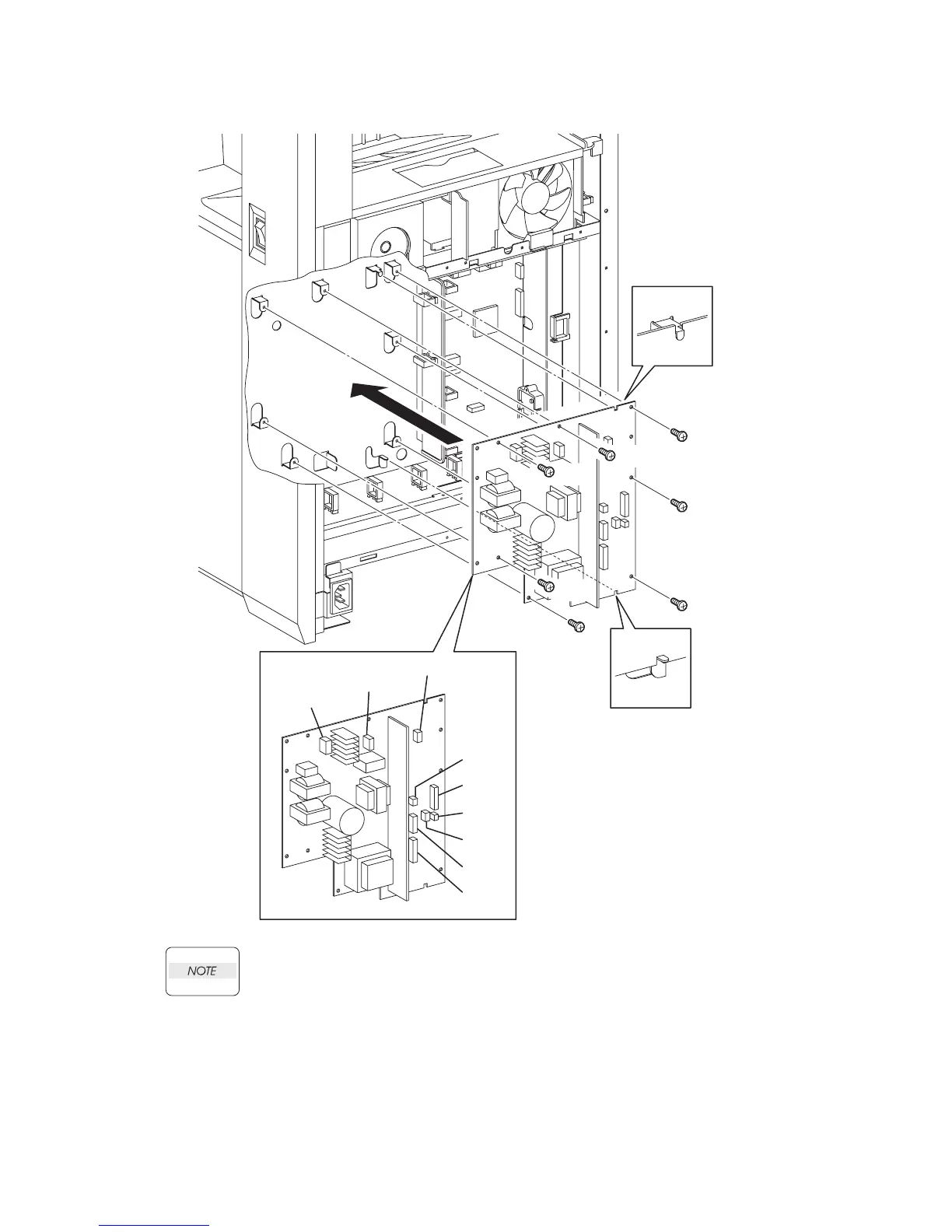
Replacement 57 LOW VOLTAGE POWER SUPPLY (PL13.5.14)
When performing the step described below, mate the two notches of the LOW VOLTAGE
POWER SUPPLY with the hooks of the printer.
1) Replace the LOW VOLTAGE POWER SUPPLY to the printer.
2) Secure the LOW VOLTAGE POWER SUPPLY to the printer using the seven screws (silver,
6mm).
3) Engage all the connectors of the LOW VOLTAGE POWER SUPPLY.
Go to the next replacement step:
Replacement 60 BOX ASSY FAX AIO (PL13.4.4)
Gnb03201KA
NOTE
NOTE
2)
2)
2)
1)
2)
3)
2)
2)
2)
(P44)
(P502)
(P501)
(P504)
(P503)
(P40a)
(P40b)
(P47)
(P48)















 To Next Page