3 - 71
Chapter 3 Removal and Replacement Procedures (RRPs)
Version 1 2006.11.28
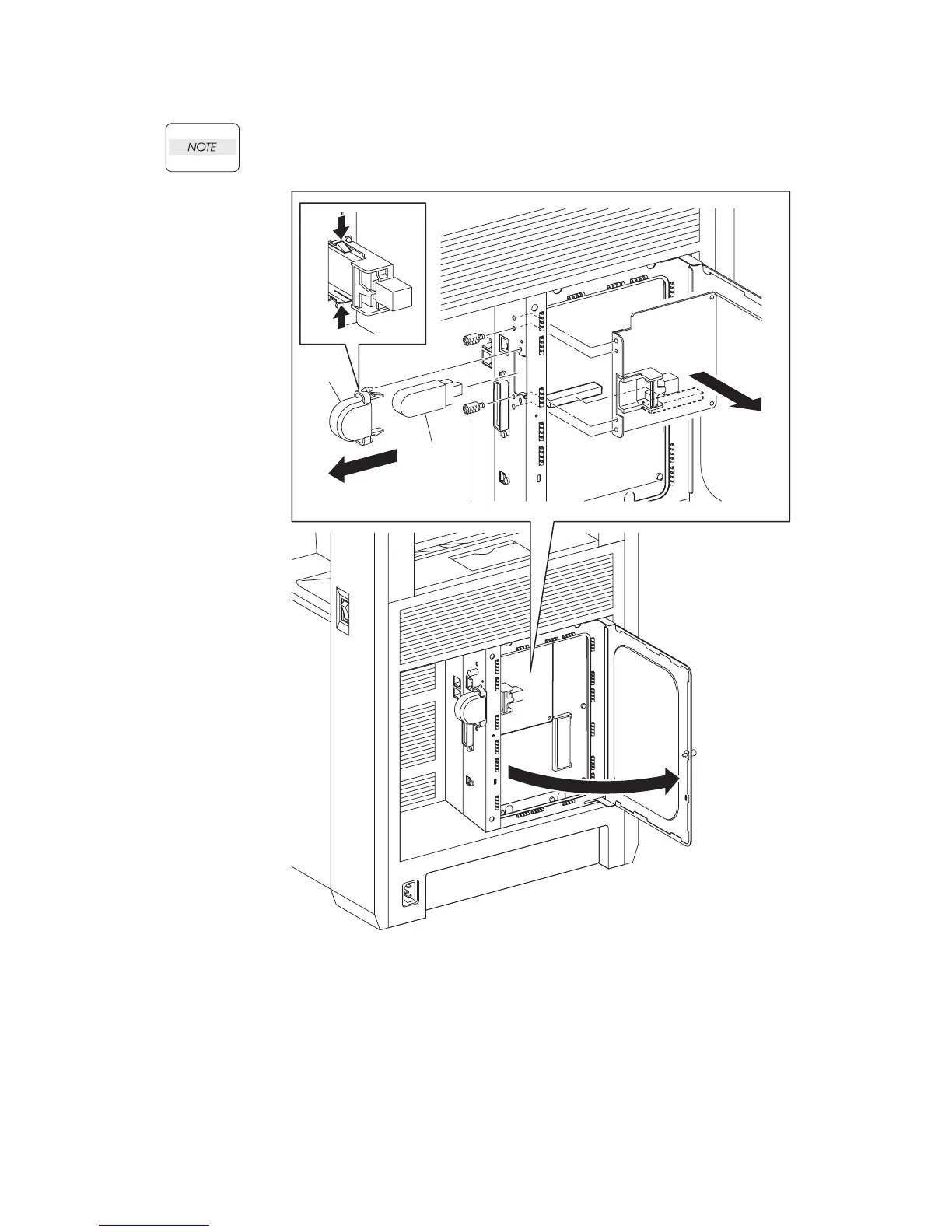
Removal 47 MULTI PROTOCOL CARD (PL13.4.23)
Use a wristband to protect the MPC from electrostatic damage.
1) Loosen the SCREW KNURLING (PL13.4.12), and then open the PLATE WINDOW ess
(PL13.4.10).
2) Remove the COVER USB (PL13.4.25) from the printer by releasing its two hooks.
3) Remove the WIRELESS PRINTER ADAPTER (PL9.1.32) from the MULTI PROTOCOL
CARD (PL13.4.23).
4) Remove the two SCREW KNURLINGs (PL13.4.12) that fix the MULTI PROTOCOL CARD to
the printer.
5) Remove the MULTI PROTOCOL CARD from the ELECTRONIC SUB-SYSTEM CONTROL
BOARD (PL13.4.20).
Gnb03128KA
2)-1
2)-1
2)-2
3)
4)
5)
4)
1)















 To Next Page