1‑172
Chapter 1 Troubleshooting
Version 2 2007.05.22
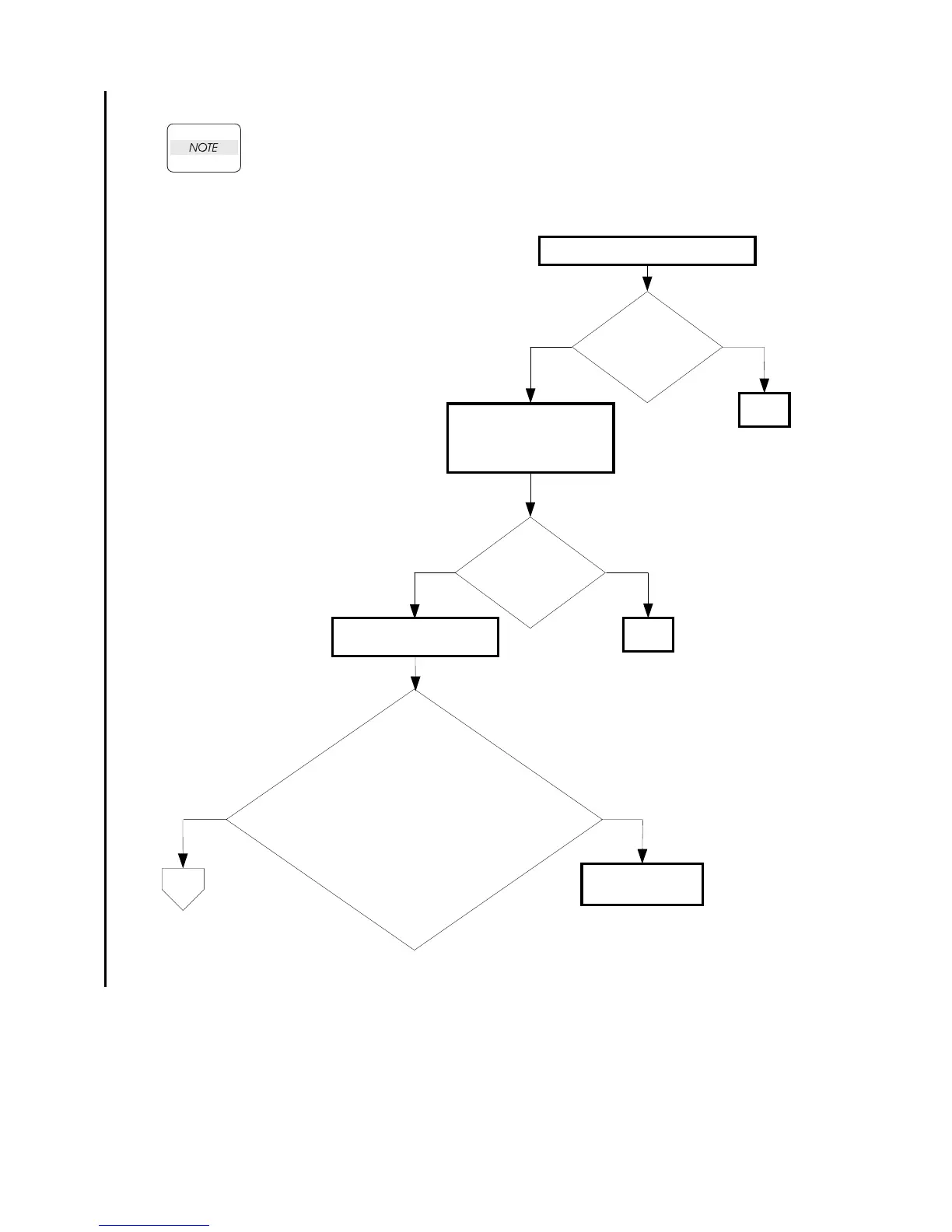
FIP-1. 68 PCScan Time Out 017-988
The 017-988 error occurs by the following causes.
-No destination folder exists in the PC.
-Black and white scanning was performed with JPEG specified as the image format.
-There was no request from the PC within 30 seconds after [Scan to Application]
was set via the printer menu.
Checking the customer operation
Is the customer
operating the printer
correctly?
NoYes
Checking the USB
connection
Reconnect the PC and the
printer.
Does the error still
occur when
scanning?
NoYes
END
Checking the driver
software
END
Is the scanner driver installed?
Check the [Dell MFP Laser 3115cn scanner]
icon in the [Scanners and Cameras] of the [Printers
and Other Hardware] of the [Control Panel].
Check the following items, before checking the driver
software.
-Connects the PC and the printer with the USB cable.
-Enables the [Windows Image Acquisition (WIA)]
of the [Service] in the [Administrative Tool]
of the [Control Panel].
No
Yes
Install the driver
software.
A















 To Next Page