3 - 108
Chapter 3 Removal and Replacement Procedures (RRPs)
Version 1 2006.11.28
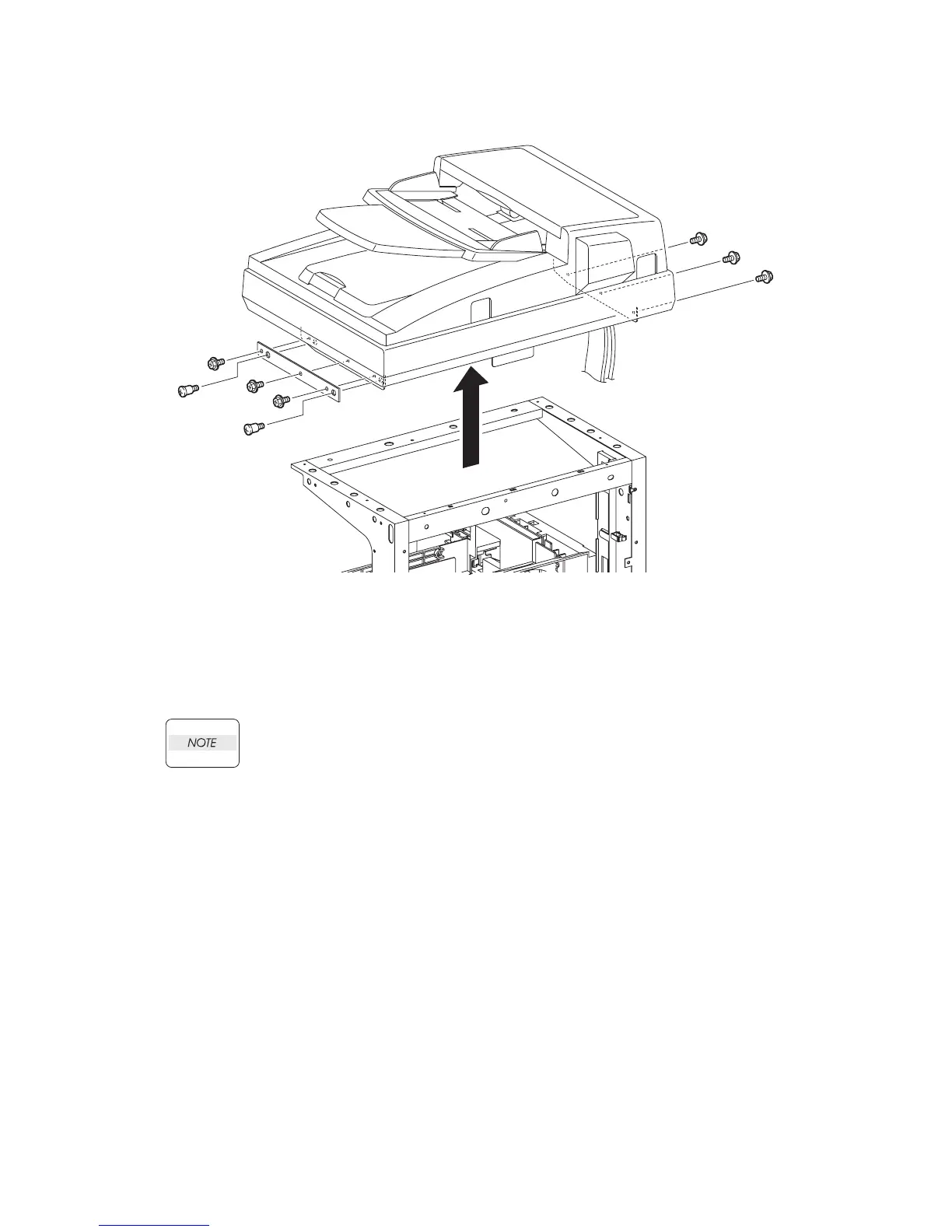
Removal 72 ADF SCANNER ASSY (PL13.8.1)
25) Remove the six screws (silver, with flange, 6mm) that fix the ADF SCANNER ASSY to the
printer.
26) Remove the PLATE SUB (PL13.8.8) from the printer by removing the two SCREWs
(PL13.8.9).
When performing the step described below, ensure that the harness of the ADF
SCANNER ASSY will not be caught inside the printer.
27) Remove the ADF SCANNER ASSY from the printer by lifting it slowly upward.
Go to the next removal step:
Removal 73 ADF ASSY (PL13.8.2), SCANNER ASSY (PL13.8.7)
Gnb03184KB
25)
25)
25)
26)-1
26)-2
27)
26)-1
25)
25)
25)















 To Next Page