3 - 193
Chapter 3 Removal and Replacement Procedures (RRPs)
Version 1 2006.11.28
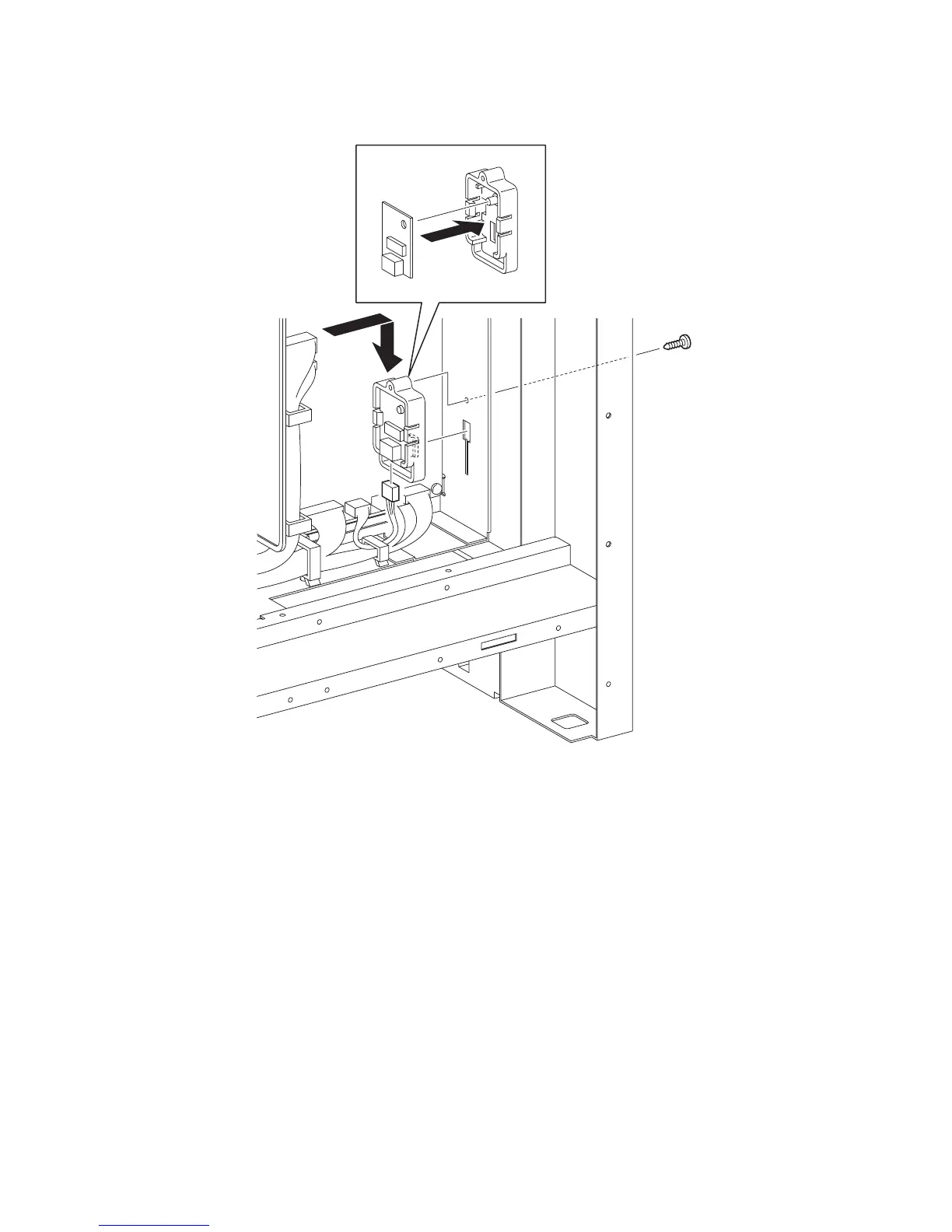
Replacement 56 HUMIDITY SENSOR (PL13.5.11)
1) Replace the HUMIDITY SENSOR by mating the hole on the HUMIDITY SENSOR with the
boss on the BRACKET SENSOR HUM.
2) Engage the connector (P/J261) of the HUMIDITY SENSOR.
3) Mate the hook of the BRACKET SENSOR HUM with the hole of the printer, and then slide
the BRACKET SENSOR HUM downward until stop it.
4) Secure the BRACKET SENSOR HUM using the one screw (silver, tap, 10mm).
Go to the next replacement step:
Replacement 60 BOX ASSY FAX AIO (PL13.4.4)
Gnb03200KA
4)
3)
2)
1)















 To Next Page