3 - 218
Chapter 3 Removal and Replacement Procedures (RRPs)
Version 1 2006.11.28
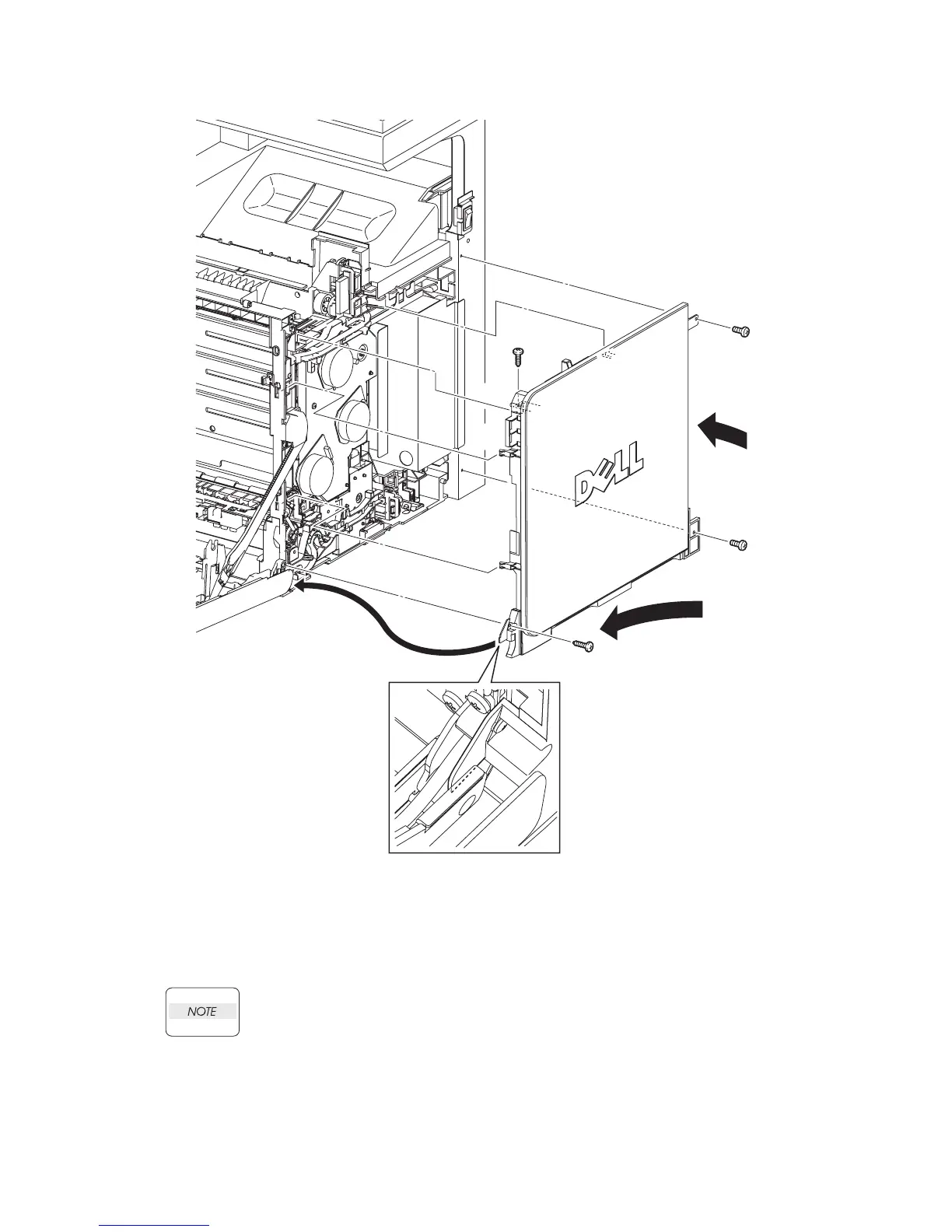
Replacement 68 RIGHT COVER (PL13.1.9)
1) Insert the front side of the RIGHT COVER between the FRONT COVER and the printer.
Mate the two front side hooks of the RIGHT COVER with the holes on the printer.
2) Mate the mounting hole on the front side of the RIGHT COVER with the boss of the printer,
and then insert the backside hook on the rear side of the RIGHT COVER into the hole of the
printer.
When performing the step described below, take care to check the screw type. The
screws (silver, tap, 6mm) are used to secure the rear side of the RIGHT COVER.
3) Secure the RIGHT COVER to the RIGHT COVER to the printer using the two screws (silver,
tap, 10mm) and the two screws (silver, 6mm).
Go to the next replacement step:
Replacement 70 COVER POLE R (PL13.1.8)
Gnb03216KA
3)
1)-1
1)-1
1)-2
1)-1
2)-2
2)-2
2)-1
3)
3)
3)















 To Next Page