3 - 13
Chapter 3 Removal and Replacement Procedures (RRPs)
Version 1 2006.11.28
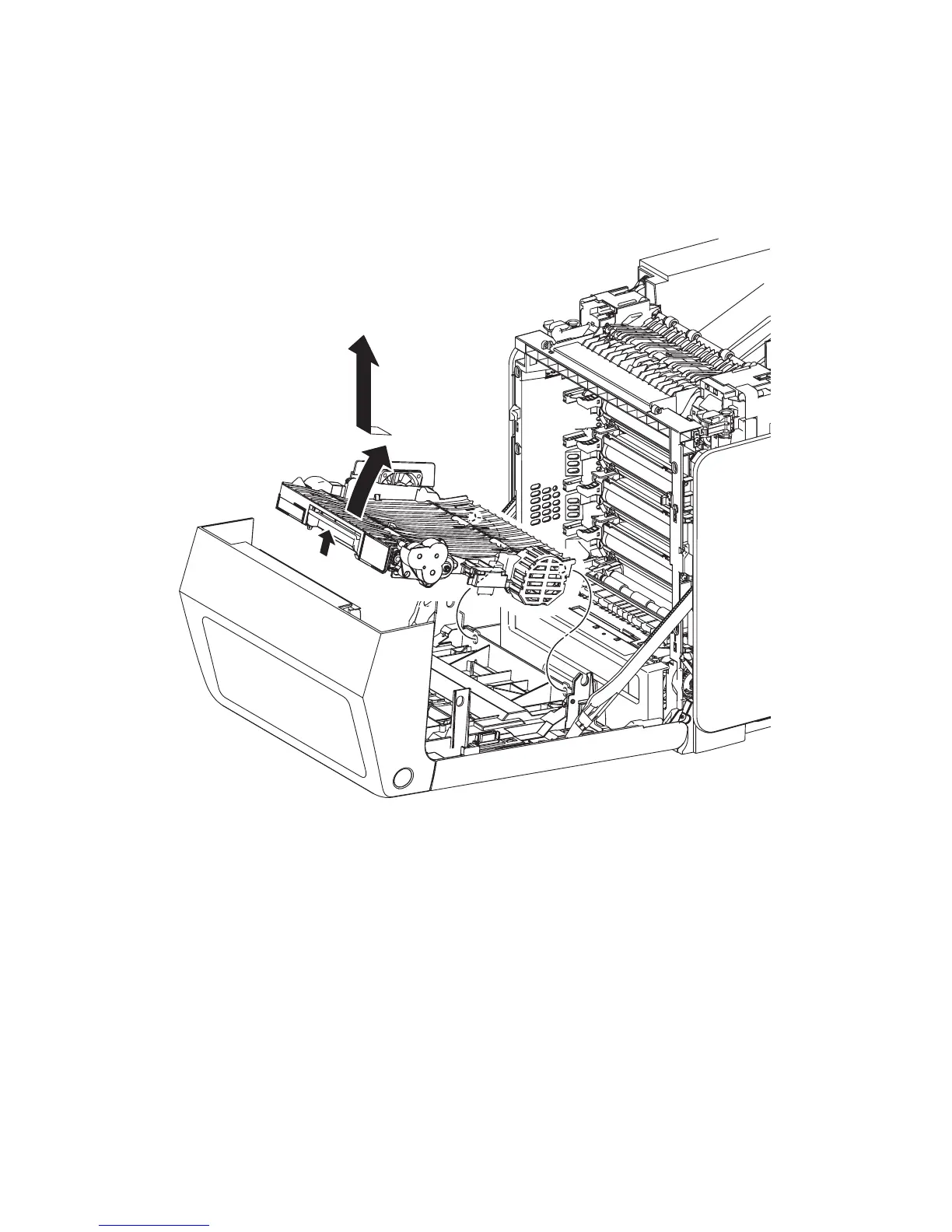
Removal 5 DUPLEX MODULE (PL11.1.1)
Steps 1 and 2 are for reference. Before removing this component, check that Steps 1 and 2 have been
performed.
1) Open the FRONT COVER (PL13.2.1).
2) Remove the TRANSFER BELT. (Removal 4)
3) Release the lock by pulling the lever of the DUPLEX MODULE (PL11.1.1), and then raise the
DUPLEX MODULE.
4) Release the two bosses on the backside of the DUPLEX MODULE from the holes on the
FRONT COVER, and then remove the DUPLEX MODULE.
Gnb03008KA
3)-1
3)-2
4)














 To Next Page