3 - 76
Chapter 3 Removal and Replacement Procedures (RRPs)
Version 1 2006.11.28
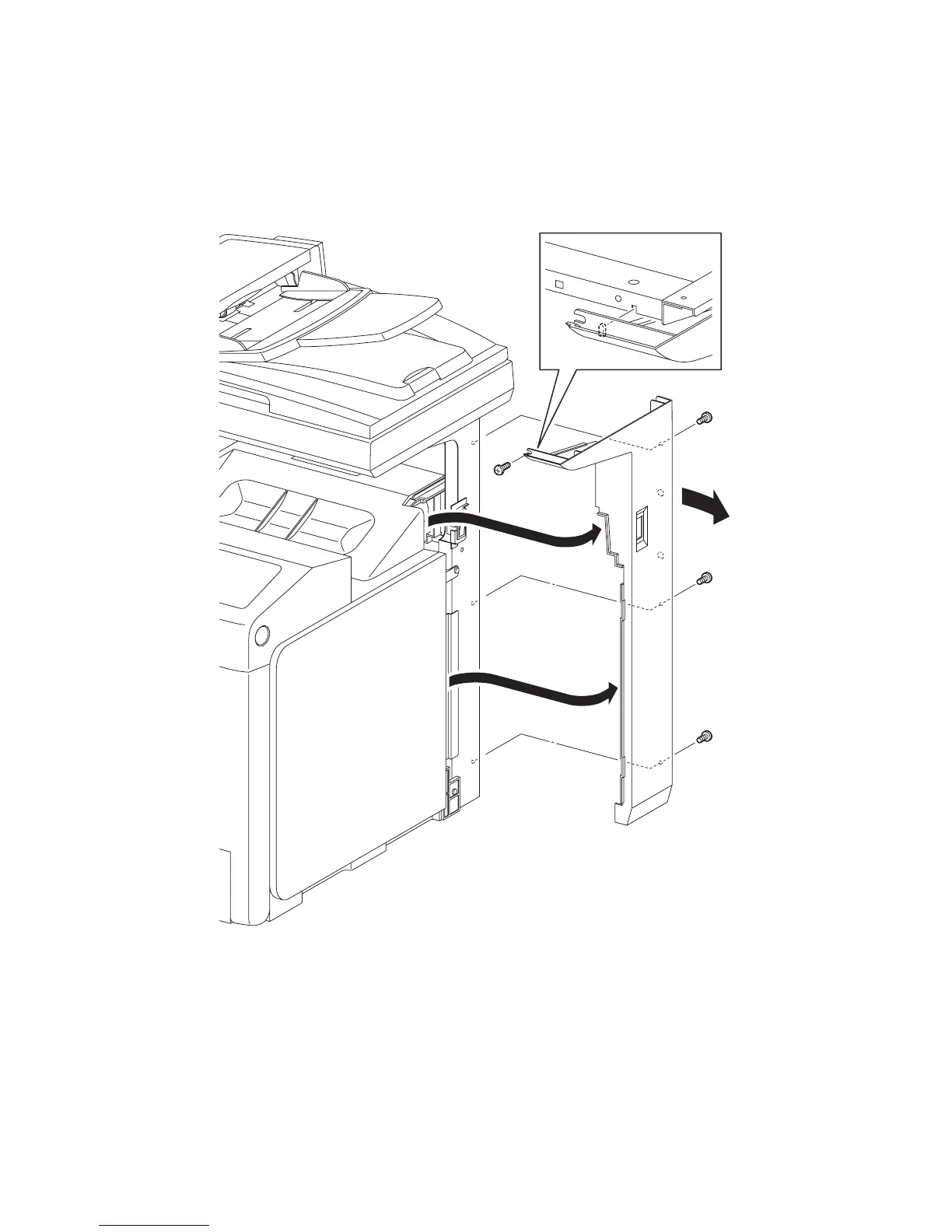
Removal 52 COVER POLE R (PL13.1.8)
Steps 1 through 3 are for reference. Before removing this component, check that Steps 1 through 3
have been performed.
1) Remove the REAR COVER. (Removal 49)
2) Remove the COVER BOTTOM. (Removal 50)
3) Remove the COVER POLE IN R. (Removal 51)
4) Remove the four screws (silver, 6mm) that fix the COVER POLE R (PL13.1.8) to the printer.
5) Release from the printer the lugs on the screw mounting positions on the front section of the
COVER POLE R.
6) Slide the rear section of the COVER POLE R outward.
7) Remove the COVER POLE R from the printer by releasing the rims on the front section of the
COVER POLE R from the TOP COVER (PL13.1.1) and from the inside of the RIGHT COVER
(PL13.1.9)
Go to the next removal steps:
Removal 53 POWER SWITCH (PL13.5.4) or Removal 54 RIGHT COVER (PL13.1.9)
Gnb03157KA
4)
4)
5)
6)
7)
7)
4)
4)















 To Next Page