3 - 80
Chapter 3 Removal and Replacement Procedures (RRPs)
Version 2 2007.03.20
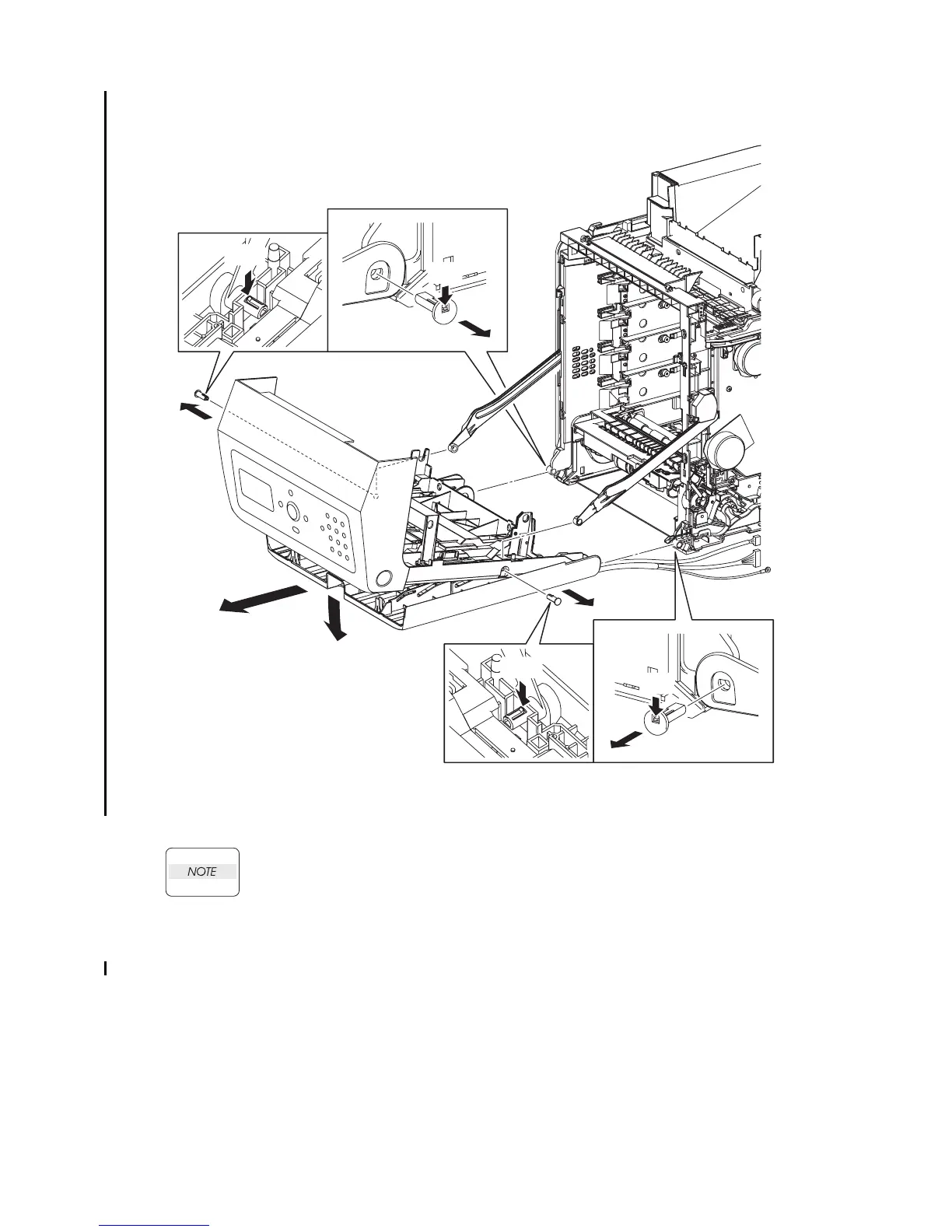
Removal 55 FRONT COVER (PL13.2.98)
11) Open the MPF COVER (PL13.2.26).
When performing the step described below, take care not to drop and break the FRONT
COVER.
12) Release the hook of SHAFT PIVOT (PL13.2.10) on the left and right sides of the FRONT
COVER, and then pull out the SHAFT PIVOT to the outside while holding the FRONT
COVER. Remove the FRONT COVER from the LINK L (PL7.1.3) and LINK R (PL13.3.20) on
the printer.
13) Release the hook of the SHAFT PIVOT MSI (PL13.2.33) that fixes the left and right sides of
the FRONT COVER and the MPF COVER to the printer, and then pull out the SHAFT PIVOT
MSI to the inside.
14) Remove the FRONT COVER together with the MPF COVER.
Gnb03026KB
13)-2
12)-2
12)-2
12)-3
12)-3
11)
14)
13)-1
12)-1
12)-1
13)-2
13)-1















 To Next Page