3 - 138
Chapter 3 Removal and Replacement Procedures (RRPs)
Version 1 2006.11.28
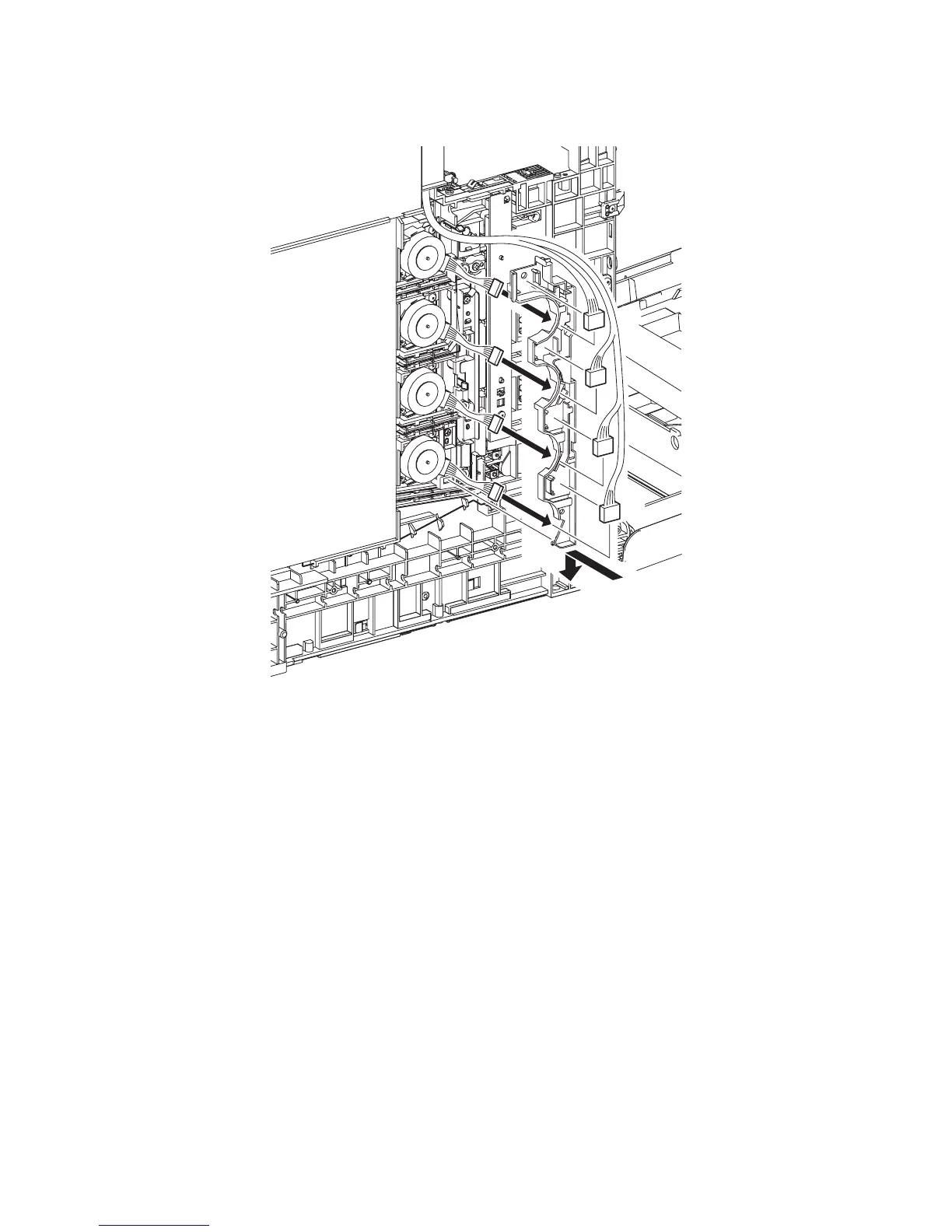
Replacement 20 TONER DISPENSER MOTOR (PL5.1.12)
3) Pass the four sets of connectors of the TONER DISPENSER MOTOR through the hole of the
DUCT HARNESS MOT.
4) Mate the tab of the DUCT HARNESS MOT with the hole on the printer, and secure the DUCT
HARNESS MOT with the two hooks on the printer.
5) Engage the four sets of connectors of the TONER DISPENSER MOTOR and route the harness
along the DUCT HARNESS MOT.
Go to the next replacement step:
Replacement 63 LEFT COVER (PL13.1.10)
Gnb03099KA
5)
3)
3)
3)
3)
5)
5)
5)
4)















 To Next Page