Command Usage
◆
When configuring static trunks, you may not be able to link switches of
different types, depending on the vendor’s implementation. However, note
that the static trunks on this switch are Cisco EtherChannel compatible.
◆
To avoid creating a loop in the network, be sure you add a static trunk via the
configuration interface before connecting the ports, and also disconnect the
ports before removing a static trunk via the configuration interface.
Parameters
These parameters are displayed:
◆
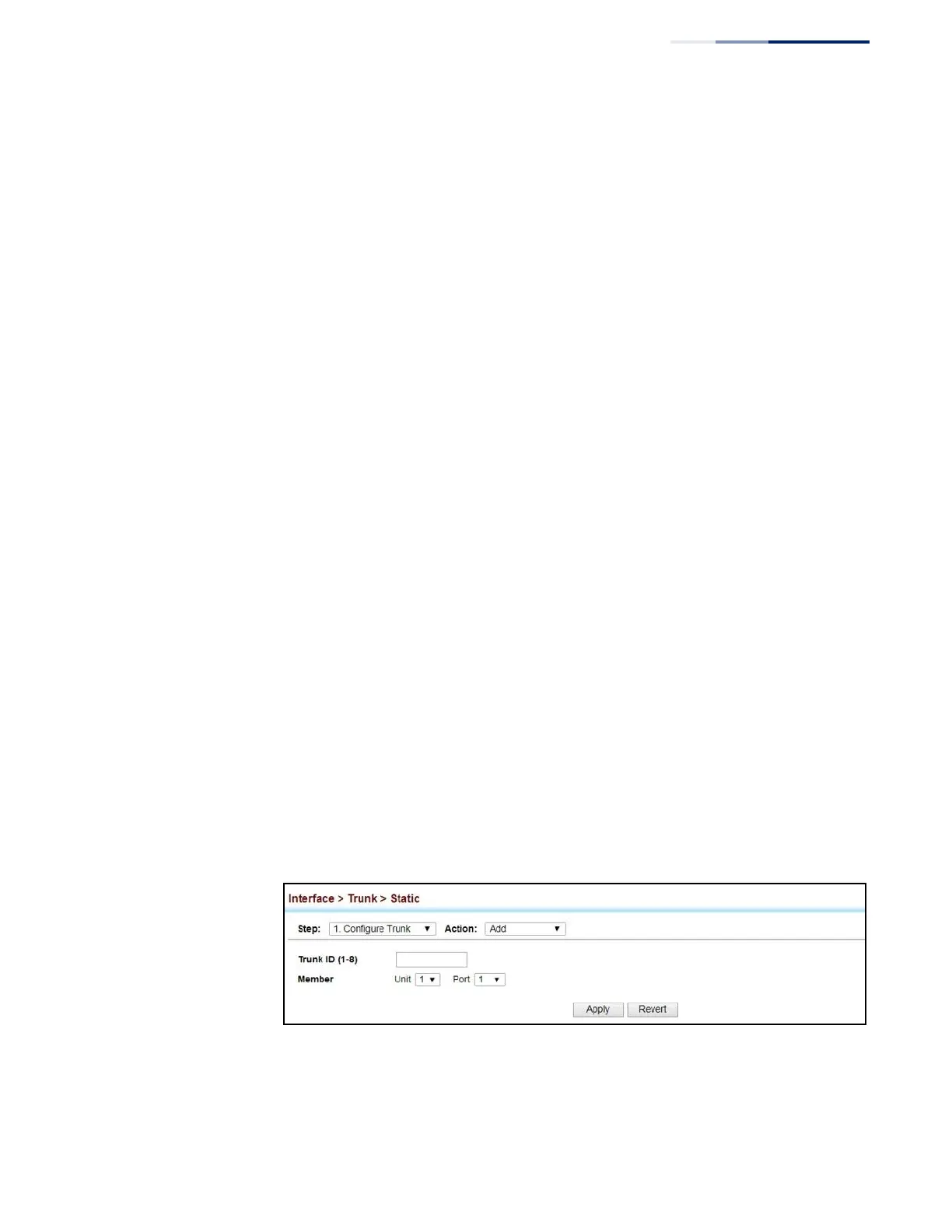
Trunk ID – Trunk identifier. (Range: 1-8)
◆
Member – The initial trunk member. Use the Add Member page to configure
additional members.
■
Unit – Unit identifier. (Range: 1)
■
Port – Port identifier. (Range: 1-52)
Web Interface
To create a static trunk:
1.
Click Interface, Trunk, Static.
2.
Select Configure Trunk from the Step list.
3.
Select Add from the Action list.
4.
Enter a trunk identifier.
5.
Set the unit and port for the initial trunk member.
6.
Click Apply.
Figure 44: Creating Static Trunks















 To Next Page