◆
If Static is not specified, ARP packets are first validated against the selected ACL;
if no ACL rules match the packets, then the DHCP snooping bindings database
determines their validity.
Parameters
These parameters are displayed:
◆
VLAN – VLAN identifier. (Range: 1-4094)
◆
DAI Status – Enables Dynamic ARP Inspection for the selected VLAN.
(Default: Disabled)
◆
ACL Name
– Allows selection of any configured ARP ACLs. (Default: None)
◆
Static – When an ARP ACL is selected, and static mode also selected, the switch
only performs ARP Inspection and bypasses validation against the DHCP
Snooping Bindings database. When an ARP ACL is selected, but static mode is
not selected, the switch first performs ARP Inspection and then validation
against the DHCP Snooping Bindings database. (Default: Disabled)
Web Interface
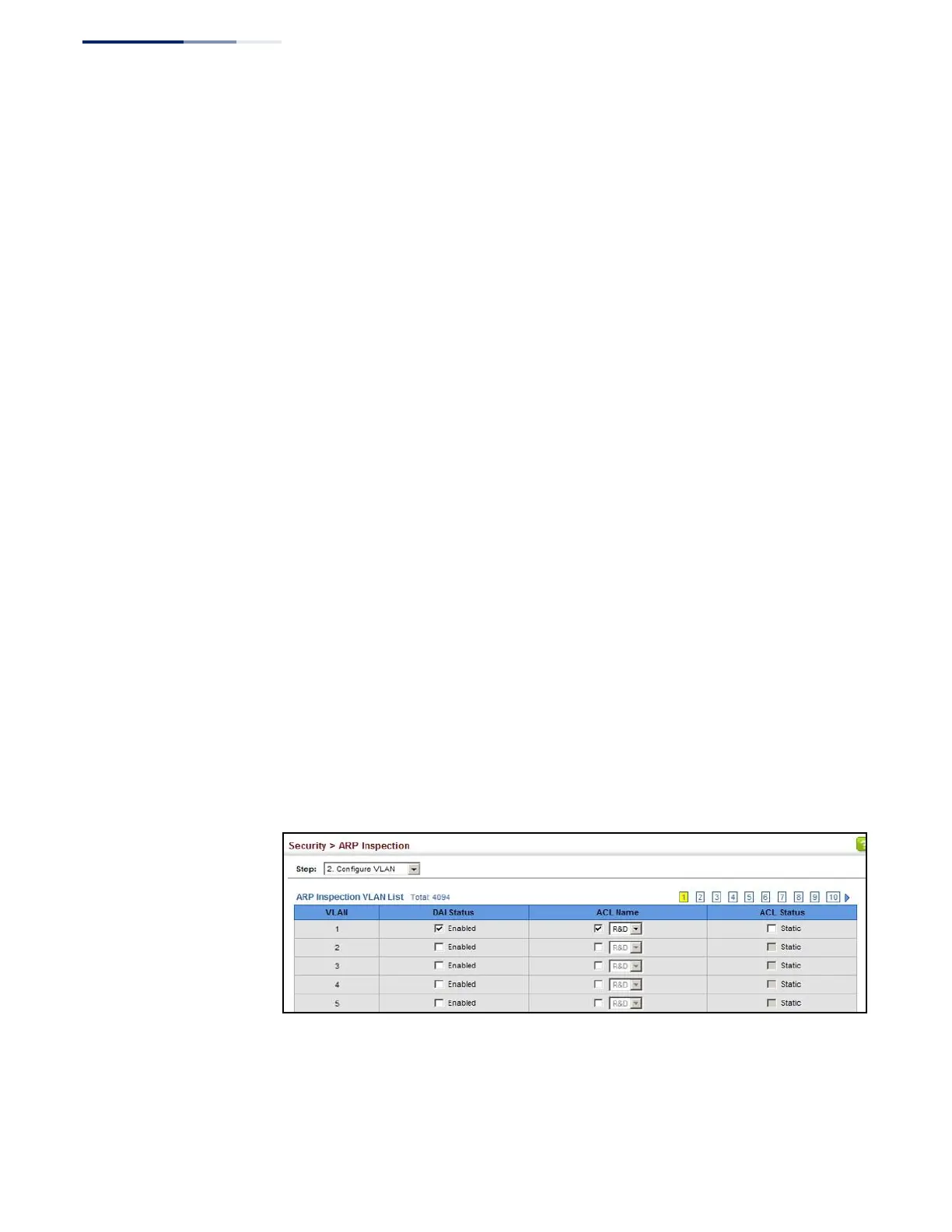
To configure VLAN settings for ARP Inspection:
1.
Click Security, ARP Inspection.
2.
Select Configure VLAN from the Step list.
3.
Enable ARP inspection for the required VLANs, select an ARP ACL filter to check
for configured addresses, and select the Static option to bypass checking the
DHCP snooping bindings database if required.
4.
Click Apply.
Figure 204: Configuring VLAN Settings for ARP Inspection















 To Next Page