◆
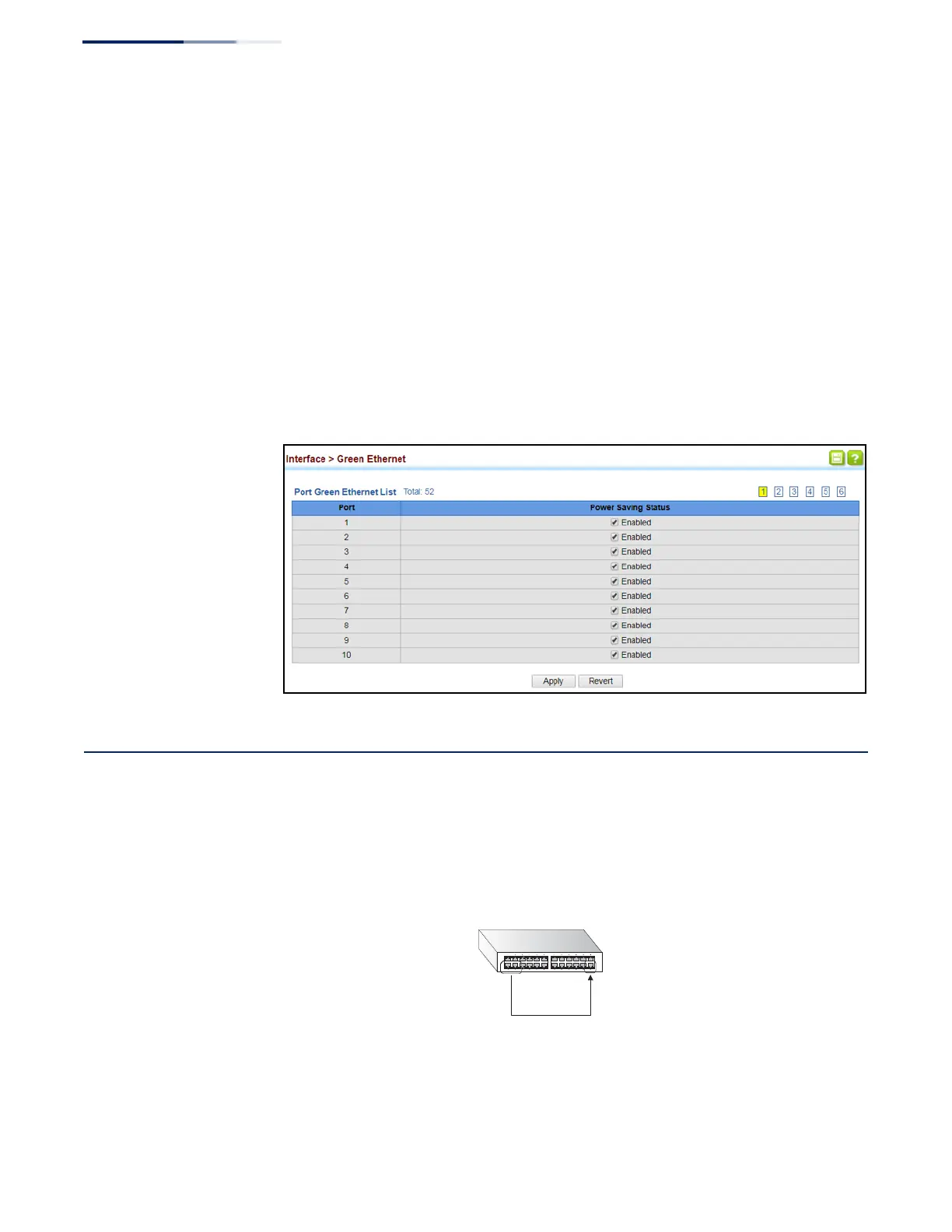
Power Saving Status – Adjusts the power provided to ports based on the
length of the cable used to connect to other devices. Only sufficient power is
used to maintain connection requirements. (Default: Enabled on Gigabit
Ethernet RJ-45 ports)
Web Interface
To enable power savings:
1.
Click Interface, Green Ethernet.
2.
Mark the Enabled check box for a port.
3.
Click Apply.
Figure 59: Enabling Power Savings
Configuring Local Port Mirroring
Use the Interface > Port > Mirror page to mirror traffic from any source port to a
target port for real-time analysis. You can then attach a logic analyzer or RMON
probe to the target port and study the traffic crossing the source port in a
completely unobtrusive manner.
Figure 60: Configuring Local Port Mirroring
Source
port(s)
Single
target
port
Command Usage
◆
Traffic can be mirrored from one or more source ports to a destination port on
the same switch (local port mirroring as described in this section), or from one
or more source ports on remote switches to a destination port on this switch















 To Next Page