◆
Quiet Period – Configures how long a host must wait to attempt
authentication again after it has exceeded the maximum allowable failed login
attempts. (Range: 1-180 seconds; Default: 60 seconds)
◆
Login Attempts – Configures the amount of times a supplicant may attempt
and fail authentication before it must wait the configured quiet period.
(Range: 1-3 attempts; Default: 3 attempts)
Web Interface
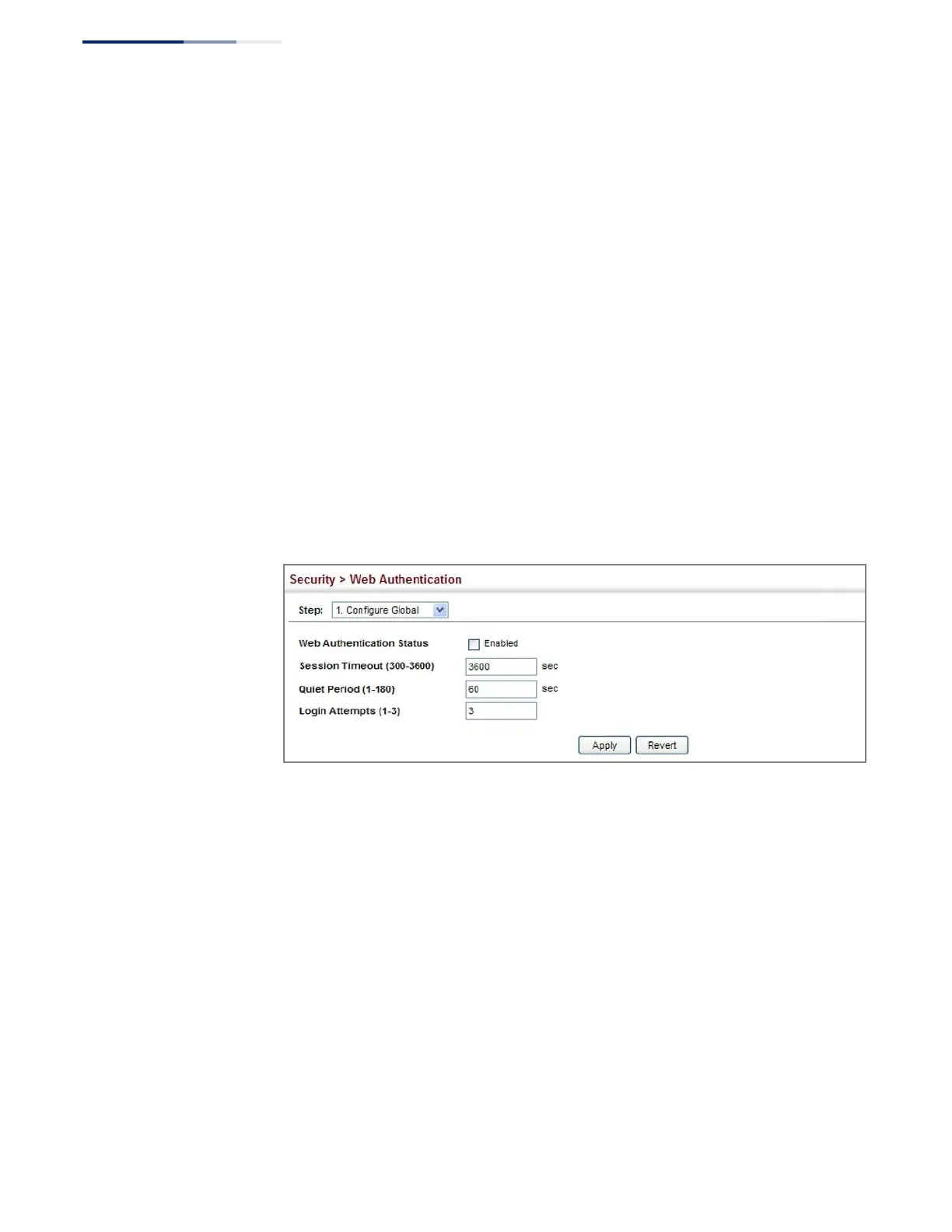
To configure global parameters for web authentication:
1.
Click Security, Web Authentication.
2.
Select Configure Global from the Step list.
3.
Enable web authentication globally on the switch, and adjust any of the
protocol parameters as required.
4.
Click Apply.
Figure 162: Configuring Global Settings for Web Authentication
Configuring Interface
Settings for Web
Authentication
Use the Security > Web Authentication (Configure Interface) page to enable web
authentication on a port, and display information for any connected hosts.
Parameters
These parameters are displayed:
◆
Port – Indicates the port being configured.
◆
Status – Configures the web authentication status for the port.
◆
Host IP Address
– Indicates the IP address of each connected host.
◆
Remaining Session Time – Indicates the remaining time until the current
authorization session for the host expires.
◆
Apply – Enables web authentication if the Status box is checked.















 To Next Page