◆
VLAN – ID of a configured VLAN or a range of VLANs. (Range: 1-4094)
◆
IP Address – A valid unicast IP address, including classful types A, B or C.
◆
Port – The port to which a static entry is bound. Specify a physical port number
or list of port numbers. Separate nonconsecutive port numbers with a comma
and no spaces; or use a hyphen to designate a range of port numbers.
(Range: 1-52)
Show
◆
MAC Address – Physical address associated with the entry.
◆
IP Address – IP address corresponding to the client.
◆
VLAN – VLAN to which this entry is bound.
◆
Interface
– The port to which this entry is bound.
Web Interface
To configure static bindings for IP Source Guard:
1.
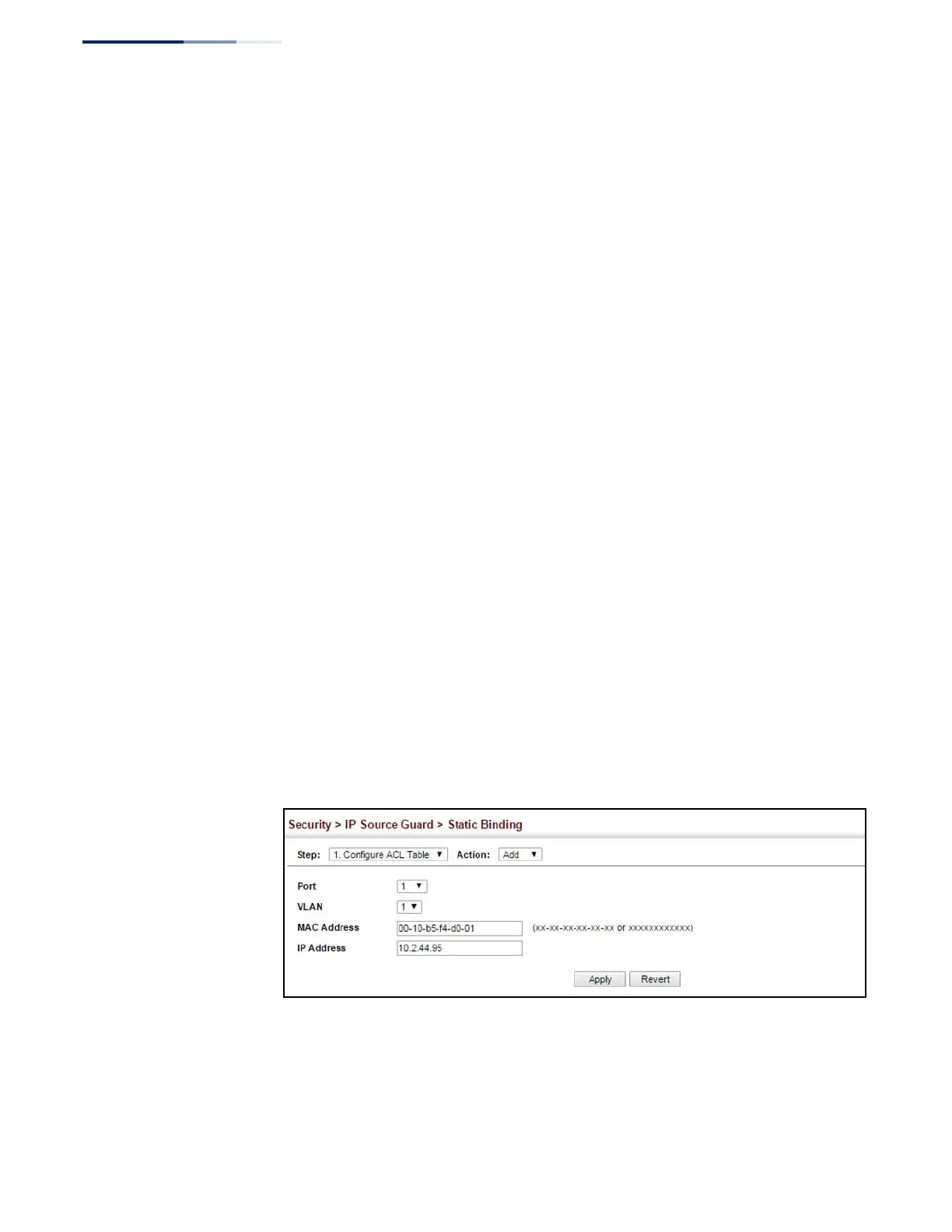
Click Security, IP Source Guard, Static Binding.
2.
Select Configure ACL Table or Configure MAC Table from the Step list.
3.
Select Add from the Action list.
4.
Enter the required bindings for each port.
5.
Click Apply
Figure 200: Configuring Static Bindings for IPv4 Source Guard
To display static bindings for IP Source Guard:
1.
Click Security, IP Source Guard, Static Binding.
2.
Select Configure ACL Table or Configure MAC Table from the Step list.















 To Next Page