◆
Router Port Expire Time – The time the switch waits after the previous querier
stops before it considers it to have expired. (Range: 1-65535, Recommended
Range: 300-500 seconds, Default: 300)
◆
IGMP Snooping Version – Sets the protocol version for compatibility with
other devices on the network. This is the IGMP Version the switch uses to send
snooping reports. (Range: 1-3; Default: 2)
This attribute configures the IGMP report/query version used by IGMP
snooping. Versions 1 - 3 are all supported, and versions 2 and 3 are backward
compatible, so the switch can operate with other devices, regardless of the
snooping version employed.
◆
Querier Status – When enabled, the switch can serve as the Querier, which is
responsible for asking hosts if they want to receive multicast traffic. This feature
is not supported for IGMPv3 snooping. (Default: Disabled)
Web Interface
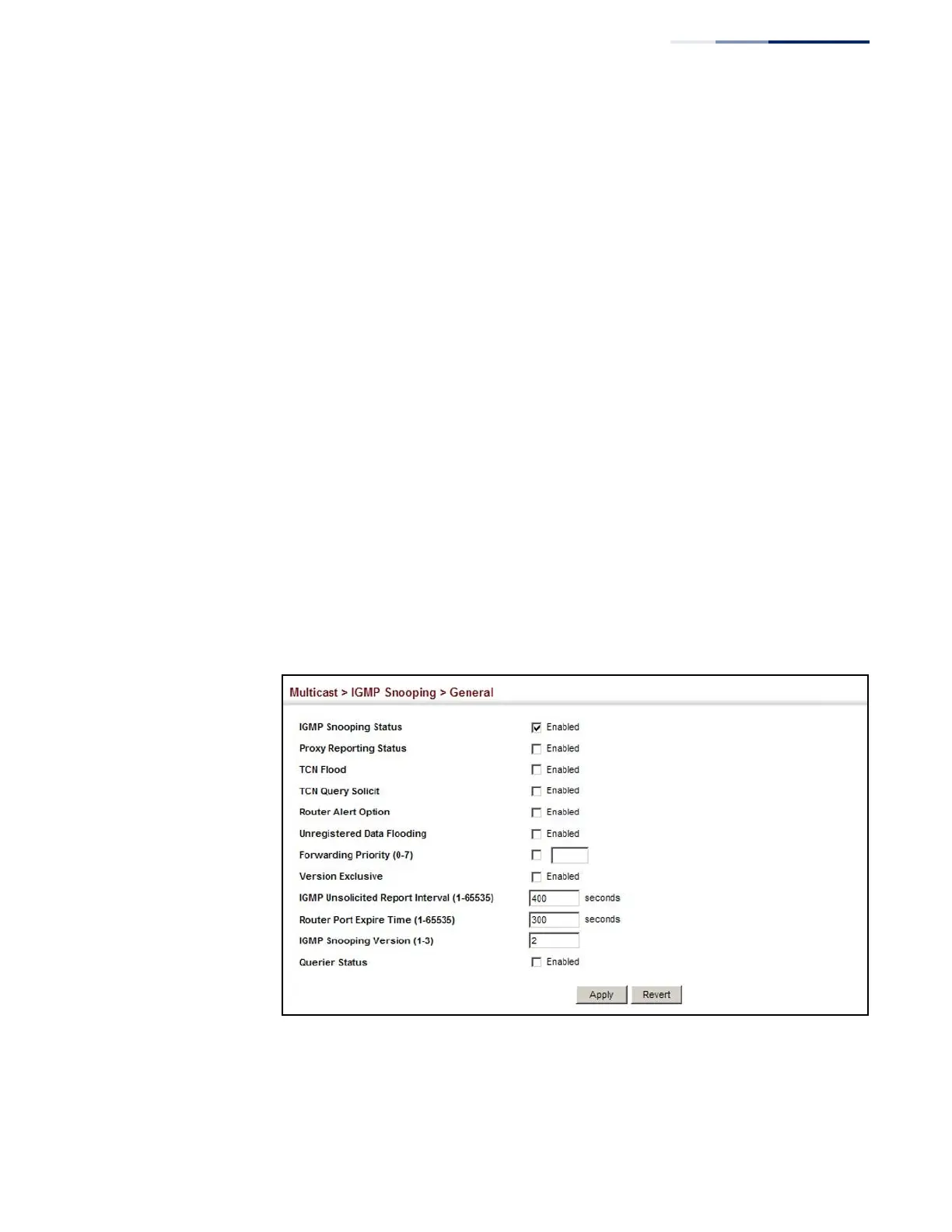
To configure general settings for IGMP Snooping and Query:
1.
Click Multicast, IGMP Snooping, General.
2.
Adjust the IGMP settings as required.
3.
Click Apply.
Figure 280: Configuring General Settings for IGMP Snooping















 To Next Page