■
Link Local
– Configures an IPv6 link-local address.
■
The address prefix must be in the range of FE80~FEBF.
■
You can configure only one link-local address per interface.
■
The specified address replaces a link-local address that was
automatically generated for the interface.
◆
IPv6 Address – IPv6 address assigned to this interface.
Web Interface
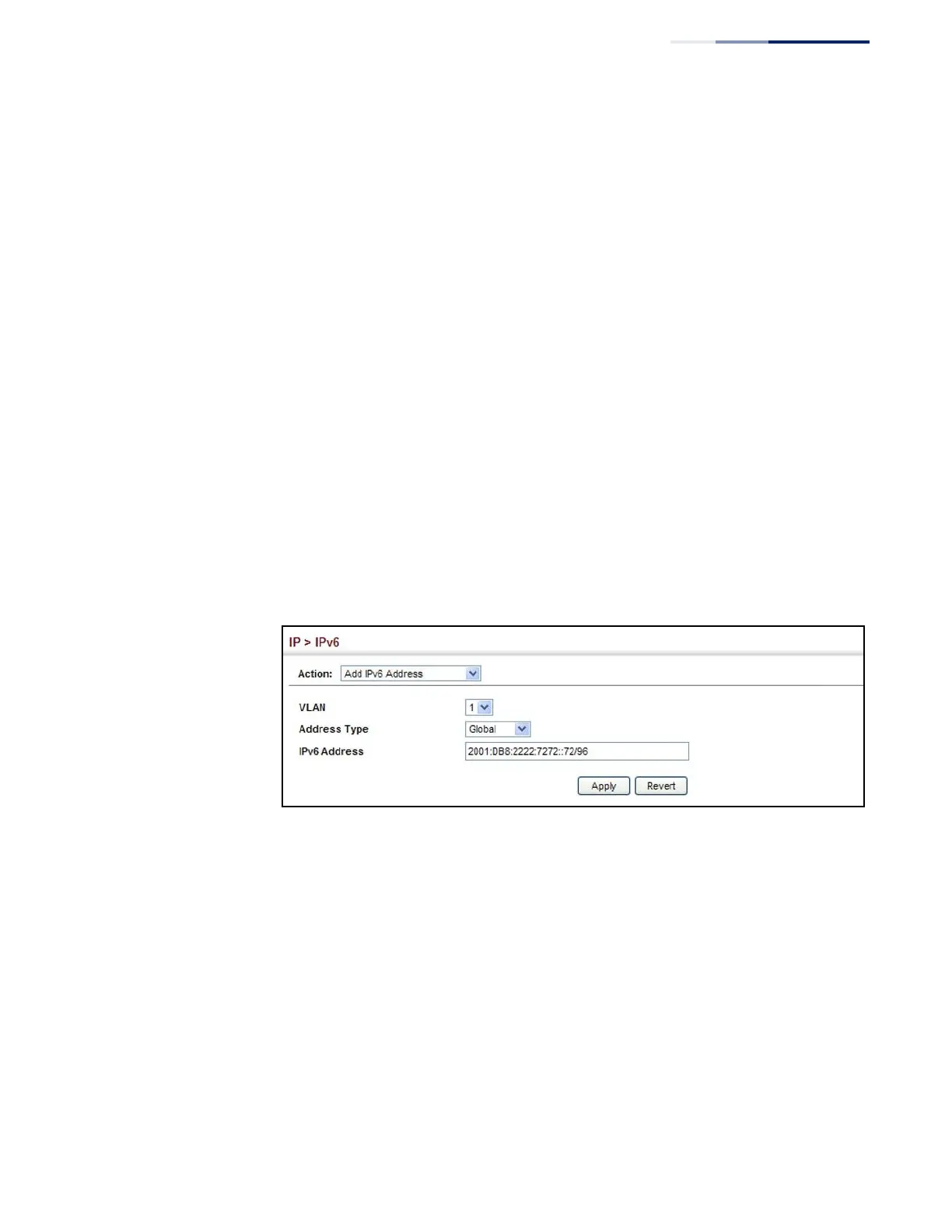
To configure an IPv6 address:
1.
Click IP, IPv6 Configuration.
2.
Select Add IPv6 Address from the Action list.
3.
Specify the VLAN to configure, select the address type, and then enter an IPv6
address and prefix length.
4.
Click Apply.
Figure 334: Configuring an IPv6 Address
Showing IPv6
Addresses
Use the IP > IPv6 Configuration (Show IPv6 Address) page to display the IPv6
addresses assigned to an interface.
Parameters
These parameters are displayed:
◆
VLAN
– ID of a configured VLAN. By default, all ports on the switch are
members of VLAN 1. However, the management station can be attached to a
port belonging to any VLAN, as long as that VLAN has been assigned an IP
address. (Range: 1-4094)
◆
IPv6 Address Type – The address type (Global, EUI-64, Link Local).
◆
IPv6 Address
– An IPv6 address assigned to this interface.















 To Next Page