Command Usage
◆
You must specify the IP address for at least one active DHCP server. Otherwise,
the switch’s DHCP relay agent will not be able to forward client requests to a
DHCP server. Up to five DHCP servers can be specified in order of preference.
If any of the specified DHCP server addresses are not located in the same
network segment with this switch, specify the default router through which
this switch can reach other IP subnetworks using the IP > Routing > Static
Routes (Add) page (see “Configuring Static Routes” on page 524) or the IP >
IPv6 Configuration (Configure Global) page (see “Configuring the IPv6 Default
Gateway” on page 503).
◆
DHCP relay configuration will be disabled if an active DHCP server is detected
on the same network segment.
Parameters
These parameters are displayed:
◆
VLAN ID
– ID of configured VLAN.
◆
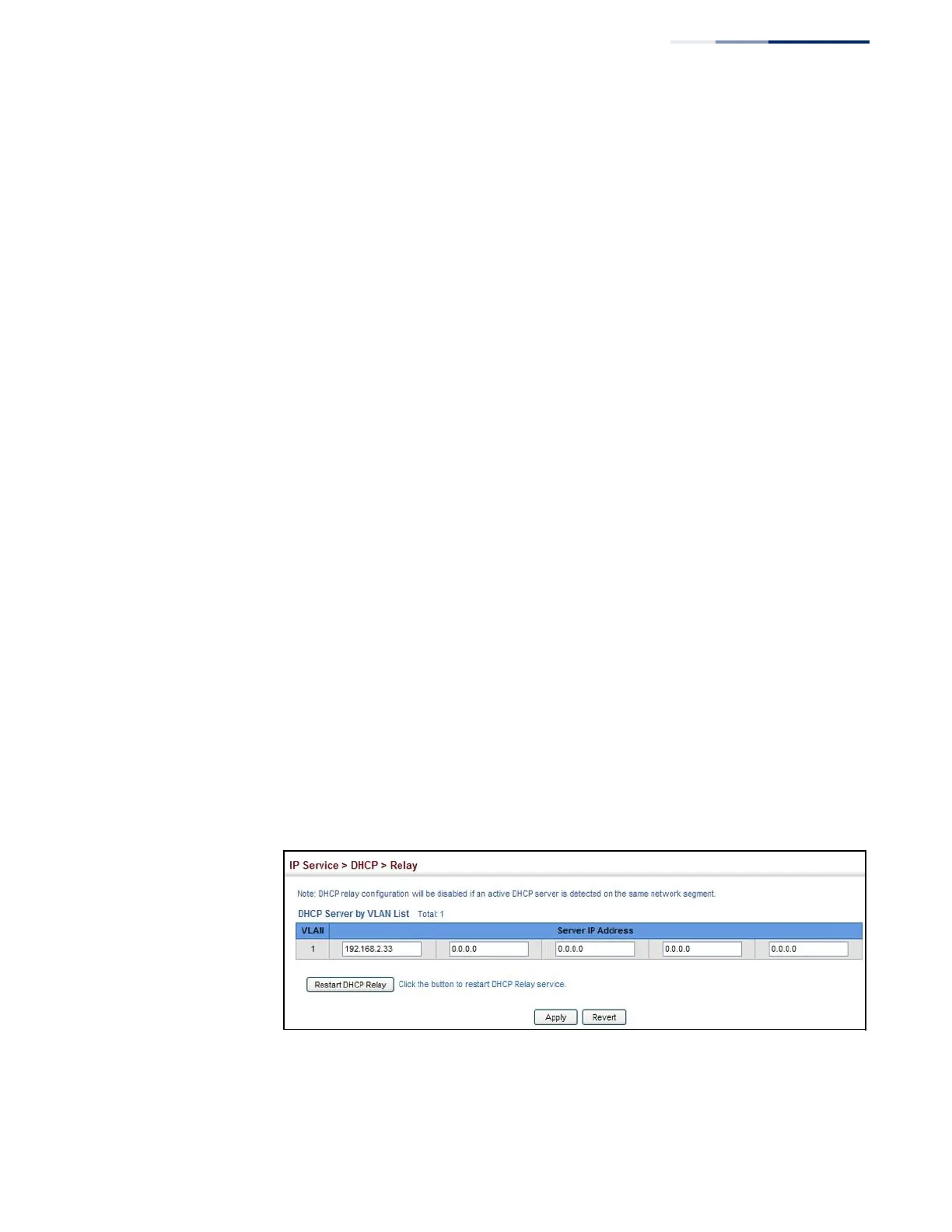
Server IP Address – Addresses of DHCP servers or relay servers to be used by
the switch’s DHCP relay agent in order of preference.
◆
Restart DHCP Relay – Use this button to re-initialize DHCP relay service.
Web Interface
To configure DHCP relay service:
1.
Click IP Service, DHCP, Relay.
2.
Enter up to five IP addresses for DHCP servers or relay servers in order of
preference for any VLAN.
3.
Click Apply.
Figure 356: Configuring DHCP Relay Service















 To Next Page